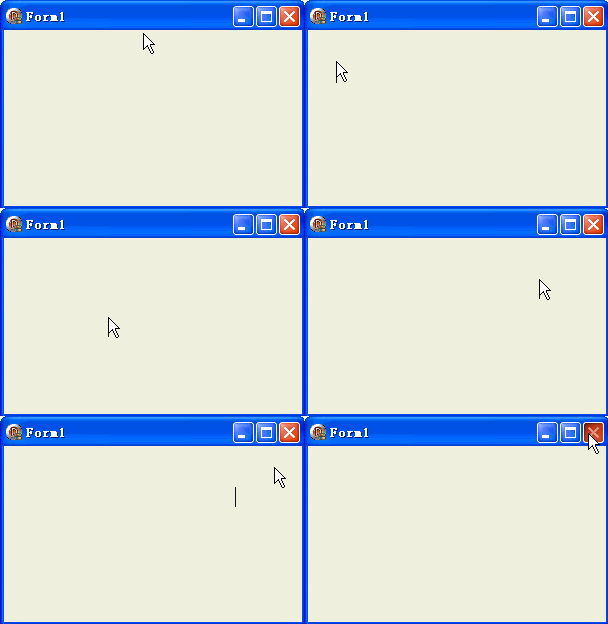
輸入光標是 Windows 文字編輯的基石。本文整理七個最常用的光標相關 API,並附上最精簡的範例:滑鼠點擊表單任意處,即建立並顯示一個標準垂直線光標。
| 函數 | 用途 |
|---|---|
CreateCaret | 建立光標 |
DestroyCaret | 銷毀光標 |
ShowCaret | 顯示光標 |
HideCaret | 隱藏光標 |
SetCaretPos | 設定光標位置 |
GetCaretPos | 取得光標位置 |
SetCaretBlinkTime | 設定閃爍間隔 |
GetCaretBlinkTime | 取得閃爍間隔 |
unit Unit1;

interface

uses
  Windows, Messages, SysUtils, Variants, Classes, Graphics, Controls, Forms,
  Dialogs;

type
  TForm1 = class(TForm)
    procedure FormMouseDown(Sender: TObject; Button: TMouseButton;
      Shift: TShiftState; X, Y: Integer);
  end;

var
  Form1: TForm1;

implementation

{$R *.dfm}

procedure TForm1.FormMouseDown(Sender: TObject; Button: TMouseButton;
  Shift: TShiftState; X, Y: Integer);
begin
  CreateCaret(Handle, 0, 0, 20); // 高度 20 像素的標準光標
  SetCaretPos(X, Y);
  ShowCaret(Handle);
end;

end.
object Form1: TForm1
  Left = 0
  Top = 0
  Caption = 'Form1'
  ClientHeight = 176
  ClientWidth = 298
  Color = clBtnFace
  Font.Charset = DEFAULT_CHARSET
  Font.Color = clWindowText
  Font.Height = -11
  Font.Name = 'Tahoma'
  Font.Style = []
  OldCreateOrder = False
  OnMouseDown = FormMouseDown
  PixelsPerInch = 96
  TextHeight = 13
end
掌握這七個 API,即可應付大多數自訂文字編輯情境的光標控制需求。