本範例專注於 SetCaretBlinkTime 與 GetCaretBlinkTime 的應用。透過 RadioGroup 讓使用者選擇三種閃爍間隔 (1000、500、200 毫秒),即時改變光標閃爍速度。特別強調:此 API 為全系統生效,因此在 FormDestroy 中務必還原預設值 (530 ms),避免影響其他程式。
SetCaretBlinkTime(ms) 即時生效。unit Unit1;
interface
uses
Windows, Messages, SysUtils, Variants, Classes, Graphics, Controls, Forms,
Dialogs, StdCtrls, ExtCtrls;
type
TForm1 = class(TForm)
RadioGroup1: TRadioGroup;
procedure FormCreate(Sender: TObject);
procedure FormMouseUp(Sender: TObject; Button: TMouseButton;
Shift: TShiftState; X, Y: Integer);
procedure RadioGroup1Click(Sender: TObject);
procedure FormDestroy(Sender: TObject);
end;
var
Form1: TForm1;
implementation
{$R *.dfm}
procedure TForm1.FormCreate(Sender: TObject);
begin
RadioGroup1.Caption := '光標閃爍速度(毫秒)';
RadioGroup1.Items.CommaText := '1000,500,200';
end;
procedure TForm1.FormDestroy(Sender: TObject);
begin
SetCaretBlinkTime(530); // 還原系統預設值
end;
procedure TForm1.FormMouseUp(Sender: TObject; Button: TMouseButton;
Shift: TShiftState; X, Y: Integer);
begin
DestroyCaret;
CreateCaret(Handle, 0, 0, 20);
SetCaretPos(X, Y);
ShowCaret(Handle);
end;
procedure TForm1.RadioGroup1Click(Sender: TObject);
var
ms: Cardinal;
begin
ms := StrToIntDef(RadioGroup1.Items[RadioGroup1.ItemIndex], 530);
SetCaretBlinkTime(ms);
end;
end.
object Form1: TForm1
  Left = 0
  Top = 0
  Caption = 'Form1'
  ClientHeight = 137
  ClientWidth = 298
  Color = clBtnFace
  Font.Charset = DEFAULT_CHARSET
  Font.Color = clWindowText
  Font.Height = -11
  Font.Name = 'Tahoma'
  Font.Style = []
  OldCreateOrder = False
  OnCreate = FormCreate
  OnDestroy = FormDestroy
  OnMouseUp = FormMouseUp
  PixelsPerInch = 96
  TextHeight = 13
  object RadioGroup1: TRadioGroup
    Left = 160
    Top = 8
    Width = 130
    Height = 113
    Caption = 'RadioGroup1'
    TabOrder = 0
    OnClick = RadioGroup1Click
  end
end
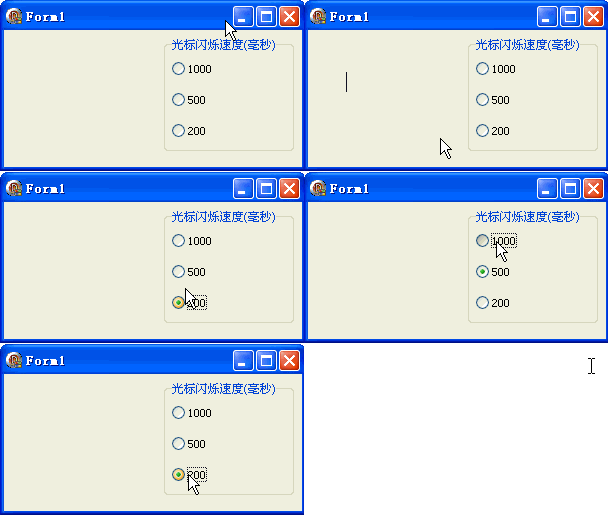
簡單幾行代碼即可掌握全系統光標閃爍節奏,開發無障礙介面時可適度調整以提升可見度。