TGPGraphicsPath 提供兩個結構操作方法:Reverse 反轉頂點順序(影響填充模式與線條方向),Reset 清空所有頂點並重置填充模式。本文透過貝塞爾曲線路徑示範兩者效果。
| 方法 | 作用 | 影響範圍 | 典型用途 |
|---|---|---|---|
Reverse | 反轉 PathPoints 陣列順序,PathTypes 同步調整 | 頂點序列、繞數方向、線條方向 | 修正字形孔洞方向、反轉動畫路徑 |
Reset | 清空 PathPoints、PathTypes,FillMode 重置為 Alternate | 整個路徑結構 | 路徑重用、動態重建、記憶體釋放前清理 |
procedure TForm1.FormPaint(Sender: TObject);
var
  g: TGPGraphics;
  p: TGPPen;
  path: TGPGraphicsPath;
  PathPts: array of TGPPoint;
  i: Integer;
begin
  g := TGPGraphics.Create(Canvas.Handle);
  p := TGPPen.Create(aclRed, 2);
  path := TGPGraphicsPath.Create;
  path.AddBeziers(PGPPoint(@pts), Length(pts));  {預設 7 點貝塞爾}

  if CheckBox1.Checked then path.Reverse;
  if CheckBox2.Checked then path.Reset;

  {顯示頂點編號}
  SetLength(PathPts, path.GetPointCount);
  path.GetPathPoints(PGPPoint(PathPts), Length(PathPts));
  Canvas.Pen.Color := clGray;
  for i := Low(PathPts) to High(PathPts) do
    Canvas.TextOut(PathPts[i].X, PathPts[i].Y, IntToStr(i+1));

  g.DrawPath(p, path);
  path.Free; p.Free; g.Free;
end;
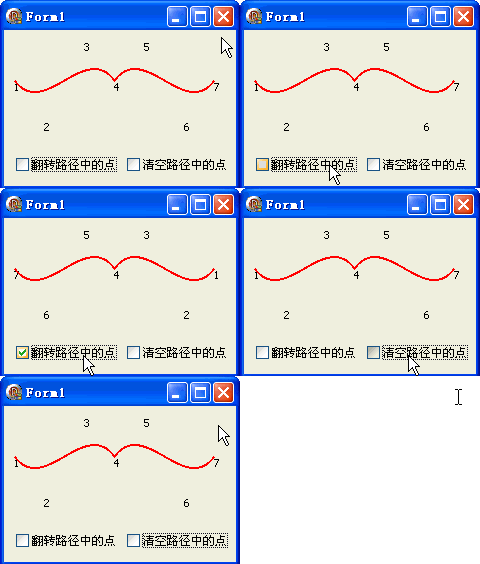
DrawPath 繪製虛線、箭頭線帽時方向反轉AddString 產生的路徑 Reverse 後會鏡像翻轉object Form1: TForm1
Left = 0
Top = 0
Caption = 'Form1'
ClientHeight = 156
ClientWidth = 232
Color = clBtnFace
Font.Charset = DEFAULT_CHARSET
Font.Color = clWindowText
Font.Height = -11
Font.Name = 'Tahoma'
Font.Style = []
OldCreateOrder = False
Position = poDesktopCenter
OnCreate = FormCreate
OnPaint = FormPaint
PixelsPerInch = 96
TextHeight = 13
object CheckBox1: TCheckBox ... {Reverse / Reset 兩選項}
end