TGPGraphicsPath.SetFillMode 決定複雜自相交路徑的填充判斷規則。兩種模式——交替模式與繞數模式——對重疊區域的填充結果截然不同,是向量圖形渲染的核心概念。
| 模式 | 常數 | 判斷規則 | 視覺特徵 | 適用場景 |
|---|---|---|---|---|
| 交替模式 | FillModeAlternate (0) | 射線法:穿越路徑奇數次→填充,偶數次→不填充 | 重疊區呈「鎖鏈」狀交替填充 | 一般圖形、字形、SVG 預設 |
| 繞數模式 | FillModeWinding (1) | 繞數法:路徑繞數非零→填充,零→不填充 | 重疊區整體填充(視方向) | 複雜幾何、CAD、3D 渲染 |
兩個部分重疊的橢圓,RadioGroup 切換填充模式即時對比。
procedure TForm1.FormPaint(Sender: TObject);
var
  g: TGPGraphics;
  b: TGPBrush;
  p: TGPPen;
  path: TGPGraphicsPath;
  rect: TRect;
begin
  g := TGPGraphics.Create(Canvas.Handle);
  b := TGPHatchBrush.Create(HatchStyleCross, aclSilver, aclKhaki);
  p := TGPPen.Create(aclRed, 1.75);
  path := TGPGraphicsPath.Create;
  rect := Bounds(10, 20, 150, 100);
  path.AddEllipse(MakeRect(rect));
  OffsetRect(rect, 60, 0);  {第二個橢圓右移 60,產生重疊}
  path.AddEllipse(MakeRect(rect));

  if RadioGroup1.ItemIndex = 1 then
    path.SetFillMode(FillModeWinding);  {預設為 Alternate}

  g.FillPath(b, path);
  g.DrawPath(p, path);  {繪製邊框輔助觀察}

  p.Free; b.Free; path.Free; g.Free;
end;
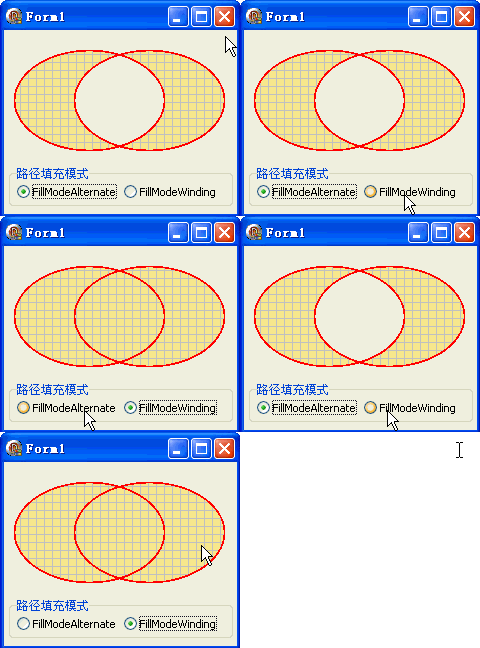
AddString 自動建立正確方向的路徑object Form1: TForm1
Left = 0
Top = 0
Caption = 'Form1'
ClientHeight = 184
ClientWidth = 233
Color = clBtnFace
Font.Charset = DEFAULT_CHARSET
Font.Color = clWindowText
Font.Height = -11
Font.Name = 'Tahoma'
Font.Style = []
OldCreateOrder = False
Position = poDesktopCenter
OnCreate = FormCreate
OnPaint = FormPaint
PixelsPerInch = 96
TextHeight = 13
object RadioGroup1: TRadioGroup ... {Alternate / Winding 兩選項}
end