Windows 視窗預設為矩形,透過 CreatePolygonRgn 建立多邊形區域,再以 SetWindowRgn 套用至視窗,即可實現任意形狀視窗。
unit Unit1;

interface
uses Windows, Messages, SysUtils, Variants, Classes, Graphics, Controls, Forms, Dialogs;

type
  TForm1 = class(TForm)
    procedure FormCreate(Sender: TObject);
  private
  public
  end;

var Form1: TForm1;

implementation {$R *.dfm}

procedure TForm1.FormCreate(Sender: TObject);
var
  Pt: array[0..4] of TPoint;
  hRgn: HRGN;
begin
  // 定義五邊形頂點(相對視窗客戶區)
  Pt[0] := Point(Width div 2, 0);           // 上中
  Pt[1] := Point(0, Height div 2);          // 左中
  Pt[2] := Point(Width div 2, Height);      // 下中
  Pt[3] := Point(Width, Height div 2);      // 右中
  Pt[4] := Point(Width, 0);                 // 右上(封閉)

  hRgn := CreatePolygonRgn(Pt, 5, WINDING); // 建立區域
  SetWindowRgn(Handle, hRgn, True);         // 套用並重繪
end;

end.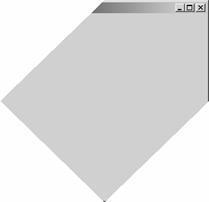
SetWindowRgn(..., True) 成功後系統接管 hRgn 生命週期,**嚴禁**自行 DeleteObject。OnResize 重新計算頂點並重建區域。BorderStyle := bsNone 自繪標題列與按鈕,避免系統繪製邊框與區域衝突。WM_NCHITTEST 回傳 HTTRANSPARENT。CreateEllipticRgn、CreateRectRgn 並用 CombineRgn(RGN_OR/RGN_XOR/RGN_DIFF) 組合出缺口、齒輪、對話氣泡等造型。OnResize 依 CurrentPPI 換算。