TDIB.DoEmboss 以固定 3x3 卷積核產生浮雕效果,模擬光源從左上方照射的立體質感。無參數、一鍵套用,本文提供最小範例。
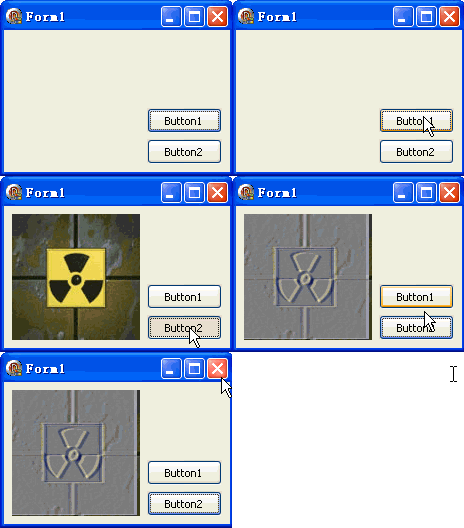
unit Unit1;
interface
uses Windows, Messages, SysUtils, Variants, Classes, Graphics, Controls, Forms,
  Dialogs, DIB, StdCtrls;
type
  TForm1 = class(TForm)
    DXPaintBox1: TDXPaintBox;
    Button1: TButton; // 載入圖片
    Button2: TButton; // 浮雕
    procedure Button1Click(Sender: TObject);
    procedure Button2Click(Sender: TObject);
  end;
var Form1: TForm1;
implementation {$R *.dfm}

procedure TForm1.Button1Click(Sender: TObject);
const ImgPath1 = 'C:\Temp\DX.jpg';
begin
  DXPaintBox1.DIB.LoadFromFile(ImgPath1);
  DXPaintBox1.Width := DXPaintBox1.DIB.Width;
  DXPaintBox1.Height := DXPaintBox1.DIB.Height;
  DXPaintBox1.Repaint;
end;

procedure TForm1.Button2Click(Sender: TObject);
begin
  // DoEmboss  // 無參數,固定左上光源浮雕核
  DXPaintBox1.DIB.DoEmboss;
  DXPaintBox1.Repaint;
end;
end.
-2 -1  0
-1  1  1
 0  1  2
等效於 Draw3x3Matrix(dib, msEmboss),但無需指定矩陣。
procedure EmbossAngle(DIB: TDIB; AngleDeg: Real; Height: Single = 1.0);
var Kernel: array[0..2, 0..2] of Integer; cosA, sinA: Double; dx, dy: Integer;
begin
  cosA := Cos(AngleDeg * Pi / 180); sinA := Sin(AngleDeg * Pi / 180);
  for dy := -1 to 1 do
    for dx := -1 to 1 do begin
      var proj := Round((dx * cosA + dy * sinA) * Height * 2);
      Kernel[dy+1, dx+1] := proj;
    end;
  Kernel[1, 1] := 1; // 中心權重
  DIB.Draw3x3Matrix(DIB, Kernel);
end;
// 用法:EmbossAngle(DIB, 45, 1.5); // 右上光源、高度 1.5x
| 特性 | DoEmboss | Draw3x3Matrix(msEmboss) |
|---|---|---|
| 參數 | 無 | 需指定矩陣常數 |
| 靈活性 | 固定左上光源 | 可用 msHardEmboss 等變體 |
| 程式碼量 | 最少 | 略多 |