TDIB.DoPosterize 將影像每個色彩通道量化到指定階數,產生海報化效果(色帶分明、層次簡化)。本文提供三種階數對比範例。
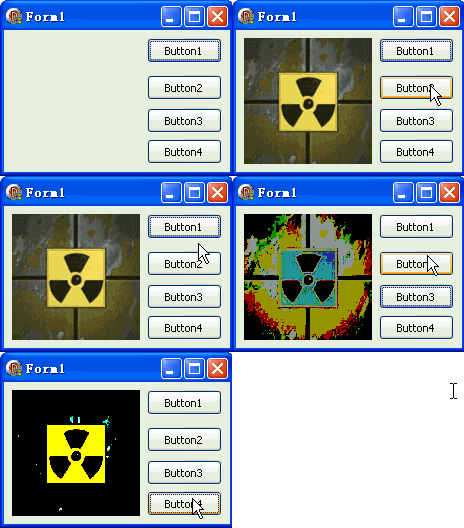
unit Unit1;
interface
uses Windows, Messages, SysUtils, Variants, Classes, Graphics, Controls, Forms,
  Dialogs, DIB, StdCtrls;
type
  TForm1 = class(TForm)
    DXPaintBox1: TDXPaintBox;
    Button1: TButton; // 載入圖片
    Button2: TButton; // 50 階
    Button3: TButton; // 150 階
    Button4: TButton; // 250 階
    procedure Button1Click(Sender: TObject);
    procedure Button2Click(Sender: TObject);
    procedure Button3Click(Sender: TObject);
    procedure Button4Click(Sender: TObject);
  end;
var Form1: TForm1;
implementation {$R *.dfm}

procedure TForm1.Button1Click(Sender: TObject);
const ImgPath1 = 'C:\Temp\DX.jpg';
begin
  DXPaintBox1.DIB.LoadFromFile(ImgPath1);
  DXPaintBox1.Width := DXPaintBox1.DIB.Width;
  DXPaintBox1.Height := DXPaintBox1.DIB.Height;
  DXPaintBox1.Repaint;
end;

procedure TForm1.Button2Click(Sender: TObject);
begin
  // DoPosterize(Levels: Integer)  // 每通道量化階數
  DXPaintBox1.DIB.DoPosterize(50);
  DXPaintBox1.Repaint;
end;

procedure TForm1.Button3Click(Sender: TObject);
begin
  DXPaintBox1.DIB.DoPosterize(150);
  DXPaintBox1.Repaint;
end;

procedure TForm1.Button4Click(Sender: TObject);
begin
  DXPaintBox1.DIB.DoPosterize(250);
  DXPaintBox1.Repaint;
end;
end.
| Levels | 每通道色階 | 總理論色數 | 視覺效果 |
|---|---|---|---|
| 2 | 2 | 8 | 極度抽象、波普藝術 |
| 4 | 4 | 64 | 強烈色帶、向量插畫感 |
| 8 | 8 | 512 | 明顯海報化 |
| 16 | 16 | 4K | 輕度簡化 |
| 50 | 50 | 125K | 中度海報化(範例) |
| 150 | 150 | 3.3M | 接近真彩、細微色帶 |
| 250 | 250 | 15.6M | 極接近原圖、極細色帶 |
| 256 | 256 | 16.7M | 無量化(原圖) |
各通道獨立量化:Quantized = Round(Original / 255 * (Levels-1)) * (255 / (Levels-1))
Greyscale(Levels):Posterize 保留彩色,各通道獨立量化DoColorize:Posterize 不映射到指定雙色,保留原相對色彩關係固定階數量化不考慮圖像色彩分佈。K-means 聚類可找到最具代表性的顏色:
procedure AdaptivePosterize(DIB: TDIB; K: Integer);
var Palette: array of TColor; Labels: array of Byte; // 簡化版
    x, y, i, iter: Integer; c: TRGBQuad; dist, minDist: Integer; centroid: TColor;
begin
  SetLength(Palette, K); SetLength(Labels, DIB.Width * DIB.Height);
  // 1. 隨機初始化 K 個質心
  for i := 0 to K-1 do Palette[i] := DIB.Pixels[Random(DIB.Width), Random(DIB.Height)];
  // 2. 迭代收斂(簡化:固定 10 迭代)
  for iter := 0 to 9 do begin
    // 指派
    for y := 0 to DIB.Height - 1 do
      for x := 0 to DIB.Width - 1 do begin
        c := DIB.Pixels[x, y]; minDist := MaxInt;
        for i := 0 to K-1 do begin
          dist := Sqr(c.rgbRed - GetRValue(Palette[i])) +
                  Sqr(c.rgbGreen - GetGValue(Palette[i])) +
                  Sqr(c.rgbBlue - GetBValue(Palette[i]));
          if dist < minDist then begin minDist := dist; Labels[y*DIB.Width+x] := i; end;
        end;
      end;
    // 更新質心
    for i := 0 to K-1 do begin
      var cnt := 0; var sr, sg, sb: Integer;
      for y := 0 to DIB.Height - 1 do
        for x := 0 to DIB.Width - 1 do
          if Labels[y*DIB.Width+x] = i then begin
            c := DIB.Pixels[x, y]; Inc(sr, c.rgbRed); Inc(sg, c.rgbGreen); Inc(sb, c.rgbBlue); Inc(cnt);
          end;
      if cnt > 0 then Palette[i] := RGB(sr div cnt, sg div cnt, sb div cnt);
    end;
  end;
  // 3. 套用
  for y := 0 to DIB.Height - 1 do
    for x := 0 to DIB.Width - 1 do
      DIB.Pixels[x, y] := Palette[Labels[y*DIB.Width+x]];
end;