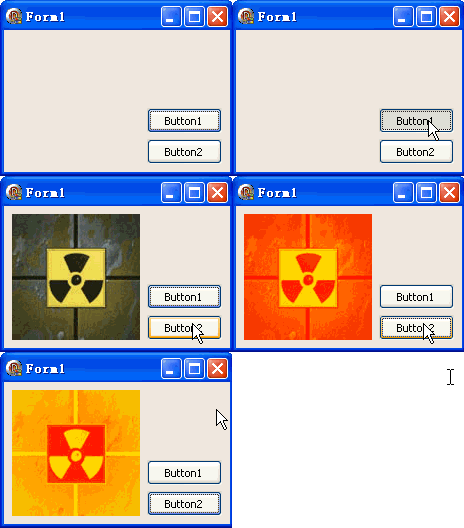
TDIB.DoColorize 將影像灰階值映射到兩指定顏色之間的漸層,產生雙色調藝術效果。本文提供黃→紅映射的完整範例。
unit Unit1;
interface
uses Windows, Messages, SysUtils, Variants, Classes, Graphics, Controls, Forms,
  Dialogs, DIB, StdCtrls;
type
  TForm1 = class(TForm)
    DXPaintBox1: TDXPaintBox;
    Button1: TButton; // 載入圖片
    Button2: TButton; // 雙色調映射
    procedure Button1Click(Sender: TObject);
    procedure Button2Click(Sender: TObject);
  end;
var Form1: TForm1;
implementation {$R *.dfm}

procedure TForm1.Button1Click(Sender: TObject);
const ImgPath1 = 'C:\Temp\DX.jpg';
begin
  DXPaintBox1.DIB.LoadFromFile(ImgPath1);
  DXPaintBox1.Width := DXPaintBox1.DIB.Width;
  DXPaintBox1.Height := DXPaintBox1.DIB.Height;
  DXPaintBox1.Repaint;
end;

procedure TForm1.Button2Click(Sender: TObject);
begin
  // DoColorize(Color1, Color2: TColor)  // 灰階 0→Color1, 255→Color2
  DXPaintBox1.DIB.DoColorize(clYellow, clRed);
  DXPaintBox1.Repaint;
end;
end.
Gray = 0.299*R + 0.587*G + 0.114*BResult = Color1 + (Color2 - Color1) * (Gray / 255)| Color1 (暗部) | Color2 (亮部) | 風格 | 應用 |
|---|---|---|---|
| clBlack | clWhite | 標準灰階 | 黑白照片 |
| clNavy | clYellow | 藍黃對比 | 科技感、夜視 |
| clMaroon | clGold | 復古暖調 | 懷舊、複古海報 |
| clGreen | clLime | 綠色終端機 | 駭客風、矩陣風 |
| clBlue | clCyan | 冷冽藍調 | 科幻、冰凍、醫療 |
| clYellow | clRed | 火焰漸層 | 熱成像、能量、警示 |
procedure MultiColorize(DIB: TDIB; Colors: array of TColor; Positions: array of Single);
var x, y, i: Integer; c: TRGBQuad; gray: Byte; t: Single;
begin
  for y := 0 to DIB.Height - 1 do
    for x := 0 to DIB.Width - 1 do begin
      c := DIB.Pixels[x, y];
      gray := Round(0.299*c.rgbRed + 0.587*c.rgbGreen + 0.114*c.rgbBlue);
      t := gray / 255;
      // 找區間
      i := 0; while (i < High(Positions)) and (t > Positions[i+1]) do Inc(i);
      if i = High(Positions) then i := High(Positions) - 1;
      // 區間內插值
      var localT := (t - Positions[i]) / (Positions[i+1] - Positions[i]);
      c.rgbRed := Round(GetRValue(Colors[i]) * (1-localT) + GetRValue(Colors[i+1]) * localT);
      c.rgbGreen := Round(GetGValue(Colors[i]) * (1-localT) + GetGValue(Colors[i+1]) * localT);
      c.rgbBlue := Round(GetBValue(Colors[i]) * (1-localT) + GetBValue(Colors[i+1]) * localT);
      DIB.Pixels[x, y] := c;
    end;
end;
// 用法:MultiColorize(DIB, [clBlack, clBlue, clCyan, clYellow, clRed], [0, 0.25, 0.5, 0.75, 1]);