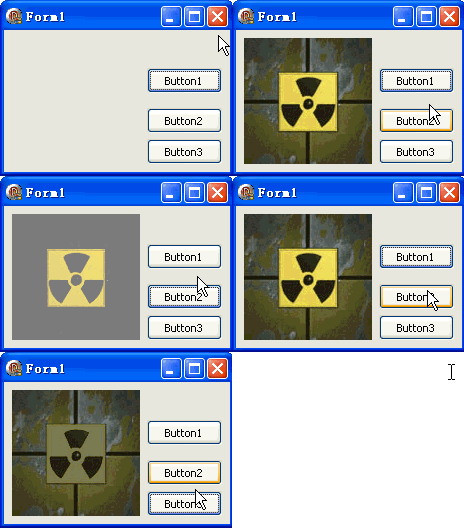
TDIB.FadeOut 與 FadeIn 實現影像的淡出/淡入轉場,以指定步長逐漸調整像素亮度。本文提供載入圖片後按鈕觸發雙向淡化的完整範例。
unit Unit1;
interface
uses Windows, Messages, SysUtils, Variants, Classes, Graphics, Controls, Forms,
  Dialogs, DIB, StdCtrls;
type
  TForm1 = class(TForm)
    DXPaintBox1: TDXPaintBox;
    Button1: TButton; // 載入圖片
    Button2: TButton; // 淡出
    Button3: TButton; // 淡入
    procedure Button1Click(Sender: TObject);
    procedure Button2Click(Sender: TObject);
    procedure Button3Click(Sender: TObject);
  end;
var Form1: TForm1;
implementation {$R *.dfm}

procedure TForm1.Button1Click(Sender: TObject);
const ImgPath1 = 'C:\Temp\DX.jpg';
begin
  DXPaintBox1.DIB.LoadFromFile(ImgPath1);
  DXPaintBox1.Width := DXPaintBox1.DIB.Width;
  DXPaintBox1.Height := DXPaintBox1.DIB.Height;
  DXPaintBox1.Repaint;
end;

procedure TForm1.Button2Click(Sender: TObject); // FadeOut
begin
  // FadeOut(SrcDIB, Step: Byte)
  DXPaintBox1.DIB.FadeOut(DXPaintBox1.DIB, 127);
  DXPaintBox1.Repaint;
end;

procedure TForm1.Button3Click(Sender: TObject); // FadeIn
begin
  // FadeIn(SrcDIB, Step: Byte)
  DXPaintBox1.DIB.FadeIn(DXPaintBox1.DIB, 127);
  DXPaintBox1.Repaint;
end;
end.
FadeOut(SrcDIB: TDIB; Step: Byte)
FadeIn(SrcDIB: TDIB; Step: Byte)
Step,漸變全黑Step,從當前狀態漸變回原圖Assign 保存原圖副本var FadingOut: Boolean = True; Step: Byte = 10;
procedure TForm1.Timer1Timer(Sender: TObject);
begin
if FadingOut then
DXPaintBox1.DIB.FadeOut(OriginalDIB, Step)
else
DXPaintBox1.DIB.FadeIn(OriginalDIB, Step);
DXPaintBox1.Repaint;
// 判斷是否完成(可檢查是否全黑/等於原圖)
end;
內建方法固定向黑/原圖插值。若需淡入特定顏色(如紅色受傷),需自行實作:
procedure FadeToColor(DIB: TDIB; TargetColor: TColor; Step: Byte);
var x, y: Integer; c: TRGBQuad;
begin
  for y := 0 to DIB.Height - 1 do
    for x := 0 to DIB.Width - 1 do begin
      c := DIB.Pixels[x, y];
      c.rgbRed := c.rgbRed + Sign(GetRValue(TargetColor) - c.rgbRed) * Min(Step, Abs(GetRValue(TargetColor) - c.rgbRed));
      c.rgbGreen := c.rgbGreen + Sign(GetGValue(TargetColor) - c.rgbGreen) * Min(Step, Abs(GetGValue(TargetColor) - c.rgbGreen));
      c.rgbBlue := c.rgbBlue + Sign(GetBValue(TargetColor) - c.rgbBlue) * Min(Step, Abs(GetBValue(TargetColor) - c.rgbBlue));
      DIB.Pixels[x, y] := c;
    end;
end;