頁面上有多個分段控件(UISegmentedControl),業務邏輯要求:**所有分段控件都必須被選中(即都不為 -1)才能進行下一步操作**。單個控件檢測很簡單,但如何批量遍歷檢測?
NSInteger selectedSegment = segment.selectedSegmentIndex;
if (selectedSegment == -1) {
    // 未選中,彈出提示或阻止操作
}
在 Header 文件中聲明集合:
@property (nonatomic, strong) IBOutletCollection(UISegmentedControl) NSArray *allSegmentControls;
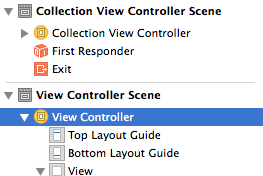
在 Storyboard/XIB 中將多個 UISegmentedControl 連線到此 Outlet Collection。
使用快速枚舉遍歷集合:
- (BOOL)areAllSegmentsSelected {
    for (UISegmentedControl *control in self.allSegmentControls) {
        if (control.selectedSegmentIndex == -1) {
            return NO; // 發現未選中的,直接返回
        }
    }
    return YES; // 全部都有選中值
}
調用示例:
- (IBAction)nextButtonTapped:(id)sender {
    if ([self areAllSegmentsSelected]) {
        // 執行下一步邏輯
    } else {
        // 提示用戶完成所有選擇
        UIAlertController *alert = [UIAlertController alertControllerWithTitle:@"提示" message:@"請完成所有分段選擇" preferredStyle:UIAlertControllerStyleAlert];
        [alert addAction:[UIAlertAction actionWithTitle:@"確定" style:UIAlertActionStyleDefault handler:nil]];
        [self presentViewController:alert animated:YES completion:nil];
    }
}
IBOutletCollection 自動將連線的控件按連線順序存入數組,類型為 NSArray。for (Type *obj in array) 語法,簡潔高效。- (NSArray *)getAllSelectedIndices {
NSMutableArray *indices = [NSMutableArray array];
for (UISegmentedControl *control in self.allSegmentControls) {
[indices addObject:@(control.selectedSegmentIndex)];
}
return indices;
}
通過 IBOutletCollection 統一管理同類控件,配合快速枚舉,可輕鬆實現批量狀態檢測、數據收集等操作,代碼清晰且易維護。