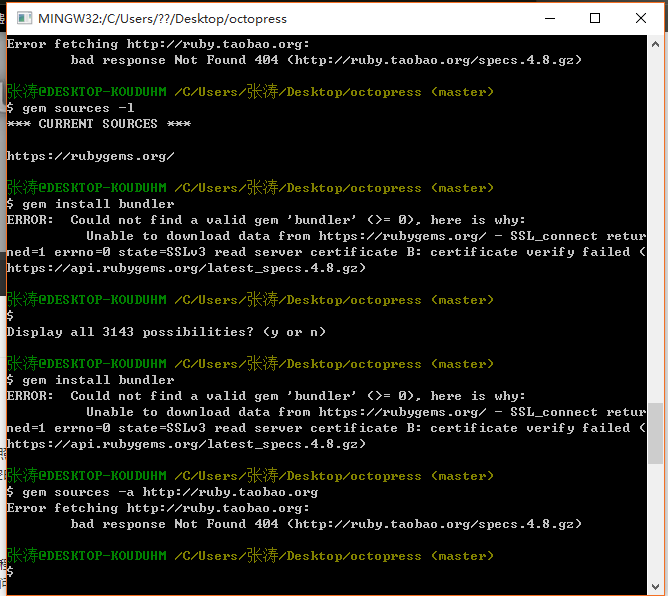
國內訪問 Ruby 官網極慢/無法連線,原淘寶源 https://ruby.taobao.org 已停止服務,`gem sources -a` 新增失敗。
| 鏡像源 | 新增命令 | 狀態 |
|---|---|---|
| 清華大學 | gem sources --add https://mirrors.tuna.tsinghua.edu.cn/rubygems/ --remove https://rubygems.org/ | ✅ 推薦 |
| 中科大 | gem sources --add https://mirrors.ustc.edu.cn/rubygems/ --remove https://rubygems.org/ | ✅ 穩定 |
| 北京外國語大學 | gem sources --add https://mirrors.bfsu.edu.cn/rubygems/ --remove https://rubygems.org/ | ✅ 快速 |
| 騰訊雲 | gem sources --add https://mirrors.cloud.tencent.com/rubygems/ --remove https://rubygems.org/ | ✅ 內網快 |
# 1. 查看當前源
gem sources -l

# 2. 移除官方源(可選,保留作為備用)
gem sources --remove https://rubygems.org/

# 3. 新增國內源(擇一)
gem sources --add https://mirrors.tuna.tsinghua.edu.cn/rubygems/

# 4. 驗證
gem sources -l
# 應顯示 *** CURRENT SOURCES *** 列表包含新增源

# 5. 測試安裝
gem install rails -V  # -V 顯示詳細下載過程
# 專案根目錄
bundle config mirror.https://rubygems.org https://mirrors.tuna.tsinghua.edu.cn/rubygems
# 或寫入 .bundle/config 提交版控,團隊共享
source 'https://mirrors.tuna.tsinghua.edu.cn/rubygems'
gem 'rails', '~> 7.0'
# ...
# 終端代理(需可用代理服務)
export http_proxy=https://127.0.0.1:7890
export https_proxy=https://127.0.0.1:7890
gem install rails

# 或 gem 特定代理
gem install rails --http-proxy https://127.0.0.1:7890
| 現象 | 原因 | 解決 |
|---|---|---|
| SSL 憑證驗證失敗 | 鏡像源用 HTTPS 但系統 CA 憑證舊 | gem sources --add https://mirrors.tuna.tsinghua.edu.cn/rubygems/ 暫用 HTTP |
| 權限錯誤 | 系統 Ruby 需 sudo | 使用 rbenv/rvm 管理用戶級 Ruby,或 gem install --user-install |
| 原生擴展編譯失敗 | 缺少開發工具鏈 | Ubuntu: apt install build-essential / macOS: xcode-select --install |
淘寶 Ruby 源已停維,清華/中科大/北外/騰訊雲 均為優質替代。專案級建議用 bundle config mirror 或 Gemfile 指定源,避免全域污染。若網絡受限,終端代理是通用兜底方案。