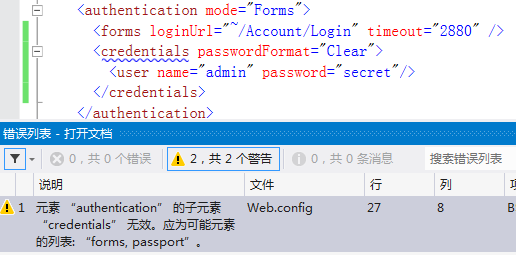
元素 “authentication” 的子元素 “credentials” 無效
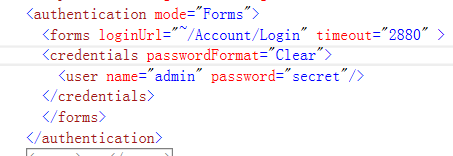
<authentication mode="Forms"> 下的 <forms> 子元素**不包含** <credentials>。credentials 僅用於 mode="Passport"(已淘汰)或舊版 Forms 的 <forms> 內部(且需特定 schema)。
<authentication mode="Forms">
  <forms loginUrl="Login.aspx" timeout="30" />
</authentication>

<authorization>
  <deny users="?" />
</authorization><authentication mode="Forms">
<forms loginUrl="Login.aspx">
<credentials passwordFormat="SHA1">
<user name="admin" password="sha1_hash" />
</credentials>
</forms>
</authentication>但現代應用應使用 **ASP.NET Identity / Membership / IdentityServer** 管理使用者,勿在 config 明文/哈希存密碼。
web.config,定位 <authentication> 區塊。<credentials> 或移至正確父元素。web.config 享有 IntelliSense,輸入 < 即可看到合法子元素,防止拼寫錯誤。