瀏覽器快取是前端效能優化的關鍵。本文詳細說明如何在 IIS 設定靜態檔案快取、在動態頁面程式碼輸出快取標頭、區分 F5/網址列重新整理/Ctrl+F5 的不同行為,並提供 Web.config 批次設定與關閉快取範例。
| 機制 | 觸發條件 | 網路交互 | 適用場景 |
|---|---|---|---|
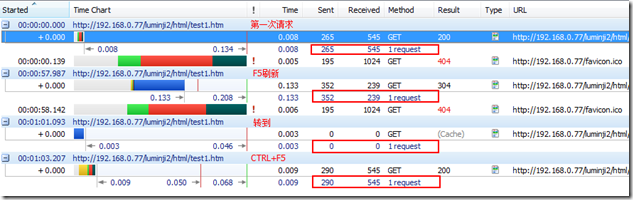
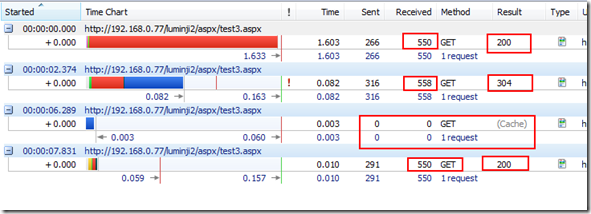
| Last-Modified / If-Modified-Since | F5 重新整理 | 有 (304 Not Modified) | 動態內容版本控制 |
| Cache-Control: max-age | 網址列 Enter / 超連結導航 | 無 (瀏覽器直接讀快取) | 靜態資源、不常變動頁面 |
| Ctrl+F5 | 強制重新整理 | 有 (200 OK 全內容) | 除錯、強制更新 |
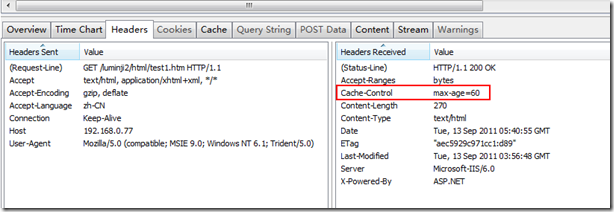
Cache-Control: max-age=60<system.webServer>
<staticContent>
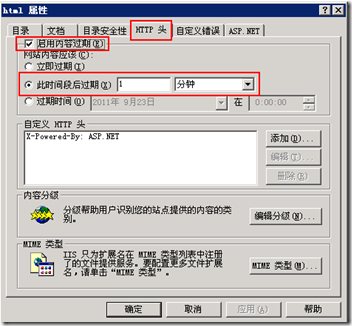
<clientCache cacheControlMode="UseMaxAge" cacheControlMaxAge="0.00:01:00" /> <!-- 1 分鐘 -->
</staticContent>
</system.webServer>
<location path="test2.htm">
  <system.webServer>
    <staticContent>
      <clientCache cacheControlMode="DisableCache" />
    </staticContent>
  </system.webServer>
</location>
protected void Page_Load(object sender, EventArgs e)
{
    // 1. Cache-Control: max-age=60 → 瀏覽器 60 秒內不發請求
    Response.AddHeader("Cache-Control", "max-age=60");

    // 2. Last-Modified → 處理 F5 重新整理
    Response.AddHeader("Last-Modified", DateTime.Now.ToString("R")); // RFC1123 格式

    // 3. 手動處理 If-Modified-Since → 回傳 304
    DateTime ifModifiedSince;
    if (DateTime.TryParse(Request.Headers["If-Modified-Since"], out ifModifiedSince))
    {
        // 注意:HTTP 標頭時間為 UTC,本地時間需轉換
        if ((DateTime.Now - ifModifiedSince.AddHours(8)).TotalSeconds < 60)
        {
            Response.StatusCode = 304;
            Response.StatusDescription = "Not Modified";
            Response.End();
        }
    }
}
<%@ OutputCache Duration="60" Location="Client" VaryByParam="none" %>
或在 Web.config 定義快取設定檔:
<system.web>
  <caching>
    <outputCacheSettings>
      <outputCacheProfiles>
        <add name="Cache1Min" duration="60" location="Client" varyByParam="none" />
      </outputCacheProfiles>
    </outputCacheSettings>
  </caching>
</system.web>

<!-- 頁面引用 -->
<%@ OutputCache CacheProfile="Cache1Min" %>
AddHeader 精確控制