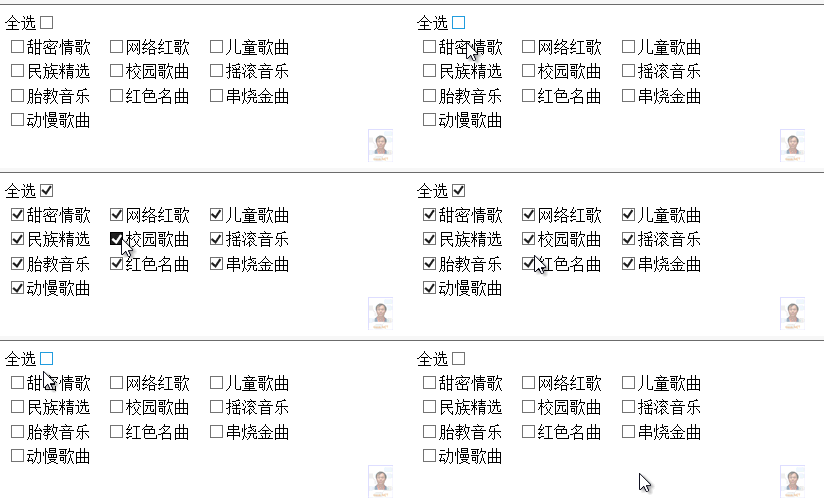
提供一個「全選」 CheckBox,點擊後自動勾選/取消勾選 CheckBoxList 中所有項目,適用於選項較多需批量操作的場景。
public class MusicType
{
    public int ID { get; set; }
    public string TypeName { get; set; }
    public MusicType() { }
    public MusicType(int id, string name) { ID = id; TypeName = name; }
}

public List<MusicType> GetMusicType()
{
    return new List<MusicType> {
        new MusicType(1, "甜密情歌"), new MusicType(2, "網絡紅歌"),
        new MusicType(3, "兒童歌曲"), new MusicType(4, "民族精選"),
        new MusicType(5, "校園歌曲"), new MusicType(6, "搖滾音樂"),
        new MusicType(7, "胎教音樂"), new MusicType(8, "紅色名曲"),
        new MusicType(9, "串燒金曲"), new MusicType(10, "動慢歌曲")
    };
}
全選 <asp:CheckBox ID="CheckBoxAll" runat="server" onclick="Check_Uncheck_All(this);" /><br />
<asp:CheckBoxList ID="CheckBoxListMusicType" runat="server"
    RepeatColumns="3" RepeatDirection="Horizontal" Width="300">
</asp:CheckBoxList>
protected void Page_Load(object sender, EventArgs e)
{
    if (!IsPostBack) Data_Binding();
}
private void Data_Binding()
{
    CheckBoxListMusicType.DataSource = GetMusicType();
    CheckBoxListMusicType.DataTextField = "TypeName";
    CheckBoxListMusicType.DataValueField = "ID";
    CheckBoxListMusicType.DataBind();
}
<script type="text/javascript">
function Check_Uncheck_All(cb) {
    // 取得 CheckBoxList 渲染後的客戶端 ID
    var cbl = document.getElementById("<%=CheckBoxListMusicType.ClientID%>");
    // 取得所有 input 元素(CheckBoxList 渲染為多個 input[type=checkbox])
    var inputs = cbl.getElementsByTagName("input");

    for (var i = 0; i < inputs.length; i++) {
        if (inputs[i].type == "checkbox") {
            inputs[i].checked = cb.checked;
        }
    }
}
</script>
ASP.NET CheckBoxList 渲染為 <table> 包裹的 <input type="checkbox"> 群組,每個項目對應一個 input。ClientID 會附加在外層 span/table 上,故以 getElementsByTagName("input") 遍歷最可靠。
querySelectorAll('input[type=checkbox]') 或分批處理避免阻塞主執行緒:checked 偽類或 JS 切換父容器 class,提供視覺反饋aria-controls 指向 CheckBoxList ID,aria-label="全選/取消全選"<script>
function Check_Uncheck_All(cb) {
var cbl = document.getElementById("<%=CheckBoxListMusicType.ClientID%>");
var inputs = cbl.querySelectorAll('input[type=checkbox]');
inputs.forEach(function(chk) { chk.checked = cb.checked; });
}
function Item_CheckChanged(chk) {
var cbl = document.getElementById("<%=CheckBoxListMusicType.ClientID%>");
var allChk = document.getElementById("<%=CheckBoxAll.ClientID%>");
var inputs = cbl.querySelectorAll('input[type=checkbox]');
var checkedCount = Array.from(inputs).filter(c => c.checked).length;
allChk.checked = (checkedCount === inputs.length);
allChk.indeterminate = (checkedCount > 0 && checkedCount < inputs.length); // 顯示中間狀態
}
</script>
在 CheckBoxList 每個項目加上 onclick="Item_CheckChanged(this)" 即可實現雙向同步與中間狀態顯示。