專案採用三層架構:
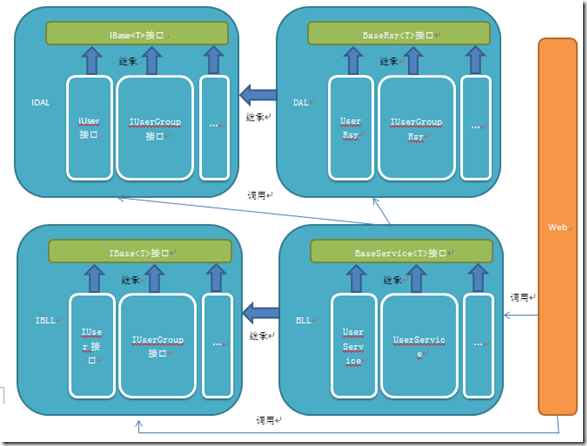
雖然將邏輯寫在 Controller 可減少層級,但長期維護會導致程式碼混亂、重複率高、難以重用。現代硬體效能足以吸收分層帶來的微小開銷,系統瓶頸通常在頻寬、I/O 與資料庫查詢優化,而非物件實例化成本。
using System;
using System.ComponentModel.DataAnnotations;
namespace Ninesky.Models {
    public class User {
        [Key] public int UserID { get; set; }

        [Required(ErrorMessage="必填")]
        [StringLength(20, MinimumLength=4, ErrorMessage="{1}到{0}個字符")]
        [Display(Name="用戶名")] public string UserName { get; set; }

        [Required(ErrorMessage = "必填")]
        [Display(Name = "用戶組ID")] public int GroupID { get; set; }

        [Required(ErrorMessage = "必填")]
        [StringLength(20, MinimumLength = 2, ErrorMessage = "{1}到{0}個字符")]
        [Display(Name = "顯示名")] public string DisplayName { get; set; }

        [Required(ErrorMessage = "必填")]
        [Display(Name = "密碼")]
        [DataType(DataType.Password)] public string Password { get; set; }

        [Required(ErrorMessage = "必填")]
        [Display(Name = "郵箱")]
        [DataType(DataType.EmailAddress)] public string Email { get; set; }

        public int Status { get; set; } // 0正常 1鎖定 2未驗證郵件 3待審核
        public DateTime RegistrationTime { get; set; }
        public DateTime LoginTime { get; set; }
        public string LoginIP { get; set; }

        public virtual UserGroup Group { get; set; }
    }
}
註冊僅收集核心帳號資訊,擴充資料(個人檔案、聯繫方式)另建關聯表,使用者登入後補完。
public class UserGroup {
    [Key] public int GroupID { get; set; }
    [Required(ErrorMessage="必填")]
    [StringLength(20, MinimumLength = 2, ErrorMessage = "{1}到{0}個字")]
    [Display(Name="名稱")] public string Name { get; set; }

    [Required(ErrorMessage = "必填")]
    [Display(Name = "用戶組類型")] public int GroupType { get; set; }
    // 0普通 1特權(VIP) 2管理

    [Required(ErrorMessage = "必填")]
    [StringLength(50, ErrorMessage = "少於{0}個字")]
    [Display(Name = "說明")] public string Description { get; set; }
}
public class UserConfig {
    [Key] public int ConfigID { get; set; }
    [Display(Name = "啟用註冊")] [Required] public bool Enabled { get; set; }
    [Display(Name = "禁止用戶名")] public string ProhibitUserName { get; set; } // 用 | 分隔
    [Display(Name = "啟用管理員審核")] [Required] public bool EnableAdminVerify { get; set; }
    [Display(Name = "啟用郵件驗證")] [Required] public bool EnableEmailVerify { get; set; }
    [Display(Name = "預設用戶組Id")] [Required] public int DefaultGroupId { get; set; }
}
using System; using System.Linq; using System.Linq.Expressions;
namespace Ninesky.IDAL {
    public interface IBaseRepository<T> where T : class {
        T Add(T entity);
        int Count(Expression<Func<T, bool>> predicate);
        bool Update(T entity);
        bool Delete(T entity);
        bool Exist(Expression<Func<T, bool>> anyLambda);
        T Find(Expression<Func<T, bool>> whereLambda);
        IQueryable<T> FindList<S>(Expression<Func<T, bool>> whereLambda, bool isAsc, Expression<Func<T, S>> orderLambda);
        IQueryable<T> FindPageList<S>(int pageIndex, int pageSize, out int totalRecord,
            Expression<Func<T, bool>> whereLambda, bool isAsc, Expression<Func<T, S>> orderLambda);
    }
}
namespace Ninesky.IDAL {
    public interface IUserRepository : IBaseRepository<User> { }
}
public class NineskyDbContext : DbContext {
    public DbSet<User> Users { get; set; }
    public DbSet<UserGroup> UserGroups { get; set; }
    public DbSet<UserConfig> UserConfigs { get; set; }
    public NineskyDbContext() : base("DefaultConnection") { }
}
public class ContextFactory {
    public static NineskyDbContext GetCurrentContext() {
        var ctx = CallContext.GetData("NineskyContext") as NineskyDbContext;
        if (ctx == null) {
            ctx = new NineskyDbContext();
            CallContext.SetData("NineskyContext", ctx);
        }
        return ctx;
    }
}
CallContext 提供邏輯執行緒唯一資料槽,ASP.NET 每個請求即一邏輯執行緒,確保單一請求內 DbContext 單例。
public class BaseRepository<T> : IBaseRepository<T> where T : class {
    protected NineskyDbContext nContext = ContextFactory.GetCurrentContext();

    public T Add(T entity) {
        nContext.Entry(entity).State = EntityState.Added;
        nContext.SaveChanges(); return entity;
    }
    // Update, Delete, Exist, Find, FindList, FindPageList 實作略...
}
public class UserRepository : BaseRepository<User>, IUserRepository { }

public static class RepositoryFactory {
    public static IUserRepository UserRepository { get { return new UserRepository(); } }
}
public interface IBaseService<T> where T : class {
    T Add(T entity); bool Update(T entity); bool Delete(T entity);
}
public interface IUserService : IBaseService<User> {
    bool Exist(string userName);
    User Find(int userID); User Find(string userName);
    IQueryable<User> FindPageList(int pageIndex, int pageSize, out int totalRecord, int order);
}
public abstract class BaseService<T> : IBaseService<T> where T : class {
    protected IBaseRepository<T> CurrentRepository { get; set; }
    public BaseService(IBaseRepository<T> repo) { CurrentRepository = repo; }
    public T Add(T entity) => CurrentRepository.Add(entity);
    public bool Update(T entity) => CurrentRepository.Update(entity);
    public bool Delete(T entity) => CurrentRepository.Delete(entity);
}

public class UserService : BaseService<User>, IUserService {
    public UserService() : base(RepositoryFactory.UserRepository) { }

    public bool Exist(string userName) => CurrentRepository.Exist(u => u.UserName == userName);
    public User Find(int userID) => CurrentRepository.Find(u => u.UserID == userID);
    public User Find(string userName) => CurrentRepository.Find(u => u.UserName == userName);

    public IQueryable<User> FindPageList(int pageIndex, int pageSize, out int totalRecord, int order) {
        // 依 order 參數動態排序(UserID、RegistrationTime、LoginTime 升/降序)
        // 後續優化:抽離排序邏輯至 BaseRepository,使用 Expression 動態建構 OrderBy
    }
}
建立兩組基底介面與實作,後續新增實體僅需繼承擴充,大幅降低重複程式碼。下階段將於 Web 專案透過 IBLL/BLL 進行資料操作,並著手開發前台介面。