<script src="~/Scripts/jquery.contextmenu.js"></script>
<link href="~/Content/contextmenu.css" rel="stylesheet" />
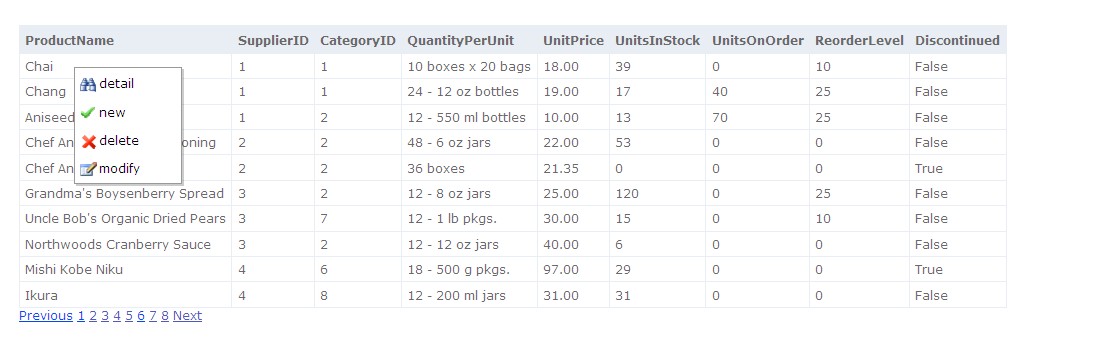
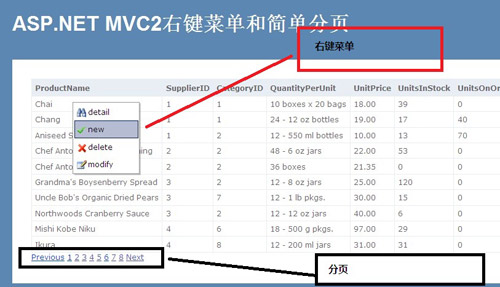
<div class="contextMenu" id="myMenu1">
    <ul>
        <li id="detail"><img src="/Content/detail.ico" />明細</li>
        <li id="new"><img src="/Content/new.ico" />新增</li>
        <li id="delete"><img src="/Content/delete.ico" />刪除</li>
        <li id="modify"><img src="/Content/modify.ico" />修改</li>
    </ul>
</div>
<td class="showContext" id="<%= item.ProductID %>">
    <%: item.ProductName %>
</td>
$(function () {
    $('td.showContext').contextMenu('myMenu1', {
        bindings: {
            'detail': function (t) { location.href = '/Products/Detail/' + t.id; },
            'new':    function (t) { location.href = '/Products/Detail/' + t.id; },
            'delete': function (t) { if (confirm('確定刪除?')) location.href = '/Products/Delete/' + t.id; },
            'modify': function (t) { location.href = '/Products/Edit/' + t.id; }
        }
    });
});
public static class PagingExtensions
{
    public static string Pager(this HtmlHelper helper, int currentPage, int pageSize, int totalRecords, string urlPrefix)
    {
        var sb = new StringBuilder();
        int totalPages = (int)Math.Ceiling((double)totalRecords / pageSize);
        int start = Math.Max(1, currentPage - 2);
        int end = Math.Min(totalPages, currentPage + 2);

        if (currentPage > 1)
            sb.AppendFormat("<a href='{0}/{1}'>上一頁</a> ", urlPrefix, currentPage - 1);

        for (int i = start; i <= end; i++)
        {
            if (i == currentPage)
                sb.AppendFormat("<span class='current'>{0}</span> ", i);
            else
                sb.AppendFormat("<a href='{0}/{1}'>{1}</a> ", urlPrefix, i);
        }

        if (currentPage < totalPages)
            sb.AppendFormat("<a href='{0}/{1}'>下一頁</a>", urlPrefix, currentPage + 1);

        return sb.ToString();
    }
}
<div class="pager">
    <%= Html.Pager(Model.CurrentPage, Model.PageSize, Model.TotalItems, "/Products/List") %>
</div>
contextmenu.js、tippy.js、Headless UI MenuX.PagedList、TagHelper (ASP.NET Core)、Bootstrap PaginationMVC 2 時代的經典做法,理解原理後易於遷移至現代框架。