xp_cmdshell 允許在 SQL Server 服務帳號的安全性內容下執行作業系統命令(.exe, .bat, PowerShell 等)。SQL Server 2005 起預設停用,以降低攻擊面。若業務確有需求(如匯出檔案、呼叫外部程式),需明確啟用並嚴格管控。
-- 1. 允許進階選項變更
EXEC sp_configure 'show advanced options', 1;
RECONFIGURE;

-- 2. 啟用 xp_cmdshell
EXEC sp_configure 'xp_cmdshell', 1;
RECONFIGURE;
亦可使用 Surface Area Configuration Tool(外圍應用配置器)→ Features → xp_cmdshell → Enable。
sysadmin 角色呼叫 xp_cmdshell 時,會使用 ##xp_cmdshell_proxy_account## 憑證。請設定低權限 Proxy:EXEC sp_xp_cmdshell_proxy_account 'DOMAIN\LowPrivUser', 'StrongPassword';
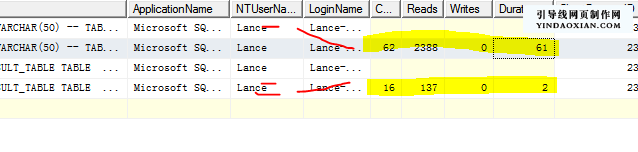
xp_cmdshell 呼叫記錄(物件名、參數、呼叫者、時間)。| 需求場景 | 替代技術 | 優勢 |
|---|---|---|
| 匯出檔案至磁碟 | BCP Utility / SSIS / sp_OACreate + ADO Stream / CLR | 無需 OS Shell,權限可控 |
| 觸發外部流程 | Service Broker + 外部啟動器 / SQL Agent Job + sp_start_job / 訊息佇列 | 非同步、解耦、可重試 |
| 讀取檔案內容 | OPENROWSET(BULK...) / OPENJSON / CLR | 集合化處理、效能佳 |
| 執行 PowerShell | SQL Agent PowerShell 步驟 / 外部排程器 | 不開放 xp_cmdshell |
xp_cmdshell 預設開啟,風險極高,升級 2005+ 時務必確認關閉。xp_cmdshell 僅支援特定命令,行為受限於容器/主機權限。xp_cmdshell,架構設計時需排除。xp_cmdshell 是雙面刃,啟用前務必完成威脅建模,評估是否有更安全的替代方案。若必須啟用,請落實「最小權限、Proxy 隔離、全審計、定期審查」四大原則,將風險控制在可接受範圍內。