使用者定義型別 (UDT) 是 SQL Server 2005 引入的重要特性,允許開發人員在資料庫中定義結構化的複雜資料型別。與前幾篇介紹的預存程序、函數、觸發器不同,UDT 具有更嚴格的規格限制:二進位大小不超過 8000 位元組、必須實作 NULL 語意、支援序列化等。本文將詳細解析 UDT 的設計規範、完整程式碼範例與部署驗證流程。
struct 或 class 定義;若為 class 需加 [StructLayout(LayoutKind.Sequential)] 確保序列化順序[Serializable] 與 [SqlUserDefinedType] 屬性INullable 介面提供 NULL 語意IBinarySerialize 介面控制二進位序列化Parse 方法與 ToString 方法實現字串轉換using System;
using System.IO;
using System.Data;
using System.Data.SqlClient;
using System.Data.SqlTypes;
using Microsoft.SqlServer.Server;
[Serializable]
[Microsoft.SqlServer.Server.SqlUserDefinedType(Format.UserDefined, MaxByteSize = 1024)]
public struct Person : INullable, IBinarySerialize
{
public override string ToString()
{
return FormatU();
}
public bool IsNull
{
get { return m_Null; }
}
public static Person Null
{
get
{
Person h = new Person();
h.m_Null = true;
return h;
}
}
public static Person Parse(SqlString s)
{
if (s.IsNull) return Null;
Person u = new Person();
string value = s.Value;
if (value == "null") return Null;
string[] parts = value.Split(',');
u.name = parts[0];
u.age = ParseAge(parts[1]);
u.sex = parts[2];
return u;
}
private string FormatU()
{
return string.Format("名稱:{0},年齡:{1},性別:{2}", name, age, sex);
}
private static int ParseAge(string str)
{
return int.Parse(str.Substring(0, str.LastIndexOf("歲")));
}
private int age;
public int Age
{
get { return age; }
set { age = value; }
}
private string name;
public string Name
{
get { return name; }
set { name = value; }
}
private string sex;
public string Sex
{
get { return sex; }
set { sex = value; }
}
private bool m_Null;
public byte[] b;
public void Read(BinaryReader r)
{
name = r.ReadString();
sex = r.ReadString();
age = r.ReadInt32();
m_Null = r.ReadBoolean();
}
public void Write(BinaryWriter w)
{
w.Write(name);
w.Write(sex);
w.Write(age);
w.Write(m_Null);
}
}
提供標準的 NULL 語意,資料庫引擎透過這兩個成員識別與處理 NULL 值。
實現字串格式「名稱,年齡歲,性別」與 UDT 物件的雙向轉換,支援資料輸入/輸出。
自訂二進位序列化順序:Name → Sex → Age → IsNull,確保跨 AppDomain 傳輸正確性。
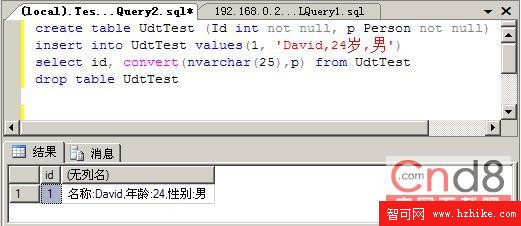
create table UdtTest (Id int not null, p Person not null);
insert into UdtTest values(1, 'David,24歲,男');
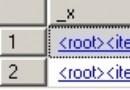
select id, convert(nvarchar(25), p) from UdtTest;
drop table UdtTest;
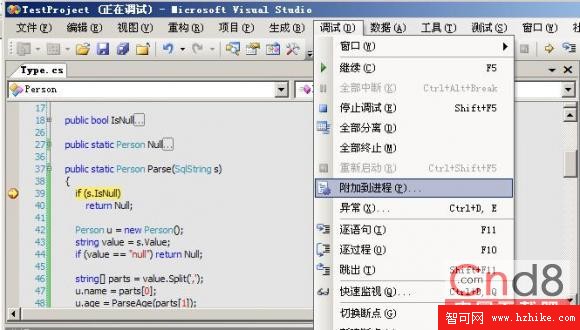
為了深入理解 SQLCLR 處理 UDT 的機制,可在 Visual Studio 中將偵錯器附加至 SQL Server 進程,於 Parse、Read、Write 等方法設定中斷點,觀察資料流向。
文中提到發現一份以 VB.NET 講解 SQLCLR 的 PDF 文件,對使用 VB.NET 的開發人員具參考價值。