SQL Server 2005 CLR 整合讓資料庫擁有 .NET 程式設計能力。本文回顧 CLR 核心物件 (函數/預存程序/觸發器/彙總/UDT),深入解析 使用者定義型別 (UDT) 適用場景與限制,並完整演示開發一個「只接受數字字串、其它回傳 0」的 UDT,從 VS 專案建立、程式碼實作、部署、建立資料表欄位、測試資料驗證全流程。
SqlUserDefinedTypeAttribute + 實作 INullable、ToString()、Parse()、IsNull、Null 靜態屬性。CREATE TYPE 註冊 → CREATE TABLE 使用。varbinary(max) / FILESTREAM。效能提示:每次存取 UDT 欄位都需反序列化 + 方法呼叫,固定開銷。若無行為邏輯,純資料存儲請用標準欄位。
IsNumber UDT (驗證純數字字串)SQL Server 專案 → 加入資料庫參考 → 右鍵專案 → 加入新項目 → 使用者定義型別 → 命名 IsNumber.cs。
using System;
using System.Data.SqlTypes;
using Microsoft.SqlServer.Server;
using System.Text.RegularExpressions;

[Serializable]
[Microsoft.SqlServer.Server.SqlUserDefinedType(Format.Native)]
public struct IsNumber : INullable
{
    // 儲存驗證結果:1=純數字, 0=非數字
    public int Value;

    // 私有 Null 標記
    private bool m_Null;

    // INullable 介面
    public bool IsNull { get { return m_Null; } }
    public static IsNumber Null
    {
        get { var n = new IsNumber(); n.m_Null = true; return n; }
    }

    // 從字串解析 (INSERT/CAST 時自動呼叫)
    public static IsNumber Parse(SqlString s)
    {
        if (s.IsNull) return Null;
        var u = new IsNumber();
        u.Value = IsNumeric(s.Value) ? 1 : 0;
        return u;
    }

    // 輸出字串 (SELECT 時自動呼叫)
    public override string ToString()
    {
        return Value.ToString();  -- 回傳 "1" 或 "0"
    }

    // 靜態驗證方法:正則 ^[0-9]+$
    public static bool IsNumeric(string input)
    {
        return Regex.IsMatch(input, @"^[0-9]+$");
    }

    // 佔位方法 (UDT 範本產生)
    public string Method1() { return "Hello"; }
    public static SqlString Method2() { return new SqlString("Hello"); }
    public int var1;  -- 未使用
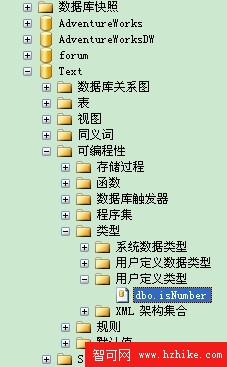
}VS 右鍵專案 → 部署。輸出視窗顯示成功。SSMS 可程式性 → 型別 → 使用者定義型別 見 IsNumber。
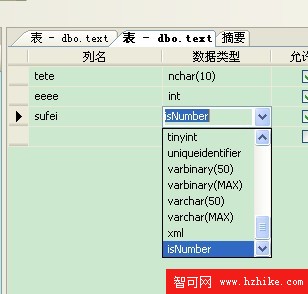
CREATE TABLE UDT_Test (
    id INT IDENTITY PRIMARY KEY,
    raw_input VARCHAR(50),
    type3 IsNumber  -- UDT 欄位
);
INSERT INTO UDT_Test (raw_input, type3) VALUES
('abc', 'abc'),      -- 非數字 → 0
('123abc', '123abc'),-- 非數字 → 0
('123', '123'),      -- 純數字 → 1
('', ''),            -- 空字串 → 0
('0', '0'),          -- 純數字 → 1
(NULL, NULL);        -- NULL → NULL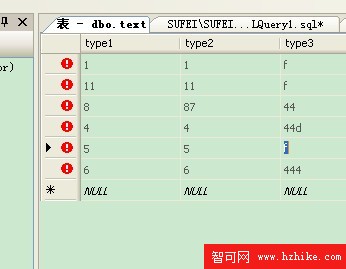
SELECT raw_input, type3 FROM UDT_Test;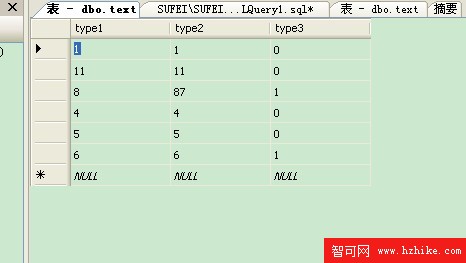
結果完全符合預期:非數字列 type3 顯示 0,純數字列顯示 1,NULL 保持 NULL。
Format.Native 適用簡單型別 (高效能);複雜結構需 Format.UserDefined 實作 IBinarySerialize。SELECT col.Method() FROM table。IComparable 或建立排序規則。