隨著 .NET Framework 普及,開發者急需了解如何將 .NET 應用與 Oracle 高效整合。本文詳述使用 Visual Studio .NET (VS.Net) 開發 Oracle 應用的核心流程:添加資料提供者引用、建立連接字串、使用 Connection/Command/DataReader 物件,並附三個漸進式實作練習。
除基本 Oracle Client 軟體外,.NET 應用需 Managed Data Provider(程式碼由 .NET Framework 管理)。此層介於應用程式碼與 Oracle Client 之間。針對特定資料庫優化的 Provider 效能優於通用 OLE DB Provider。
主要選擇:
本文以 ODP.NET 為例(單獨下載安裝)。安裝完成後,用 SQL*Plus 測試連線確認 Client 配置正確。
OtnWinApp)與方案(如 OtnSamples)Oracle.DataAccess.dll → OK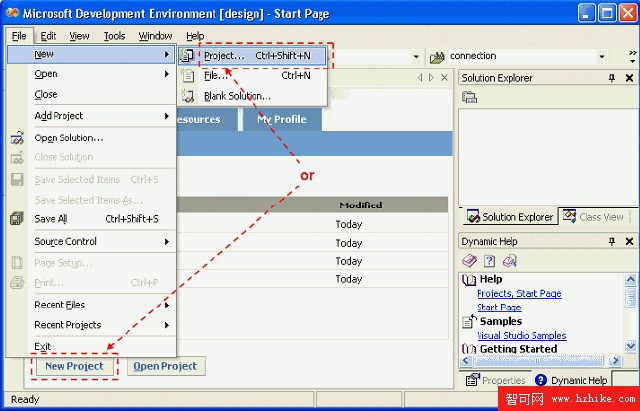
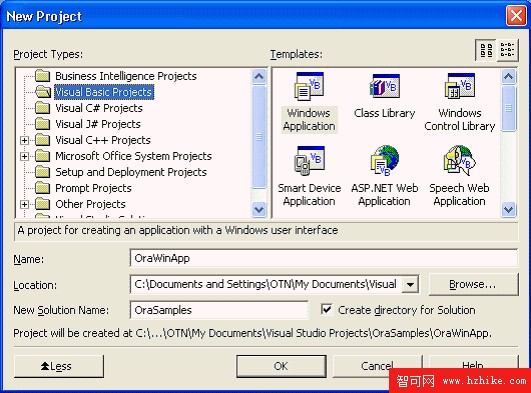
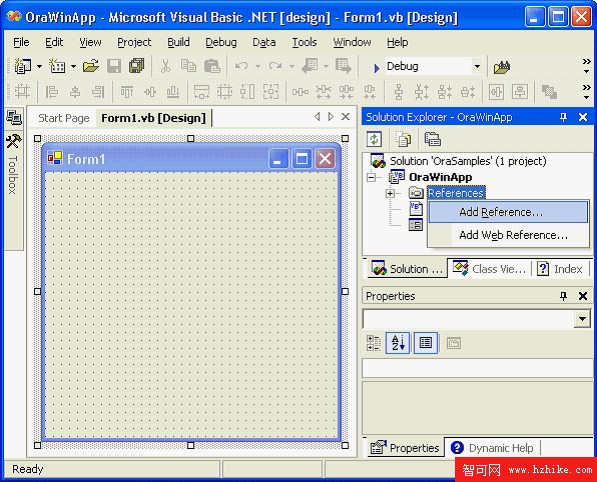
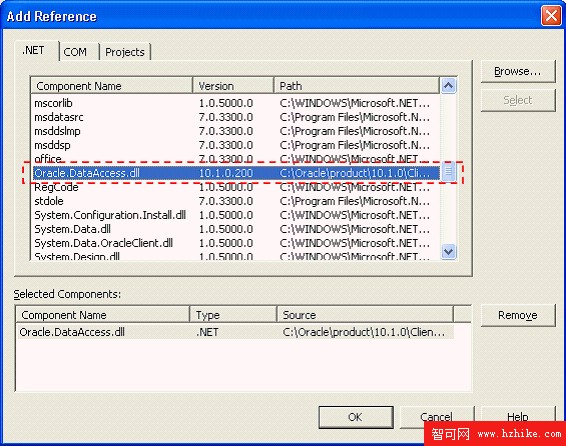
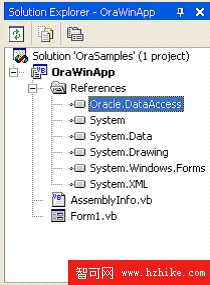
' VB.Net
Imports System.Data
Imports Oracle.DataAccess.Client

// C#
using System.Data;
using Oracle.DataAccess.Client;

// J#
import System.Data.*;
import Oracle.DataAccess.Client;
' tnsnames.ora 定義:
OraDb = (DESCRIPTION=(ADDRESS_LIST=(ADDRESS=(PROTOCOL=TCP)(HOST=OTNSRVR)(PORT=1521)))
         (CONNECT_DATA=(SERVER=DEDICATED)(SERVICE_NAME=ORCL)))

' VB.Net
Dim oradb As String = "Data Source=OraDb;User Id=scott;Password=tiger;"

// C#
string oradb = "Data Source=OraDb;User Id=scott;Password=tiger;";
' VB.Net
Dim oradb As String = "Data Source=(DESCRIPTION=" & _
    "(ADDRESS_LIST=(ADDRESS=(PROTOCOL=TCP)(HOST=OTNSRVR)(PORT=1521)))" & _
    "(CONNECT_DATA=(SERVER=DEDICATED)(SERVICE_NAME=ORCL)));" & _
    "User Id=scott;Password=tiger;"

// C#
string oradb = "Data Source=(DESCRIPTION=" +
    "(ADDRESS_LIST=(ADDRESS=(PROTOCOL=TCP)(HOST=OTNSRVR)(PORT=1521)))" +
    "(CONNECT_DATA=(SERVER=DEDICATED)(SERVICE_NAME=ORCL)));" +
    "User Id=scott;Password=tiger;";
安全提醒:帳密以明文嵌入字串不安全,編譯後的 .NET 組件易被反編譯。生產環境應採用加密儲存或 Windows 整合驗證。
' VB.Net
Dim conn As New OracleConnection(oradb)
conn.Open()

// C#
OracleConnection conn = new OracleConnection(oradb);
conn.Open();

// 替代語法:先建立物件再設定 ConnectionString
Dim conn As New OracleConnection()
conn.ConnectionString = oradb
conn.Open()
' VB.Net
Dim sql As String = "SELECT dname FROM dept WHERE deptno = 10"
Dim cmd As New OracleCommand(sql, conn)
cmd.CommandType = CommandType.Text
Dim dr As OracleDataReader = cmd.ExecuteReader()
dr.Read()
Label1.Text = dr.Item("dname")      ' 依欄位名
Label1.Text = dr.Item(0)            ' 依序號(零基)
Label1.Text = dr.GetString(0)       ' 強型別存取器

// C#
string sql = "SELECT dname FROM dept WHERE deptno = 10";
OracleCommand cmd = new OracleCommand(sql, conn);
cmd.CommandType = CommandType.Text;
OracleDataReader dr = cmd.ExecuteReader();
dr.Read();
label1.Text = dr.GetString(0);  // C# 必須用存取器
隱式轉換可能失敗,建議顯式轉換:
' VB.Net 整數轉字串
Label1.Text = CStr(dr.Item("deptno"))

// C# 整數轉字串
string deptno = dr.GetInt16("deptno").ToString();
' VB.Net
conn.Close()      ' 或 conn.Dispose()

// C#
conn.Close();
conn.Dispose();

// C# using 區塊自動清理(推薦)
using (OracleConnection conn = new OracleConnection(oradb)) {
    conn.Open();
    OracleCommand cmd = new OracleCommand();
    cmd.Connection = conn;
    cmd.CommandText = "SELECT dname FROM dept WHERE deptno = 10";
    cmd.CommandType = CommandType.Text;
    OracleDataReader dr = cmd.ExecuteReader();
    dr.Read();
    label1.Text = dr.GetString(0);
} // 區塊結束自動 Dispose
' VB.Net
Dim conn As New OracleConnection(oradb)
Try
    conn.Open()
    ' ... 執行命令、讀取資料 ...
Catch ex As Exception
    MessageBox.Show(ex.Message.ToString())
Finally
    conn.Dispose()
End Try
直接顯示 ORA-12545 等錯誤碼使用者看不懂,應捕獲 OracleException 並轉換:
' VB.Net
Catch ex As OracleException
    If InStr(1, ex.Message.ToString(), "ORA-1:", CompareMethod.Text) > 0 Then
        MessageBox.Show("嘗試插入重複資料。")
    ElseIf InStr(1, ex.Message.ToString(), "ORA-12545:", CompareMethod.Text) > 0 Then
        MessageBox.Show("資料庫不可用。")
    Else
        MessageBox.Show("資料庫錯誤: " + ex.Message.ToString())
    End If
Catch ex As Exception
    MessageBox.Show(ex.Message.ToString())

// C#
catch (OracleException ex) {
    switch (ex.Number) {
        case 1:    MessageBox.Show("嘗試插入重複資料。"); break;
        case 12545: MessageBox.Show("資料庫不可用。"); break;
        default:   MessageBox.Show("資料庫錯誤: " + ex.Message.ToString()); break;
    }
}
catch (Exception ex) {
    MessageBox.Show(ex.Message.ToString());
}
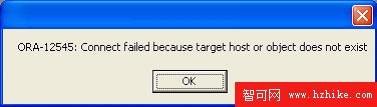
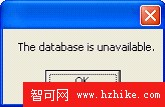
原則:Catch 區塊按「特殊到一般」排序;Finally 區塊確保連接關閉,多次 Close/Dispose 無害。
SELECT deptno, dname, loc FROM dept WHERE deptno = 10
' VB.Net
Label1.Text = "The " + dr.Item(1) + " department is in " + dr.Item("loc")
// C#
label1.Text = "The " + dr.GetString(1) + " department is in " + dr.GetString(2);
DataReader 唯前向唯讀,不支援 DataGrid 繫結,適合 ListBox:
SELECT deptno, dname, loc FROM dept
' VB.Net
While dr.Read()
    ListBox1.Items.Add("The " + dr.Item(1) + " department is in " + dr.Item("loc"))
End While

// C#
while (dr.Read()) {
    listBox1.Items.Add("The " + dr.GetString(1) + " department is in " + dr.GetString(2));
}
If dr.Read() 判斷避免無資料報錯掌握 ODP.NET 的引用添加、連接字串構建、Connection/Command/DataReader 核心物件用法、Try-Catch-Finally 錯誤處理與資源清理,即可開發健壯的 .NET Oracle 應用。建議實際操作三個練習深化理解。