64 位 Windows 上安裝 32 位 PL/SQL Developer 時,常遇到 Could not load "...\bin\oci.dll" 或 initialization error could not locate OCI dll。根因是 PL/SQL Developer 需 32 位 Oracle Client 的 oci.dll,而 64 位 Oracle Client 無法滿足。本文提供標準修復流程。
https://download.csdn.net/detail/shenkxiao/4181424(搜尋 instantclient_10_2 32-bit)D:\Program Files\instantclient_10_2。tnsnames.ora 確保能 tnsping 通目標資料庫。oci.dll。設定畫面:
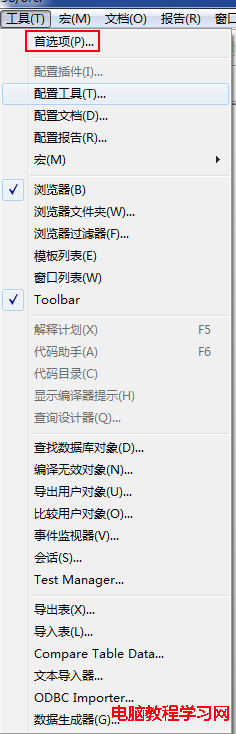
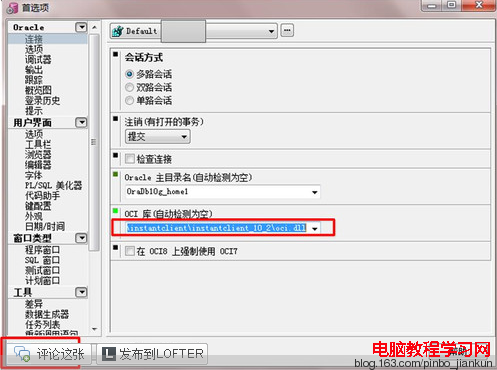
小註:Oracle Home 與 OCI Library 最好都指向同一 32 位 Client 目錄(紅框內容)。
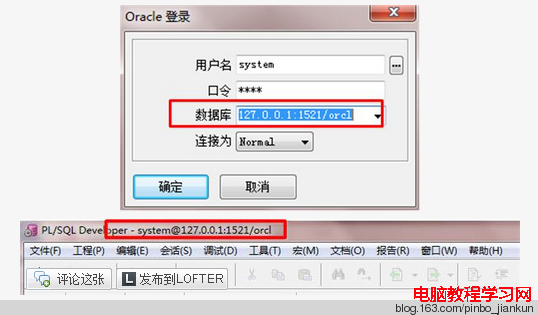
登入視窗的 Database 欄位直接填寫 IP:Port/ServiceName(例如 192.168.1.100:1521/ORCL),而非 TNS 別名。測試證實此寫法最穩定。
Password:xs374ca
Product Code:46lexxzpthqrjmkhyd5czddfcjh33a9p2z
Serial Number:275052
PATH 環境變數最前端,避免版本衝突。