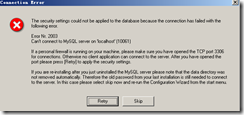
現象
/etc/init.d/mysql restart
Stopping MySQL: [FAILED]
Timeout error occurred trying to start MySQL Daemon.
Starting MySQL: [FAILED]

service mysqld status
mysqld (pid 21847) is running...  # 顯示運行中但實際不可用
排查定位
df -h
Filesystem      Size  Used Avail Use% Mounted on
/dev/simfs       10G   10G     0 100% /   # 磁盤 100% 滿
快速清理騰空
- 找出大目錄:
du -sh /* | sort -hr | head -20
- 常見可清理項:
/tmp、/var/log (舊日誌)、/var/lib/mysql/*.log (舊 binlog/error log)、/root/.cache、Docker /var/lib/docker (未使用鏡像/容器)。
- 清理示例:
rm -rf /tmp/*
find /var/log -name '*.log.*' -mtime +7 -delete
docker system prune -af
驗證恢復
/etc/init.d/mysql restart
Stopping MySQL: [OK]
Starting MySQL: [OK]
預防長效機制
- 配置
logrotate 定期輪轉 MySQL/系統日誌。
- 設置
expire_logs_days=7 或 binlog_expire_logs_seconds 自動清理 binlog。
- 監控告警:
df -h 定時任務 + 閾值告警(如 > 80%)。
- 數據目錄掛載獨立分區/磁碟,避免系統盤滿影響資料庫。
- 定期
PURGE BINARY LOGS BEFORE DATE_SUB(NOW(), INTERVAL 7 DAY)。
避坑提醒
- 不要直接刪除
ibdata1、ib_logfile*、.ibd 等核心資料檔。
- 清理 binlog 前確認從庫已同步(
SHOW SLAVE STATUS\G)。
- 生產環境操作前務必快照/備份。