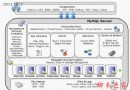
MySQL 採用非同步單向複製:
Master: [Client] → Binlog → [Binlog Dump Thread] → Network
                                        ↑
Slave: [I/O Thread] ← Relay Log ← [SQL Thread] → Execute SQL| 優勢 | 說明 |
|---|---|
| 高可用性 | Master 故障可提升 Slave 為新 Master |
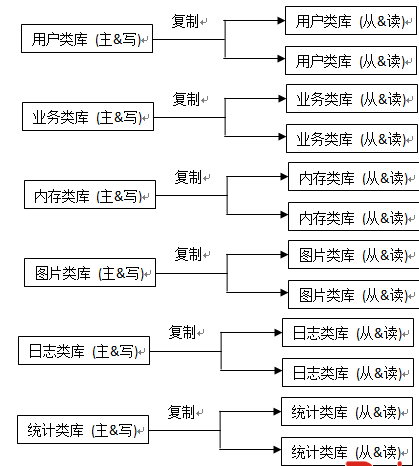
| 讀寫分離 | 查詢分流至 Slave,減輕 Master 壓力 |
| 線上備份 | 在 Slave 執行備份不影響 Master 服務 |
| 災難恢復 | 異地 Slave 可應對機房級故障 |
log-bin 並設定唯一 server-idserver-id(不同於 Master)GRANT REPLICATION SLAVE ON *.* TO 'repl'@'%' IDENTIFIED BY 'password';mysql> FLUSH TABLES WITH READ LOCK;
mysql> SHOW MASTER STATUS;
+------------------+----------+--------------+------------------+
| File | Position | Binlog_Do_DB | Binlog_Ignore_DB |
+------------------+----------+--------------+------------------+
| mysql-bin.000003 | 73 | test | manual,mysql |
+------------------+----------+--------------+------------------+
shell> cd /var/lib/mysql
shell> tar -czf /tmp/mysql-snapshot.tar.gz ./data

shell> tar -czf /tmp/mysql-snapshot.tar.gz --exclude=./data/mysql ./datamysql> UNLOCK TABLES;shell> scp /tmp/mysql-snapshot.tar.gz slave_host:/tmp/
shell> cd /var/lib/mysql
shell> tar -xzf /tmp/mysql-snapshot.tar.gz
shell> chown -R mysql:mysql /var/lib/mysql/datamysql> CHANGE MASTER TO
MASTER_HOST='master_ip',
MASTER_USER='repl',
MASTER_PASSWORD='password',
MASTER_LOG_FILE='mysql-bin.000003',
MASTER_LOG_POS=73;
mysql> START SLAVE;mysql> SHOW SLAVE STATUS\G
*************************** 1. row ***************************
Slave_IO_State: Waiting for master to send event
Master_Host: master_ip
Master_User: repl
Master_Log_File: mysql-bin.000003
Read_Master_Log_Pos: 73
Relay_Log_File: slave-relay-bin.000002
Relay_Log_Pos: 320
Relay_Master_Log_File: mysql-bin.000003
Slave_IO_Running: Yes
Slave_SQL_Running: Yes
Last_Error:
Seconds_Behind_Master: 0關鍵指標:Slave_IO_Running: Yes、Slave_SQL_Running: Yes、Seconds_Behind_Master: 0
[mysqld]
server-id = 1
log-bin = mysql-bin
binlog-format = ROW          # 推薦 ROW 格式,避免非確定性函數問題
sync_binlog = 1              # 每次提交同步到磁碟,最安全
innodb_flush_log_at_trx_commit = 1[mysqld]
server-id = 2
relay-log = slave-relay-bin
read-only = 1 # 防止誤在 Slave 寫入
log-slave-updates = 1 # 若 Slave 需作為下一級 Master| 現象 | 可能原因 | 解決方向 |
|---|---|---|
| IO_Running: No | 網路不通、帳號密碼錯、Master Binlog 已清理 | 檢查防火牆、CHANGE MASTER TO 重設位置 |
| SQL_Running: No | SQL 執行錯誤(主鍵衝突、欄位不存在等) | 查看 Last_Error,手動修復或跳過錯誤 |
| Seconds_Behind_Master 偏大 | Slave 機能不足、大事務、網路延遲 | 優化 SQL、升級硬體、並行複製 |
rpl_semi_sync_master=1,提升資料安全性slave_parallel_workers=4,提升 SQL 執行效能