# 1. 安裝官方釋出套件(含 repo 定義)
rpm -Uvh https://dev.mysql.com/get/mysql-community-release-el7-5.noarch.rpm

# 2. 查看可用版本
yum repolist enabled | grep mysql
# mysql56-community  → MySQL 5.6 Community Server

# 3. 安裝社區版 Server(會自動替換 mariadb)
yum -y install mysql-community-server
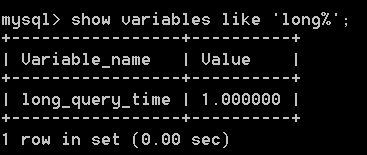
mariadb、mariadb-libs、mariadb-devel,安裝 mysql-community-{client,libs,server,devel,common}/etc/pki/rpm-gpg/RPM-GPG-KEY-mysql 導入# 基礎優化 skip-name-resolve skip-external-locking # 連接與緩衝 max_connections = 2000 max_connect_errors = 1000 open_files_limit = 65535 table_open_cache = 3072 # InnoDB 核心 innodb_buffer_pool_size = 512M # 物理記憶體 50~70% innodb_log_file_size = 512M innodb_log_files_in_group = 2 innodb_log_buffer_size = 64M innodb_flush_log_at_trx_commit = 1 sync_binlog = 1 innodb_file_per_table = 1 innodb_data_file_path = ibdata1:1G:autoextend # 查詢快取(建議關閉) query_cache_type = 0 query_cache_size = 0 # 會話緩衝(勿設過大) sort_buffer_size = 2M join_buffer_size = 2M read_buffer_size = 2M read_rnd_buffer_size = 2M tmp_table_size = 1024M max_heap_table_size = 3000M # 其他 max_allowed_packet = 16M thread_cache_size = 8 key_buffer_size = 32M long_query_time = 0.05 slow_query_log = 1
註:實際數值需依機器規格(CPU/記憶體/SSD)壓測調整,上方為 16G 記憶體、SSD 單實例參考值。
常見問題排查
rpm --import /etc/pki/rpm-gpg/RPM-GPG-KEY-mysql/var/log/mysqld.log,常見於舊 mariadb 殘留配置衝突validate_password_policy