近期在學習資料庫開發的實作範例,這裡分享如何使用 JDBC 連接 MySQL 資料庫(同樣適用於 SQL Server 或 Oracle,但我更偏好開源軟體,且設定相對簡單)。
首先確保已正確安裝 MySQL,並建立名為 studentinfo 的資料庫:
MySQL> create database studentinfo;建立 ConnectToMySQL.java 檔案,完整程式碼如下:
import java.sql.*;

public class ConnectToMySQL {
    public static Connection getConnection() throws SQLException, ClassNotFoundException {
        String url = "jdbc:mysql://localhost:3306/studentinfo";
        Class.forName("com.mysql.jdbc.Driver");
        String userName = "root";
        String password = "";
        Connection con = DriverManager.getConnection(url, userName, password);
        return con;
    }

    public static void main(String[] args) {
        try {
            Connection con = getConnection();
            Statement sql = con.createStatement();

            // 建立測試資料表
            sql.execute("drop table if exists student");
            sql.execute("create table student(" +
                "id int not null auto_increment," +
                "name varchar(20) not null default 'name'," +
                "math int not null default 60," +
                "primary key(id))");

            // 插入測試資料
            sql.execute("insert into student values(1, 'AAA', 99)");
            sql.execute("insert into student values(2, 'BBB', 77)");
            sql.execute("insert into student values(3, 'CCC', 65)");

            // 查詢並顯示資料
            String query = "select * from student";
            ResultSet result = sql.executeQuery(query);

            System.out.println("Student 表資料如下:");
            System.out.println("---------------------------------");
            System.out.println("學號" + " " + "姓名" + " " + "數學成績");
            System.out.println("---------------------------------");

            while (result.next()) {
                int number = result.getInt("id");
                String name = result.getString("name");
                String math = result.getString("math");
                System.out.println(number + " " + name + " " + math);
            }

            sql.close();
            con.close();
        } catch (ClassNotFoundException e) {
            System.err.println("ClassNotFoundException: " + e.getMessage());
        } catch (SQLException ex) {
            System.err.println("SQLException: " + ex.getMessage());
        }
    }
}程式執行成功後,輸出結果如下圖所示:
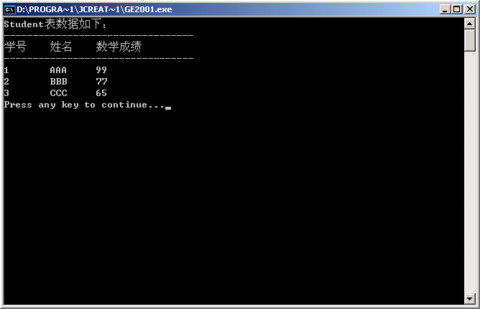
透過這個簡單的範例,您可以快速掌握 JDBC 連接 MySQL 的核心步驟:載入驅動、建立連線、執行 SQL 指令、處理結果集,最後關閉資源。