首頁
編程語言
C語言|JAVA編程
Python編程
網頁編程
ASP編程|PHP編程
JSP編程
數據庫
MYSQL數據庫|SqlServer數據庫
Oracle數據庫|DB2數據庫

忘記 MySQL Root 密碼?5 步快速重置找回權限

     編輯:MySQL 資料庫相關知識

適用場景

  • Root 密碼遺失/忘記
  • 無其他具備 SUPER 權限的帳號可登入

重置步驟

  1. 停止 MySQL 服務
    systemctl stop mysqld 或 service mysql stop 或 killall mysqld
  2. 跳過授權表啟動
    mysqld_safe --skip-grant-tables &
    此模式下不檢查權限,任意用戶可無密碼登入
  3. 免密登入 Root
    mysql -u root
  4. 更新密碼並刷新權限
    mysql> UPDATE mysql.user SET authentication_string=PASSWORD('新密碼') WHERE User='root';
    mysql> FLUSH PRIVILEGES;
    mysql> QUIT;
    MySQL 5.7+ 欄位為 authentication_string,5.6 及之前為 Password。建議先 DESC mysql.user; 確認欄位名。
  5. 正常重啟驗證
    systemctl restart mysqld
    mysql -u root -p'新密碼'

Windows 環境調整

  1. 以管理員身分開啟 CMD
  2. net stop mysql
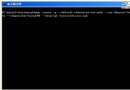
  3. mysqld --skip-grant-tables(在另一視窗保持運行)
  4. mysql -u root 免密登入
  5. 同步驟 4 更新密碼
  6. net stop mysql → net start mysql 重啟服務

安全提醒

  • --skip-grant-tables 期間任何人可無密碼登入 Root,務必在內網/單用戶模式下操作

  • 完成後立即移除臨時配置,恢復正常授權檢查
  • 建議同步檢查是否有其他弱密碼帳號、匿名用戶
  1. 上一篇文章:
  2. 下一篇文章:
Copyright © 程式碼之家 All Rights Reserved