-- 1. 分配緩存內存(單位:字節)
SET GLOBAL query_cache_size = 102760448;  -- ~98 MB
SET GLOBAL query_cache_limit = 2097152;   -- 2 MB/查詢

-- 2. 啟用按需模式
SET GLOBAL query_cache_type = 2;  -- DEMAND

-- 3. 當前會話啟用緩存
SET SESSION query_cache_type = ON;注意:GLOBAL 變量僅對**新連接**生效,當前會話需設 SESSION。
mysql> USE test;
mysql> SELECT COUNT(*) FROM animals;  -- 首次查詢
+----------+
| count(*) |
+----------+
| 6        |
+----------+

mysql> SHOW STATUS LIKE 'Qcache_hits';
+---------------+-------+
| Variable_name | Value |
+---------------+-------+
| Qcache_hits   | 0     |
+---------------+-------+

mysql> SELECT COUNT(*) FROM animals;  -- 完全相同 SQL
+----------+
| count(*) |
+----------+
| 6        |
+----------+

mysql> SHOW STATUS LIKE 'Qcache_hits';
+---------------+-------+
| Variable_name | Value |
+---------------+-------+
| Qcache_hits   | 1     |  -- 命中 +1
+---------------+-------+mysql> INSERT INTO animals SELECT 9, 'testsds';
Query OK, 1 row affected
mysql> SELECT COUNT(*) FROM animals; -- 數據已變,緩存失效
+----------+
| count(*) |
+----------+
| 7 |
+----------+
mysql> SHOW STATUS LIKE 'Qcache_hits';
+---------------+-------+
| Variable_name | Value |
+---------------+-------+
| Qcache_hits | 1 | -- 仍為 1,未命中
mysql> SELECT COUNT(*) FROM animals; -- 新結果入緩存
mysql> SHOW STATUS LIKE 'Qcache_hits';
+---------------+-------+
| Variable_name | Value |
+---------------+-------+
| Qcache_hits | 2 | -- 再次命中
+---------------+-------+[mysqld]
query_cache_type = 2
query_cache_size = 268435456 # 256 MB
query_cache_limit = 1048576 # 1 MB
query_cache_min_res_unit = 2048 # 2 KB 減少碎片修改後 systemctl restart mysqld 生效。
| 變量 | 含義 | 異常判斷 |
|---|---|---|
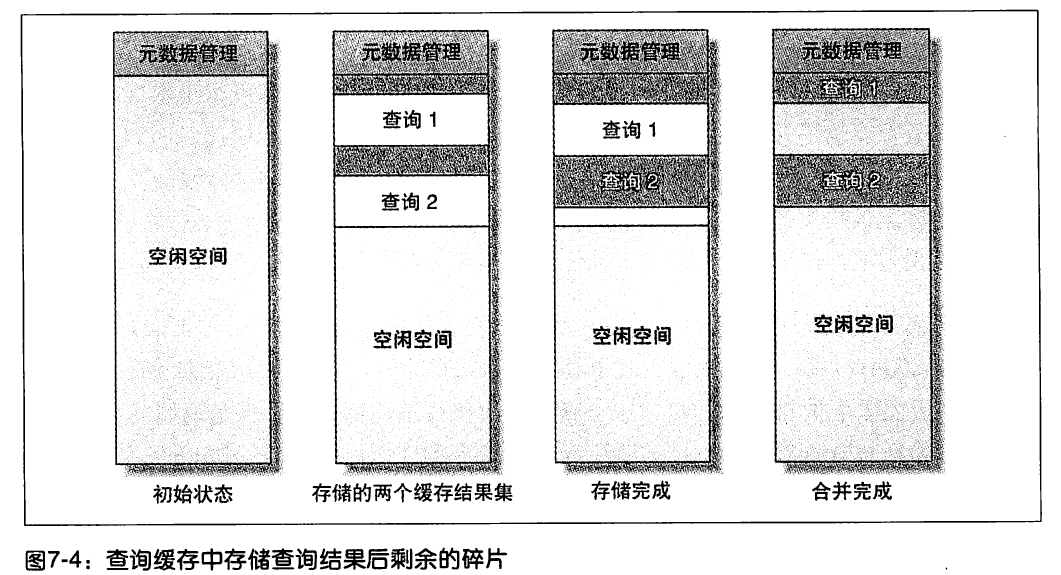
Qcache_free_blocks | 空閒內存塊數 | 過大 → 碎片,執行 FLUSH QUERY CACHE |
Qcache_free_memory | 剩餘內存 | 過小 → 擴大 query_cache_size |
Qcache_hits | 命中次數 | 持續增長為正常 |
Qcache_inserts | 寫入次數 | - |
Qcache_lowmem_prunes | 內存不足淘汰次數 | 持續增長 → 內存不足或碎片嚴重 |
Qcache_not_cached | 未緩存查詢數 | 含非 SELECT、NOW() 等不可緩存函數 |
Qcache_queries_in_cache | 當前緩存查詢數 | - |
Qcache_total_blocks | 總塊數 | - |
FLUSH QUERY CACHE:整理碎片,**不清除數據**RESET QUERY CACHE:**清空所有緩存**FLUSH TABLES:同步效果等同 RESET