在 CentOS 7 上透過 yum 安裝 MySQL 5.7.10 後,嘗試以 root 身分登入卻遇到錯誤:
ERROR 1045 (28000): Access denied for user 'root'@'localhost' (using password: NO)
由於安裝過程中未提示設定 root 密碼,且 /root/.mysql_secret 檔案也不存在,經查證發現 MySQL 5.6 版本後出於安全考量,預設不再使用空密碼,而是生成一組隨機臨時密碼。若錯誤訊息顯示 (using password: NO),表示未生成臨時密碼;若為 (using password: YES) 則表示已生成。
MySQL 自動生成的密碼已過期,導致無法驗證。解決思路是啟動 skip-grant-tables 模式暫時繞過權限檢查,重新設定密碼並標記為未過期。
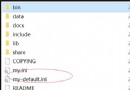
service mysqld stopmy.cnf,在 [mysqld] 區段末尾新增 skip-grant-tables 並儲存。service mysqld startmysql -u root -p(直接按 Enter 跳過密碼)USE mysql;
-- 方案 1:僅標記密碼未過期(保留原密碼,若知道的話)
UPDATE user SET password_expired = 'N' WHERE User = 'root';
-- 方案 2:重設新密碼並標記未過期(推薦)
UPDATE user SET authentication_string = PASSWORD('YourNewPassword'), password_expired = 'N' WHERE User = 'root';
FLUSH PRIVILEGES;
my.cnf 中的 skip-grant-tables,重啟服務即可正常登入。參考來源:Unable to access MySQL after it automatically generated a temporary password