| 項目 | 生產環境 | 測試環境 |
|---|---|---|
| OS | Windows 2000 | Windows 2000 |
| DB2 版本 | V8.2 Fixpack 8 ESE 單分區 | V8.2 Fixpack 8 ESE 單分區 |
| 資料庫 | SAMPLE | DUMMYDB |
db2 get db cfg for sample > dbcfg_sample.out
# 關注:DBHEAP=600, STMTHEAP=2048, NUM_FREQVALUES=10, NUM_QUANTILES=20
db2 connect to sample
db2 runstats on table <schema>.org with distribution and indexes all
db2 runstats on table <schema>.sales with distribution and indexes all
db2 terminate
db2 connect to sample
db2 -tvf <install_path>/sqllib/misc/EXPLAIN.DDL
db2 terminate

# query.sql 內容
connect to sample
set current explain mode explain
select * from org a, staff b where a.deptnumb=b.dept and b.dept=15
set current explain mode no
terminate

db2 -tvf query.sql
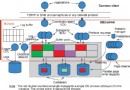
db2exfmt -d SAMPLE -g TIC -w -1 -n % -s % -# 0 -o prod_sample_exfmt.txt
Access Plan:
Total Cost: 25.8823
Query Degree: 1
RETURN -> HSJOIN -> TBSCAN(ORG) + TBSCAN(STAFF)
db2look -d SAMPLE -l -o storage.out
db2look -d SAMPLE -f -fd -o config.out
db2look -d SAMPLE -e -a -m -t ORG SALES -o table.ddl
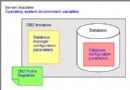
CONNECT TO SAMPLE; 改為 CONNECT TO DUMMYDB;config.out 中將 dft_queryopt 5 改為 3(演示優化級別影響)
db2 -tvf storage.out > storage_output.out
db2 -tvf config.out > config_output.out
db2 -tvf table.ddl > table.out
檢查輸出確認無誤,並同步修改 DBHEAP、STMTHEAP、NUM_FREQVALUES、NUM_QUANTILES 等配置。
db2stop && db2start
db2 connect to dummydb
db2 -tvf <install_path>/sqllib/misc/EXPLAIN.DDL
db2 terminate
修改 query.sql 連線目標為 DUMMYDB,執行並產出 db2exfmt 報表,對比 Total Cost、Access Plan 結構是否與生產一致。
-m 選項導出的 UPDATE 統計語句是核心db2fopt 虛擬緩衝池/排序堆、註冊表變量、優化級別