InfoSphere MDM Server 安全模組提供事務層級授權,決定「通過認證的用戶/群組是否允許呼叫特定事務」。預設關閉,需啟用並配置 Provider 類別。本文聚焦內建 LDAP Provider的完整部署流程,並示範如何自訂 Provider。
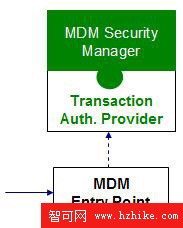
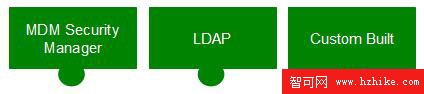
com.dwl.base.security.AuthorizationProvider 介面每筆事務攜帶 DWLControl,含用戶與群組資訊:
<DWLControl>
  <requesterName>myUserName</requesterName>
  <userRole>myGroup1</userRole>
  <userRole>myGroup2</userRole>
</DWLControl>requesterName:單一用戶名(必填)userRole:零或多個群組名(選填)Provider 依此判斷授權。
案例:NewBusiness 部門三群組、三事務:
| 事務 | DirectSales | CSRs | DataStewards |
|---|---|---|---|
| addPerson | 允許 | 允許 | 允許 |
| getPerson | 拒絕 | 允許 | 允許 |
| updatePerson | 拒絕 | 拒絕 | 允許 |
用戶對應:Fred→DirectSales、Sue→CSRs、Thomas→DataStewards。
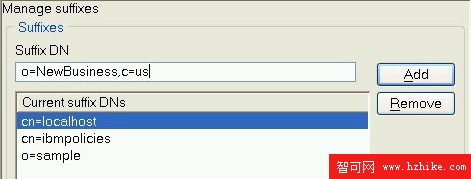
使用 Tivoli Directory Server 6.1,建立後綴 o=NewBusiness,c=us,匯入 LDIF 定義用戶、群組、事務授權關係。
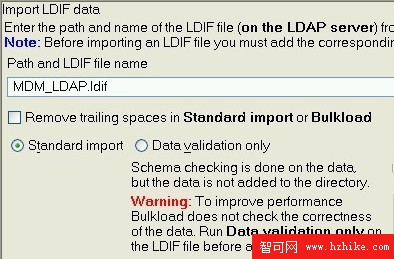
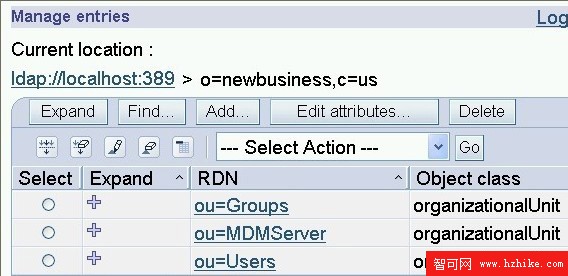
目錄設計關鍵:以 groupOfNames 物件類別代表事務,member 屬性關聯用戶(uid=...)或群組(cn=...)。
透過 Configuration and Management 設定:
| 配置路徑 | 值 | 說明 |
|---|---|---|
| /IBM/DWLCommonServices/Security/enabled | true | 啟用事務授權 |
| /IBM/DWLCommonServices/Security/transaction_authorization_provider_class_name_1 | com.dwl.base.security.provider.LdapTransactionAuthorizationProvider | 指定 Provider 類 |
| /IBM/DWLCommonServices/LdapSecurityProvider/LdapSearch/jndiFactoryClass | com.sun.jndi.ldap.LdapCtxFactory | JNDI Factory |
| /IBM/DWLCommonServices/LdapSecurityProvider/LdapSearch/jndiProviderUrl | ldap://localhost:389 | LDAP Server URL |
| /IBM/DWLCommonServices/LdapSecurityProvider/LdapSearch/base | o=NewBusiness,c=us | 搜尋基底 DN |
| /IBM/DWLCommonServices/LdapSecurityProvider/LdapSearch/Filter/user | (&(objectClass=groupOfNames)(cn=%t)(member=uid=%u,*)) | 用戶授權過濾器,%t=事務、%u=用戶 |
| /IBM/DWLCommonServices/LdapSecurityProvider/LdapSearch/Filter/group | (&(objectClass=groupOfNames)(cn=%t)(member=cn=%g,*)) | 群組授權過濾器,%g=群組 |
運行時解析範例:Fred 呼叫 addPerson → 產生過濾器 (&(objectClass=groupOfNames)(cn=addPerson)(member=uid=Fred,*)) 查詢 LDAP。
未授權用戶收到標準錯誤回應:
<TxResult>
  <ResultCode>FATAL</ResultCode>
  <DWLError>
    <ComponentType>108</ComponentType>
    <ErrorMessage>Security violation occurred.</ErrorMessage>
    <ErrorType>DIERR</ErrorType>
    <ReasonCode>4934</ReasonCode>
  </DWLError>
</TxResult>
附件 RequestResponseSamples.zip 提供完整請求/回應範例供測試。
實作 AuthorizationProvider 介面唯一方法:
public boolean authorize(AuthenticationData authData, String resourceName)
throws SecurityProviderException;authData:從 DWLControl 解析出的用戶/群組資訊resourceName:事務名稱true 表示授權通過開發完成後,同樣在 Configuration 中註冊類名並啟用安全即可。
透過「業務矩陣→目錄結構→Provider 配置」三步走,快速落地事務級授權,滿足合規與最小權限原則。