現代瀏覽器通過 AJAX 與服務器交換 XML,利用 DHTML/DOM 在客戶端導航、渲染數據,使其成為富客戶端。Dojo、Sarissa 等庫簡化 XML 操作,SVG、Mashup、Feed 進一步擴展應用場景。XML 串聯起服務端、客戶端、數據庫三端,構成統一數據模型。
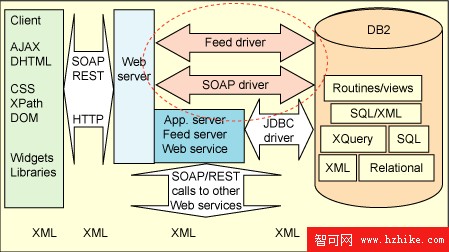
未來若解決安全性,數據庫驅動將直接暴露 SOAP/REST 接口,省去中間層映射。下文將構建一個完整的客戶端 XML 操作示例。
引入 Sarissa 庫為 JavaScript 提供 XPath API,編寫 XMLparse.js 包裝器,使客戶端代碼風格與服務端 Java 代碼高度一致:
<script type="text/javascript" src="sarissa/sarissa.js"></script>
<script type="text/javascript" src="XMLparse.js"></script>
function getCustomerInfo(cid) {
  var xmlhttp = new XMLHttpRequest();
  var url = hosturl + "?cmd=getuserprofile&msg=" + cid;
  xmlhttp.open('GET', url, true);
  xmlhttp.onreadystatechange = function() { customerInfoCallback(xmlhttp); };
  xmlhttp.send("");
}
public void service(HttpServletRequest req, HttpServletResponse res) {
  String cmd = req.getMethod().equalsIgnoreCase("POST")
    ? new XMLParse(getPostBody(req.getReader())).getValue("//request/@cmd")
    : req.getParameter("cmd");
  String msg = req.getMethod().equalsIgnoreCase("POST")
    ? new XMLParse(getPostBody(req.getReader())).toString("/request/*")
    : req.getParameter("msg");

  if ("getuserprofile".equalsIgnoreCase(cmd)) {
    // retValue = SELECT CUSTXML FROM customer_table WHERE customerid = msg
  }
  res.setContentType("text/xml");
  res.setHeader("Cache-Control", "no-cache");
  res.getWriter().write(retValue);
}
var userinfo = null;
function customerInfoCallback(xmlhttp) {
  if (xmlhttp.readyState == 4 && xmlhttp.status == 200) {
    userinfo = new xmlparse(xmlhttp.responseXML, false);
    var fn = userinfo.getValue("/Customer/@firstname", null);
    var ln = userinfo.getValue("/Customer/@lastname", null);
    var html = "<table><tr><td>Firstname:</td><td><input id='fname' value='" + fn + "'/></td></tr>"
             + "<tr><td>Lastname:</td><td><input id='lname' value='" + ln + "'/></td></tr>"
             + "<tr><td></td><td><input type='button' value='Save' onclick='updateCustomer()'/></td></tr></table>";
    document.getElementById("profilediv").innerHTML = html;
  }
}
function updateCustomer() {
  var fn = document.getElementById("fname").value;
  var ln = document.getElementById("lname").value;
  userinfo.setValue("/Customer/@firstname", null, fn);
  userinfo.setValue("/Customer/@lastname", null, ln);
  var msg = '<request cmd="updateuserprofile">' + userinfo.toString("/") + '</request>';
  var xmlhttp = new XMLHttpRequest();
  xmlhttp.open('POST', hostname, true);
  xmlhttp.onreadystatechange = function() { profileUpdated(xmlhttp); };
  xmlhttp.setRequestHeader('content-type', 'text/xml');
  xmlhttp.send(msg);
}
else if ("updateuserprofile".equalsIgnoreCase(cmd)) {
  XMLParse cust = new XMLParse(msgtext);
  String cid = cust.getValue("/Customer/@customerid");
  // UPDATE customer_table SET custXML = ? WHERE customerid = cid
}
關鍵點:客戶端與服務端使用相同 XPath 導航邏輯;服務端僅作透傳中介,不操作數據結構。
function itemsPurchased(url, cid) {
  var msg = '<request cmd="getPurchaseInfoWithInsurance"><data customerid="' + cid + '">'
          + '<![CDATA[' + url + ']]></data></request>';
  // AJAX POST 發送至服務端
}
方式 A:調用存儲過程(推薦,邏輯下推)
// returnvalue = CALL customerItemsWithInsurance(cid, insurancestr);
方式 B:服務端 Java 代碼實現(邏輯上移)
XMLParse insurance = new XMLParse(insurancestr);
customerXML.find("/Customer/Items/item", true);
String currency = insurance.getValue("//rate/@currency");
for (int i=0; i<customerXML.currentFind.getLength(); i++) {
  double price = customerXML.getValue("@price", i);
  double rate = price>500 ? insurance.getValue("//rate[@price='']/@rate")
           : price>100 ? insurance.getValue("//rate[@price='500']/@rate")
           : insurance.getValue("//rate[@price='100']/@rate");
  String ins = "<insurance currency='" + currency + "'>" + price*rate + "</insurance>";
  customerXML.appendElement(customerXML.createNode(ins), customerXML.getNode(null,i), false);
}
對比可見:XPath 表達式在數據庫 XQuery、服務端 Java、客戶端 JS 三層完全一致,極大降低認知負荷。
function itemsPurchasedCallback(xmlhttp) {
  if (xmlhttp.readyState==4 && xmlhttp.status==200) {
    var items = new xmlparse(xmlhttp.responseXML, false);
    var html = "<table><tr><td>ItemID<td>Desc<td>Date<td>Price<td>Insurance";
    items.find("//item", null, true);
    for (var j=0; j<items.currentFind.length; j++) {
      html += "<tr><td>" + items.getValue("@ID", j)
           + "<td>" + items.getValue("@description", j)
           + "<td>" + items.getValue("@purchaseDate", j)
           + "<td>" + items.getValue("@price", j)
           + "<td>" + items.getValue("insurance/text()", j);
    }
    document.getElementById("profilediv").innerHTML = html;
  }
}
在面向 Web 架構中,XML 既是傳輸格式,也是各層原生操作格式。保持 XML 本質,利用 XPath、DOM、XQuery 全棧統一,將成為解決業務數據集成的銀彈。