隨著企業數位化轉型加速,內容管理已成為商業競爭的關鍵命脈。在隨需應變的服務環境中,如何快速、有效地管理與交付內容,直接決定了企業的成敗。隨著網際網路與企業內部網資訊的爆炸式增長,Web 內容在組織中的戰略地位日益凸顯。Web 內容生命週期管理涵蓋創建、發布、儲存、搜尋/檢索、存取控制與內容整合等核心環節。IBM 推出的綜合解決方案——IBM Workplace Web Content Management 與 DB2 Content Manager,正是為滿足企業級 Web 內容管理需求而生。
IBM Workplace Web Content Management 作為 IBM Workplace 產品家族的核心組件,提供從內容創建到 Web 呈現的全流程管理能力。它為網站提供了一套成熟的內容管理系統,兼顧非技術與技術用戶的使用需求。本文將示範如何結合這兩大產品,構建統一的企業級 Web 內容管理系統,主要包含兩大核心場景:在 DB2 Content Manager 中儲存 Workplace Web Content Management 資料,以及透過 Workplace Web Content Management 發布 DB2 Content Manager 的本機內容與中繼資料。
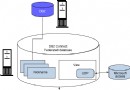
預設情況下,Web 內容管理環境將資料檔案儲存在檔案系統中。與此不同,DB2 Content Manager 採用強大的關聯式資料庫,在單一內容項目層級提供索引檢索、安全性與細粒度存取控制。這使得 Workplace Web Content Management 的功能得以擴展,整合 DB2 Content Manager 的開箱即用特性:
透過單一入口檢索各類企業 Web 內容,極大提升了對這兩款產品投資的回報率(ROI)。
假設已安裝 Workplace Web Content Management 與 DB2 Content Manager,環境部署的第一步是在安裝了 Workplace Web Content Management 的 WebSphere Application Server 上安裝 DB2 Information Integrator for Content(原稱 DB2 Enterprise Information Portal)。該組件提供整合所需的連接器,使雙向伺服器通訊成為可能。
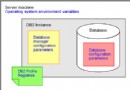
在「Select Machine Type」面板中,務必選擇「EIP development workstation」選項。接著需更新 WebSphere Application Server 的 Java 虛擬機類路徑設定:以管理員身分登入管理主控台,依序選擇 Servers > Application Servers > server1 > Process Definition > Java Virtual Machine,在 Classpaths 區段新增 DB2 Content Manager 相關 JAR 檔路徑(如 cmbvIEw81.jar、cmb81.jar 等),並包含 DB2 Java 驅動程式,最後點擊 Apply 儲存至 Master Configuration。
修改 Workplace Web Content Management 的兩個核心配置檔——connect.cfg 與 aptrixjpe.properties(位於 config 目錄下):
在 aptrixjpe.properties 中設定持久化模式為 CM,並配置 CM 伺服器資訊:
manager.persistence=CM
resource.persistence=CM
cm.server=[CM_SERVER_NAME]
cm.username=[CM_USER_NAME]
cm.password=[CM_PASSWORD]
cm.versionControl=true/false
cm.jpeserverIdentifier=[CM_WCM_SERVER_ID]
其中 cm.versionControl 為可選參數,設為 true 可啟用 DB2 Content Manager 的版本控制功能。
在 connect.cfg 的 <DataProviders> 區段新增:
<CM value="com.presence.connect.business.template.provider.CM8DataProvider"/>刪除現有索引檔案(位於 system/indexes 目錄),啟動 WebSphere Application Server 與 Workplace Web Content Management,透過瀏覽器存取 AJPEGUI 模組建立使用者介面並儲存至 DB2 Content Manager:
https://<HOST>:<PORT>/<CONTEXT_ROOT>/connect/?MOD=AJPEGUI若需遷移既有資料,可配置 Syndication 功能將資料從原伺服器複製至新環境。
本節示範如何動態檢索 DB2 Content Manager 中的內容並呈現在 Workplace Web Content Management 中。以警局網站為例,發布嫌疑犯照片、犯罪現場影像、錄影等多媒體檔案。這些檔案儲存於 DB2 Content Manager,Workplace Web Content Management 可動態提取顯示。
第一個範例使用靜態查詢表達式。雖然內容動態生成,但查詢邏輯在開發 Connect 標籤時確定。DB2 Content Manager 8.2 支援強大的 XML 型查詢語言,開發者可在 Workplace Web Content Management 中建立 Connect 標籤,實現從 DB2 Content Manager 檢索內容並動態呈現。
詳細整合資訊請參考 IBM Redbook《Lotus Workplace Web Content Management and Content Manager Working Together for LWWCM Java Edition V2 and CM V8 Only》。