客戶與車票關係:一個客戶可購多張車票(一對多),一張車票屬於一個客戶(一對一)。
CREATE TABLE t_customer (
    customerId INT PRIMARY KEY AUTO_INCREMENT,
    customerName VARCHAR(20) NOT NULL,
    customerTel INT NOT NULL
) ENGINE=InnoDB DEFAULT CHARSET=utf8;

CREATE TABLE t_ticket (
    ticketId INT PRIMARY KEY AUTO_INCREMENT,
    ticketAddress VARCHAR(50) NOT NULL,
    ticketPrice INT NOT NULL,
    ticketCId INT NOT NULL
) ENGINE=InnoDB DEFAULT CHARSET=utf8;

INSERT INTO t_customer VALUES
(1, '小王', 1888327654),
(2, '天天', 3456546354),
(3, '阿大', 123345566);

INSERT INTO t_ticket VALUES
(1, '武漢到重慶', 100, 1),
(2, '北京到上海', 200, 1),
(3, '深圳到廣州', 50, 1);public class Customer {
private Integer customerId;
private String customerName;
private Integer customerTel;
private List<Ticket> tickets; // 一對多:車票集合
// Getter/Setter/toString 省略
}public class Ticket {
private Integer ticketId;
private String ticketAddress;
private Integer ticketPrice;
private Integer ticketCId;
private Customer customer; // 一對一:所屬客戶
// Getter/Setter/toString 省略
}<collection><mapper namespace="com.mucfc.model.CustomerMapper">
<resultMap type="Customer" id="customerBean">
<id column="customerId" property="customerId"/>
<result column="customerName" property="customerName"/>
<result column="customerTel" property="customerTel"/>
<!-- 一對多關聯 -->
<collection property="tickets" ofType="Ticket">
<id column="ticketId" property="ticketId"/>
<result column="ticketAddress" property="ticketAddress"/>
<result column="ticketPrice" property="ticketPrice"/>
<result column="ticketCId" property="ticketCId"/>
</collection>
</resultMap>
<select id="selectCustomerByName" parameterType="string" resultMap="customerBean">
SELECT c.*, t.*
FROM t_customer c, t_ticket t
WHERE c.customerId = t.ticketCId AND c.customerName = #{customerName}
</select>
</mapper><association><mapper namespace="com.mucfc.model.TicketMapper">
<resultMap type="Ticket" id="ticketBean">
<id column="ticketId" property="ticketId"/>
<result column="ticketAddress" property="ticketAddress"/>
<result column="ticketPrice" property="ticketPrice"/>
<result column="ticketCId" property="ticketCId"/>
<!-- 一對一關聯 -->
<association property="customer" javaType="Customer">
<id column="customerId" property="customerId"/>
<result column="customerName" property="customerName"/>
<result column="customerTel" property="customerTel"/>
</association>
</resultMap>
<select id="selectTicketById" parameterType="int" resultMap="ticketBean">
SELECT c.*, t.*
FROM t_customer c, t_ticket t
WHERE c.customerId = t.ticketCId AND t.ticketId = #{ticketId}
</select>
</mapper><configuration>
<typeAliases>
<typeAlias alias="Customer" type="com.mucfc.model.Customer"/>
<typeAlias alias="Ticket" type="com.mucfc.model.Ticket"/>
</typeAliases>
<environments default="development">
<environment id="development">
<transactionManager type="JDBC"/>
<dataSource type="POOLED">
<property name="driver" value="com.mysql.jdbc.Driver"/>
<property name="url" value="jdbc:mysql://localhost:3306/test?characterEncoding=UTF-8"/>
<property name="username" value="root"/>
<property name="password" value="christmas258@"/>
</dataSource>
</environment>
</environments>
<mappers>
<mapper resource="com/mucfc/model/CustomerMapper.xml"/>
<mapper resource="com/mucfc/model/TicketMapper.xml"/>
</mappers>
</configuration>public class Test {
private static SqlSessionFactory sqlSessionFactory;
private static Reader reader;
static {
try {
reader = Resources.getResourceAsReader("mybatis-config.xml");
sqlSessionFactory = new SqlSessionFactoryBuilder().build(reader);
} catch (Exception e) { e.printStackTrace(); }
}
// 一對一:按車票查客戶
public static void selectTicketById(int id) {
try (SqlSession session = sqlSessionFactory.openSession()) {
Ticket ticket = session.selectOne(
"com.mucfc.model.TicketMapper.selectTicketById", id);
if (ticket != null) {
System.out.println(ticket);
System.out.println(ticket.getCustomer());
}
}
}
// 一對多:按客戶查車票
public static void selectCustomerByName(String name) {
try (SqlSession session = sqlSessionFactory.openSession()) {
Customer customer = session.selectOne(
"com.mucfc.model.CustomerMapper.selectCustomerByName", name);
if (customer != null) {
System.out.println(customer);
for (Ticket t : customer.getTickets()) {
System.out.println(t);
}
}
}
}
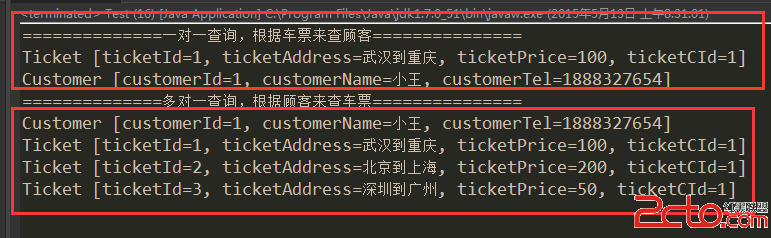
public static void main(String[] args) {
System.out.println("=== 一對一查詢 ===");
selectTicketById(1);
System.out.println("=== 一對多查詢 ===");
selectCustomerByName("小王");
}
}
| 元素 | 用途 |
|---|---|
<id> | 主鍵欄位,用於結果去重與物件識別 |
<result> | 一般屬性映射 |
<association> | 一對一關聯,單一物件 |
<collection> | 一對多關聯,集合類型 |
<constructor> | 建構子注入映射 |
<discriminator> | 根據欄位值動態選擇 ResultMap |
association:property(屬性名)、javaType(物件類型)collection:property(集合屬性名)、ofType(集合泛型類型)