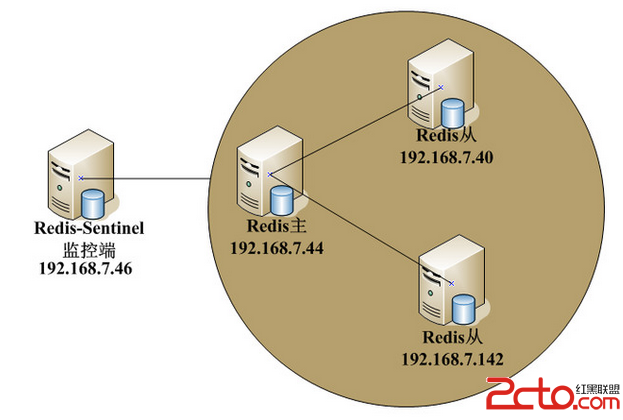
承接上篇 Sentinel 服務端部署,本文聚焦 Jedis 客戶端整合:配置文件解析、連接池封裝、主從切換故障驗證及常見連接陷阱。
[Redis]
REDIS_NUMBERS=3
REDIS_SERVER_1=tcp://192.168.0.86:26379
REDIS_SERVER_2=tcp://192.168.0.86:26479
REDIS_SERVER_3=tcp://192.168.0.86:26579
REDIS_MASTER=mymaster
REDIS_PASSWORD=vhreal
REDIS_TIME_OUT=5000
REDIS_DATABASE=0
Sentinel 地址填寫 Sentinel 節點 IP:Port,而非 Redis Master。
REDIS_MASTER需與sentinel monitor配置的主節點名一致。
public class RedisConnector {
    static JedisSentinelPool jedisSentinelPool;
    static Set SENTINELS = new HashSet<>();
    // ... 配置讀取省略 ...

    static void init() {
        GenericObjectPoolConfig poolConfig = new GenericObjectPoolConfig();
        poolConfig.setMaxTotal(100);
        poolConfig.setMaxIdle(20);
        jedisSentinelPool = new JedisSentinelPool(
            MASTER_NAME, SENTINELS, poolConfig, TIMEOUT, PASSWORD, DATABASE
        );
    }

    static boolean set(String key, String value) {
        try (Jedis jedis = jedisSentinelPool.getResource()) {
            jedis.set(key, value);
            return true;
        } catch (Exception e) {
            log.error("set error", e);
            return false;
        }
    }
    // get/del/auth/keys 同理...
} 初期測試報錯:
redis.clients.jedis.exceptions.JedisConnectionException:
Could not get a resource from the pool原因:sentinel.conf 中 sentinel monitor mymaster 127.0.0.1 6379 2,客戶端解析到本地回環,無法連接遠程 Master。
修正:所有 Sentinel 配置文件將 127.0.0.1 改為真實 LAN IP (192.168.0.86),重啟 Sentinel 後客戶端正常獲取 Master。
public class RedisTest {
    public static void main(String[] args) {
        RedisConnector.init();
        RedisConnector.set("str1", "world");
        System.out.println(RedisConnector.get("str", "default"));  // default
        System.out.println(RedisConnector.get("str1", "default")); // world
    }
}
輸出正常,證明 Jedis 成功通過 Sentinel 發現 Master 並讀寫。
# 1. 觀察當前 Master
redis-cli -p 26379 INFO replication

# 2. 強制殺掉 Master 進程
kill -9

# 3. 觀察 Sentinel 日誌:+sdown +odown -> +switch-master
# 4. 再次執行測試程序,應自動連接新 Master
RedisTest.main(null); down-after-milliseconds 設 3000-5000ms,避免誤判。maxTotal 根據業務峰值設定,監控 waiting_threads。sentinel deny-scripts-reconfig yes 防止腳本誤改配置。JedisConnectionException 重試邏輯(指數退避)。