延續七段顯示器主題,本文採用預渲染位圖數碼圖示而非向量繪圖,實作桌面電子時鐘。優點:繪製極快、支援任意字體風格(LCD、LED、點陣)、易於美工替換素材。核心類別 `CTimeDisplay` 管理 `CImageList` 載入數碼位圖(含 0-9、冒號、空白),動態建立 `CStatic` 陣列顯示各位,定時器每秒更新時間字串並逐位設定圖示。
class CTimeDisplay
{
public:
    CTimeDisplay();
    ~CTimeDisplay();

    // 初始化:父對話框、顯示位數、起始座標、間距
    void Initialize(CDialog* pParent, int nDigits, int x, int y, int nSpace);

    // 更新顯示:傳入 "HH:MM:SS" 格式字串
    void UpdateTime(const CString& strTime);

private:
    CDialog* m_pParent;
    CImageList m_imgList;           // 數碼位圖清單
    CArray m_pStatics;    // 每位一個靜態圖示控制項
    int m_nDigits;
    int m_x, m_y, m_nSpace;
};
void CTimeDisplay::Initialize(CDialog* pParent, int nDigits, int x, int y, int nSpace)
{
    m_pParent = pParent;
    m_nDigits = nDigits;
    m_x = x; m_y = y; m_nSpace = nSpace;

    // 載入位圖:每格 12px 寬,透明色白色
    m_imgList.Create(IDB_DIGITS, 12, 1, RGB(255,255,255));

    // 清除舊控制項
    for (auto p : m_pStatics) { delete p; }
    m_pStatics.RemoveAll();

    // 建立每位的 CStatic 圖示控制項
    for (int i = 0; i < nDigits; ++i)
    {
        CStatic* pStatic = new CStatic();
        CRect rc(m_x + i*(12 + nSpace), m_y, m_x + i*(12 + nSpace) + 12, m_y + 20);
        pStatic->Create(NULL, SS_ICON | WS_CHILD | WS_VISIBLE, rc, m_pParent, 1000 + i);
        m_pStatics.Add(pStatic);
    }
}

void CTimeDisplay::UpdateTime(const CString& strTime)
{
    int len = strTime.GetLength();
    // 前導空白填充
    for (int i = 0; i < m_nDigits - len; ++i)
    {
        HICON hIcon = m_imgList.ExtractIcon(10); // 索引 10 = 空白
        m_pStatics[i]->SetIcon(hIcon);
    }
    // 實際字元
    for (int i = 0; i < len; ++i)
    {
        TCHAR ch = strTime[i];
        int idx = 11; // 預設冒號索引
        if (ch >= _T('0') && ch <= _T('9')) idx = ch - _T('0');
        else if (ch == _T(':')) idx = 11;
        HICON hIcon = m_imgList.ExtractIcon(idx);
        m_pStatics[m_nDigits - len + i]->SetIcon(hIcon);
    }
}
class CClockDlg : public CDialog
{
    CTimeDisplay m_timeDisplay;
    // ...
    afx_msg void OnTimer(UINT nIDEvent);
};

BOOL CClockDlg::OnInitDialog()
{
    CDialog::OnInitDialog();
    // 8 位數:HH:MM:SS,起始 (20,20),間距 2px
    m_timeDisplay.Initialize(this, 8, 20, 20, 2);
    SetTimer(1, 1000, NULL); // 1 秒更新
    return TRUE;
}

void CClockDlg::OnTimer(UINT nIDEvent)
{
    if (nIDEvent == 1)
    {
        CTime now = CTime::GetCurrentTime();
        CString str = now.Format(_T("%H:%M:%S"));
        m_timeDisplay.UpdateTime(str);
    }
    CDialog::OnTimer(nIDEvent);
}

void CClockDlg::OnDestroy()
{
    KillTimer(1);
    CDialog::OnDestroy();
}
準備多組不同顏色的位圖資源(`IDB_DIGITS_RED`、`IDB_DIGITS_GREEN`、`IDB_DIGITS_BLUE`),在 `CTimeDisplay` 加入 `SetColorScheme(UINT nBitmapID)` 重新 `Create` ImageList 並刷新所有圖示。搭配 `CColorDialog` 讓使用者自訂顏色。
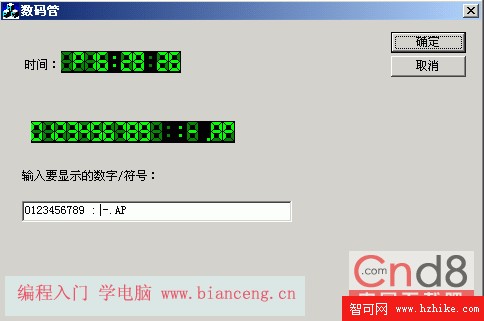
位圖數碼管風格清晰,每秒精確更新,CPU 佔用極低(僅圖示指標切換),支援視窗移動、最小化還原後自動重繪(靜態控制項自動處理)。
位圖數碼管方案以空間換時間:預先渲染所有字型狀態,執行期僅做 `SetIcon` 指標交換,極適合高頻率更新(時鐘、計數器、股票行情)。`CTimeDisplay` 封裝完整,可直接嵌入任何對話方塊、工具列、狀態列。若需向量縮放支援,可改用 GDI+ `DrawImage` 縮放單一高解析度位圖,但頻率更新時需注意效能。