七段顯示器(Seven-segment Display)廣泛用於儀表、時鐘、計數器。本文實作 `CNumPane` MFC 控制項,繼承 `CStatic`,以向量繪圖模擬七段數碼管,支援多位數顯示、前景/背景色、邊框色、小數點、負號、背景虛位顯示。核心在於 `MakeCoordinate()` 根據控制項矩形與位數動態計算每段線段端點座標,構建 `Pane8` 結構陣列供 `OnPaint` 高效繪製。
class CNumPane : public CStatic
{
    DECLARE_DYNAMIC(CNumPane)
public:
    CNumPane(BOOL bShowBackground = FALSE);
    virtual ~CNumPane();

    // 屬性設定
    void SetShowNumber(const CString& str); // 字串:支援 "123.45", "-99"
    void SetShowNumber(float f);            // 浮點數自動格式化
    void SetNumColor(COLORREF clr);         // 前景亮段顏色
    void SetBackNumColor(COLORREF clr);     // 背景暗段顏色
    void SetBorderColor(COLORREF clr);      // 控制項邊框顏色
    void SetBackGroundColor(COLORREF clr);  // 控制項背景顏色
    void SetShowBackground(BOOL bShow);     // 是否顯示背景虛位(暗段)

    void Restore(); // 重置所有屬性為預設

protected:
    struct Pane8
    {
        CPoint pts[6]; // 七段端點:A(0,1) B(1,2) C(2,3) D(3,4) E(4,5) F(5,0) G(0,3) 中心橫段
        CDC* pDC;
        void DrawSegment(int seg); // 0=A,1=B,2=C,3=D,4=E,5=F,6=G
        void DrawDigit(int digit); // 0-9, 10='-', 11='.'
    };

    CArray m_segments; // 每個數碼位一個 Pane8
    CString m_strValue;
    COLORREF m_clrFore, m_clrBack, m_clrBorder, m_clrBkgnd;
    BOOL m_bShowBack;

    // 核心:根據控制項大小與位數計算所有段座標
    void MakeCoordinate();

    afx_msg void OnPaint();
    afx_msg void OnSize(UINT nType, int cx, int cy);
    DECLARE_MESSAGE_MAP()
};
void CNumPane::MakeCoordinate()
{
    m_segments.RemoveAll();
    CRect rc; GetClientRect(&rc);

    int nDigits = m_strValue.GetLength();
    if (nDigits == 0) return;

    // 佈局參數
    int nMargin = 4;
    int nGap = 2; // 位間距
    int nSegW = (rc.Width() - 2*nMargin - (nDigits-1)*nGap) / nDigits;
    int nSegH = rc.Height() - 2*nMargin;
    if (nSegW <= 0 || nSegH <= 0) return;

    float fThick = max(2.0f, min(nSegW, nSegH) * 0.12f); // 段寬度比例
    float fGap = fThick * 0.15f; // 段間微縫

    for (int i = 0; i < nDigits; ++i)
    {
        Pane8 pane;
        pane.pDC = NULL; // 繪製時賦值

        float x0 = rc.left + nMargin + i * (nSegW + nGap);
        float y0 = rc.top + nMargin;
        float x1 = x0 + nSegW;
        float y1 = y0 + nSegH;
        float xm = x0 + nSegW / 2.0f;
        float ym = y0 + nSegH / 2.0f;

        // 七段端點定義(順時針:A上橫、B右上豎、C右下豎、D下橫、E左下豎、F左上豎、G中橫)
        // 使用 6 個關鍵點構建所有段
        pane.pts[0] = CPoint((int)(x0 + fGap), (int)(y0 + fGap));           // 左上
        pane.pts[1] = CPoint((int)(x1 - fGap), (int)(y0 + fGap));           // 右上
        pane.pts[2] = CPoint((int)(x1 - fGap), (int)(ym));                  // 右中
        pane.pts[3] = CPoint((int)(x1 - fGap), (int)(y1 - fGap));           // 右下
        pane.pts[4] = CPoint((int)(x0 + fGap), (int)(y1 - fGap));           // 左下
        pane.pts[5] = CPoint((int)(x0 + fGap), (int)(ym));                  // 左中

        m_segments.Add(pane);
    }
}
void Pane8::DrawSegment(int seg)
{
    // seg: 0=A(0-1), 1=B(1-2), 2=C(2-3), 3=D(3-4), 4=E(4-5), 5=F(5-0), 6=G(0-3 中點連線)
    static const int idx[7][2] = {
        {0,1}, {1,2}, {2,3}, {3,4}, {4,5}, {5,0}, {0,3} // G 段特殊:左上到右下中點
    };
    if (!pDC) return;
    CPoint p1 = pts[idx[seg][0]];
    CPoint p2 = pts[idx[seg][1]];
    if (seg == 6) // G 段:水平中線
    {
        p1.y = p2.y = (pts[0].y + pts[3].y) / 2;
        p1.x = pts[0].x; p2.x = pts[3].x;
    }
    pDC->MoveTo(p1); pDC->LineTo(p2);
}

void Pane8::DrawDigit(int digit)
{
    // 七段編碼:A B C D E F G
    static const BOOL code[12][7] = {
        {1,1,1,1,1,1,0}, // 0
        {0,1,1,0,0,0,0}, // 1
        {1,1,0,1,1,0,1}, // 2
        {1,1,1,1,0,0,1}, // 3
        {0,1,1,0,0,1,1}, // 4
        {1,0,1,1,0,1,1}, // 5
        {1,0,1,1,1,1,1}, // 6
        {1,1,1,0,0,0,0}, // 7
        {1,1,1,1,1,1,1}, // 8
        {1,1,1,1,0,1,1}, // 9
        {0,0,0,0,0,0,1}, // 10: '-'
        {0,0,0,1,0,0,0}  // 11: '.' (只亮 D 段下端點附近,這裡簡化亮 D)
    };
    if (digit < 0 || digit > 11) return;
    for (int s = 0; s < 7; ++s)
        if (code[digit][s]) DrawSegment(s);
}
void CNumPane::OnPaint()
{
    CPaintDC dc(this);
    CRect rc; GetClientRect(&rc);

    // 背景
    dc.FillSolidRect(&rc, m_clrBkgnd);
    // 邊框
    CPen penBorder(PS_SOLID, 1, m_clrBorder);
    CPen* pOldPen = dc.SelectObject(&penBorder);
    CBrush* pOldBrush = (CBrush*)dc.SelectStockObject(NULL_BRUSH);
    dc.Rectangle(&rc);
    dc.SelectObject(pOldPen); dc.SelectObject(pOldBrush);

    // 建立畫筆
    CPen penFore(PS_SOLID, max(1, (int)(rc.Height()*0.12)), m_clrFore);
    CPen penBack(PS_SOLID, max(1, (int)(rc.Height()*0.12)), m_clrBack);

    // 確保座標更新
    MakeCoordinate();

    for (int i = 0; i < m_segments.GetSize(); ++i)
    {
        Pane8& pane = m_segments[i];
        pane.pDC = &dc;

        int digit = 0;
        TCHAR ch = m_strValue[i];
        if (ch >= _T('0') && ch <= _T('9')) digit = ch - _T('0');
        else if (ch == _T('-')) digit = 10;
        else if (ch == _T('.')) digit = 11;
        else continue;

        // 1. 畫背景虛位(暗段)
        if (m_bShowBack)
        {
            dc.SelectObject(&penBack);
            for (int s = 0; s < 7; ++s) pane.DrawSegment(s);
        }
        // 2. 畫前景亮段
        dc.SelectObject(&penFore);
        pane.DrawDigit(digit);
    }
}
void CMyDialog::OnInitDialog()
{
    CDialog::OnInitDialog();
    m_numPane.SubclassDlgItem(IDC_STATIC_NUMPANE, this);
    m_numPane.SetNumColor(RGB(255, 0, 0));       // 紅色亮段
    m_numPane.SetBackNumColor(RGB(80, 0, 0));    // 暗紅背景段
    m_numPane.SetBorderColor(RGB(128,128,128));
    m_numPane.SetBackGroundColor(RGB(0,0,0));
    m_numPane.SetShowBackground(TRUE);
    m_numPane.SetShowNumber(_T("-123.45"));
}
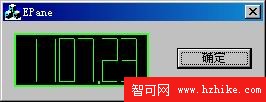
支援多位數、負號、小數點、背景虛位顯示,顏色可自訂,`OnSize` 觸發重新計算座標,適合即時數據顯示(電壓、頻率、計數器)。
`CNumPane` 以約 200 行核心代碼實現功能完整的七段顯示器控制項,展示了 MFC 控制項開發的標準流程:繼承 CStatic → 定義資料結構 → 動態座標計算 → OnPaint 分層繪製 → 屬性介面封裝。此架構可輕鬆擴充至十四段、十六段、點陣顯示器等更複雜的數字顯示裝置仿真。