在需要類 Excel 試算表介面的專案中,Chris Maunder 開發的 CGridCtrl 是 MFC 開發者的首選開源網格控件。其功能涵蓋儲存格編輯、排序、拖放、提示工具、記憶體 DC 雙緩衝繪圖等。本文記錄如何在專案中整合 CGridCtrl,並擴充儲存格合併(Merge/Unmerge)、固定儲存格合併、取得儲存格指標等實用功能,附完整原始碼整合步驟。
從官方來源(CodeProject / CodeTools)下載最新版,將下列檔案複製至專案目錄並加入專案:
GridCtrl.cpp/h, CellRange.hInPlaceEdit.cpp/h, InPlaceList.cpp/hGridDropTarget.cpp/hMemDC.h, TitleTip.cpp/h在 `stdafx.h` 或對話方塊標頭檔加入:
#include "GridCtrl.h"在 `GridCtrl.h` 的 `CGridCtrl` 類別中新增公有成員:
// 儲存格合併相關
BOOL SetCellCombine(int nRow, int nCol, int nRowSpan, int nColSpan); // 設定合併範圍
BOOL UndoCellCombine(int nRow, int nCol);                            // 取消合併
BOOL SetFixedCellCombine(int nRow, int nCol, int nRowSpan, int nColSpan); // 固定列/欄合併
CGridCellBase* GetCellp(int nRow, int nCol); // 取得儲存格指標(非 const)BOOL CGridCtrl::SetCellCombine(int nRow, int nCol, int nRowSpan, int nColSpan)
{
if (nRowSpan <= 1 && nColSpan <= 1) return FALSE;
CGridCellBase* pCell = GetCellp(nRow, nCol);
if (!pCell) return FALSE;
// 標記主儲存格
pCell->SetState(pCell->GetState() | GVIS_MERGED);
pCell->SetRowSpan(nRowSpan);
pCell->SetColSpan(nColSpan);
// 隱藏被合併的儲存格
for (int r = nRow; r < nRow + nRowSpan; ++r)
for (int c = nCol; c < nCol + nColSpan; ++c)
if (r != nRow || c != nCol)
{
CGridCellBase* pSub = GetCellp(r, c);
if (pSub) pSub->SetState(pSub->GetState() | GVIS_HIDDEN);
}
Refresh();
return TRUE;
}
BOOL CGridCtrl::UndoCellCombine(int nRow, int nCol)
{
CGridCellBase* pCell = GetCellp(nRow, nCol);
if (!pCell || !(pCell->GetState() & GVIS_MERGED)) return FALSE;
int rs = pCell->GetRowSpan(), cs = pCell->GetColSpan();
pCell->SetRowSpan(1);
pCell->SetColSpan(1);
pCell->SetState(pCell->GetState() & ~GVIS_MERGED);
for (int r = nRow; r < nRow + rs; ++r)
for (int c = nCol; c < nCol + cs; ++c)
if (r != nRow || c != nCol)
{
CGridCellBase* pSub = GetCellp(r, c);
if (pSub) pSub->SetState(pSub->GetState() & ~GVIS_HIDDEN);
}
Refresh();
return TRUE;
}
// 取得可修改的儲存格指標(原版 GetCell 回傳 const)
CGridCellBase* CGridCtrl::GetCellp(int nRow, int nCol)
{
if (nRow < 0 || nRow >= GetRowCount() || nCol < 0 || nCol >= GetColumnCount()) return NULL;
return m_GridCells[nRow][nCol];
}在繪圖函數 `OnDraw` 中,依據 `GVIS_MERGED`、`GVIS_HIDDEN`、`GetRowSpan/ColSpan` 計算合併區域矩形,僅繪製主儲存格內容與邊框,略過隱藏儲存格。標註註解 `//added for combine` 方便日後維護。
void CMyDialog::OnInitGrid()
{
    m_Grid.SetRowCount(10);
    m_Grid.SetColumnCount(6);
    m_Grid.SetFixedRowCount(1);
    m_Grid.SetFixedColumnCount(1);

    // 標題列合併:第 0 行,第 0-2 欄合併為「基本資料」
    m_Grid.SetFixedCellCombine(0, 0, 1, 3);
    m_Grid.SetItemText(0, 0, _T("基本資料"));

    // 資料區合併:第 2 行,第 1-2 欄合併
    m_Grid.SetItemText(2, 1, _T("跨欄內容"));
    m_Grid.SetCellCombine(2, 1, 1, 2);

    // 取消合併範例
    // m_Grid.UndoCellCombine(2, 1);
}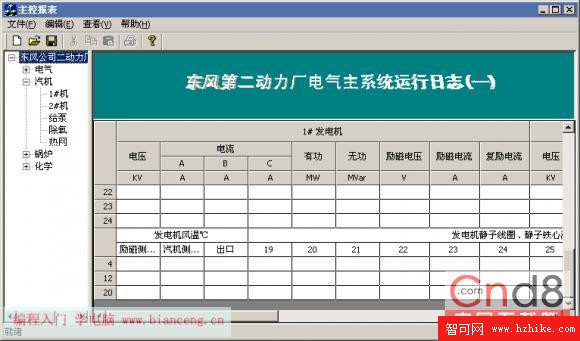
畫面呈現:固定標題列跨欄合併、資料區儲存格跨行跨欄合併、邊框正確繪製、編輯時自動展開合併區域。
CGridCtrl 功能強大且原始碼開放,適合深度客製化。本文示範的合併儲存格擴充僅需修改核心繪圖與狀態管理,即可滿足類 Excel 報表的複雜排版需求。建議開發者下載最新版本(支援 Unicode、VS2019+),並參考官方範例進一步擴充資料綁定、條件格式、圖表嵌入等進階功能。