核心功能
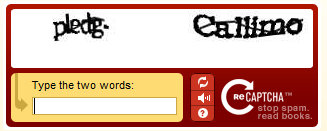
- 可配置寬高、字符數、字符集(排除易混淆字符)
- 干擾元素:噪點、曲線、隨機背景色
- 字符隨機大小、顏色、位置偏移
- 自動保存驗證碼到
$_SESSION['code']
- 析構函數自動銷毀 GD 資源
完整類代碼(修正原代碼 Bug:imagejpeg 輸出、imagechar 索引)
<?php
class Vcode {
    private $width, $height, $num, $code, $img;

    public function __construct(int $width = 100, int $height = 30, int $num = 4) {
        $this->width  = $width;
        $this->height = $height;
        $this->num    = $num;
        $this->code   = $this->generateCode();
    }

    public function getCode(): string { return $this->code; }

    public function output(): void {
        $this->createBackground();
        $this->drawChars();
        $this->addDisturbance();
        $this->sendImage();
    }

    private function generateCode(): string {
        $chars = '3456789abcdefghijkmnpqrstuvwxyABCDEFGHIJKLMNPQRSTUVWXY'; // 排除 0,1,2,o,l,I,O
        $code = '';
        for ($i = 0; $i < $this->num; $i++) {
            $code .= $chars[random_int(0, strlen($chars) - 1)];
        }
        return $code;
    }

    private function createBackground(): void {
        $this->img = imagecreatetruecolor($this->width, $this->height);
        // 淺色背景
        $bg = imagecolorallocate($this->img, random_int(220, 255), random_int(220, 255), random_int(220, 255));
        imagefill($this->img, 0, 0, $bg);
        // 邊框
        $border = imagecolorallocate($this->img, 0, 0, 0);
        imagerectangle($this->img, 0, 0, $this->width - 1, $this->height - 1, $border);
    }

    private function drawChars(): void {
        for ($i = 0; $i < $this->num; $i++) {
            $color = imagecolorallocate($this->img, random_int(0, 120), random_int(0, 120), random_int(0, 120));
            $size  = random_int(3, 5); // GD 內置字體 1-5
            $x = 5 + ($this->width / $this->num) * $i + random_int(-2, 2);
            $y = random_int(2, $this->height - imagefontheight($size) - 2);
            imagechar($this->img, $size, $x, $y, $this->code[$i], $color);
        }
    }

    private function addDisturbance(): void {
        // 噪點
        for ($i = 0; $i < 80; $i++) {
            $color = imagecolorallocate($this->img, random_int(0, 255), random_int(0, 255), random_int(0, 255));
            imagesetpixel($this->img, random_int(1, $this->width - 2), random_int(1, $this->height - 2), $color);
        }
        // 干擾線
        for ($i = 0; $i < 6; $i++) {
            $color = imagecolorallocate($this->img, random_int(0, 200), random_int(0, 150), random_int(0, 200));
            imageline($this->img,
                random_int(0, $this->width), random_int(0, $this->height),
                random_int(0, $this->width), random_int(0, $this->height),
                $color);
        }
    }

    private function sendImage(): void {
        header('Content-Type: image/png');
        imagepng($this->img);
        // 原代碼錯誤:imagegif 輸出 JPEG,這裡統一用 PNG
    }

    public function __destruct() {
        if ($this->img) imagedestroy($this->img);
    }
}
?>
使用流程
<?php
// code.php — 生成並輸出驗證碼圖片
session_start();
require 'Vcode.php';

$vcode = new Vcode(100, 35, 4);
$_SESSION['captcha'] = strtoupper($vcode->getCode()); // 統一大寫比對
$vcode->output();
?>
<!-- 表單頁 -->
<?php session_start(); ?>
<form action="verify.php" method="post">
    用戶名: <input name="username"><br>
    密碼: <input type="password" name="password"><br>
    驗證碼: <input name="captcha" size="6" style="text-transform:uppercase">
    <img src="code.php" onclick="this.src='code.php?'+Date.now()" title="點擊刷新"><br>
    <button type="submit">登錄</button>
</form>
<?php
// verify.php
session_start();
if ($_SERVER['REQUEST_METHOD'] === 'POST') {
    $input = strtoupper(trim($_POST['captcha'] ?? ''));
    if ($input === ($_SESSION['captcha'] ?? '')) {
        echo "驗證通過!";
        unset($_SESSION['captcha']); // 一次性使用
    } else {
        echo "驗證碼錯誤";
    }
}
?>
進階增強建議
- 使用 TTF 字體
imagettftext() 替換內置字體,效果更佳
- 加入扭曲、波浪變形(
imagecopyresampled 配合正弦偏移)
- 構建驗證碼服務化:API 返回
{id, image_base64},前端無 Session 依賴
- 無障礙支持:提供語音驗證碼選項
- 防暴力破解:同 IP 限制請求頻率、失敗鎖定