<?php
// 資料庫設定
$localhost = "localhost";
$username = "root";
$password = "root";
$db = "test";

// 分頁參數
$pagesize = 5; // 每頁筆數

// 連線資料庫 (注意:mysql_* 函式已棄用,建議改用 mysqli/PDO)
$conn = mysql_connect($localhost, $username, $password);
if (!$conn) die("資料庫連線失敗: " . mysql_error());

mysql_query("SET NAMES 'UTF8'");
mysql_select_db($db);

// 1. 查詢總筆數
$total_sql = "SELECT COUNT(*) FROM page";
$total_result = mysql_query($total_sql);
$total_row = mysql_fetch_row($total_result);
$total_records = $total_row[0];

// 2. 計算總頁數
$total_pages = ceil($total_records / $pagesize);

// 3. 取得當前頁碼
$page = isset($_GET['p']) ? (int)$_GET['p'] : 1;
if ($page < 1) $page = 1;
if ($page > $total_pages) $page = $total_pages;

// 4. 計算 OFFSET
$offset = ($page - 1) * $pagesize;

// 5. 查詢當頁資料
$sql = "SELECT * FROM page ORDER BY id LIMIT {$offset}, {$pagesize}";
$result = mysql_query($sql);

// 6. 輸出資料表格
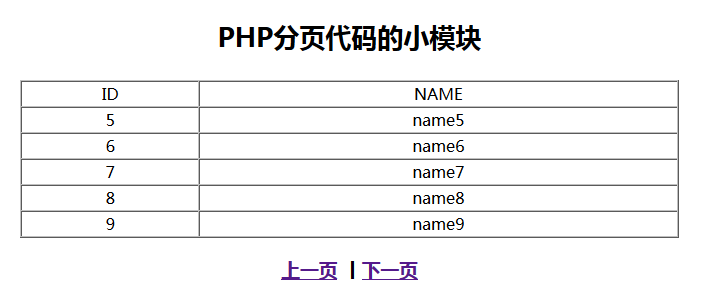
echo "<p>PHP 分頁示範模組</p>";
echo "<table border=1 cellspacing=0 width=60% align=center>";
echo "<tr><td>ID</td><td>NAME</td></tr>";
while ($row = mysql_fetch_assoc($result)) {
    echo "<tr><td>{$row['id']}</td><td>{$row['name']}</td></tr>";
}
echo "</table>";

// 7. 上一頁/下一頁連結
$page_prev = $page - 1;
$page_next = ($page < $total_pages) ? $page + 1 : $total_pages;

echo "<h3>";
echo "<a href='page.php?p={$page_prev}'>上一頁</a> | ";
echo "<a href='page.php?p={$page_next}'>下一頁</a>";
echo "</h3>";

mysql_free_result($result);
mysql_close($conn);
?>
SELECT * FROM page ORDER BY id LIMIT {$offset}, {$pagesize}
OFFSET = ($page - 1) * $pagesize:跳過前幾頁的筆數LIMIT = $pagesize:取指定筆數LIMIT $pagesize OFFSET $offset 寫法echo "<a href='page.php?p={$page_prev}'>上一頁</a>";
echo "<a href='page.php?p={$page_next}'>下一頁</a>";
p 傳遞目標頁碼$_GET['p'] 重新計算 OFFSETfunction render_pagination($current, $total, $baseUrl, $window = 2) {
$html = '<div class="pagination">';
// 首頁
if ($current > 1) $html .= "<a href='{$baseUrl}?p=1'>首頁</a> ";
// 上一頁
if ($current > 1) $html .= "<a href='{$baseUrl}?p=" . ($current-1) . "'>« 上一頁</a> ";
// 數字頁碼
$start = max(1, $current - $window);
$end = min($total, $current + $window);
if ($start > 1) $html .= "<span>...</span> ";
for ($i = $start; $i <= $end; $i++) {
if ($i == $current) {
$html .= "<span class='current'>$i</span> ";
} else {
$html .= "<a href='{$baseUrl}?p=$i'>$i</a> ";
}
}
if ($end < $total) $html .= "<span>...</span> ";
// 下一頁
if ($current < $total) $html .= "<a href='{$baseUrl}?p=" . ($current+1) . "'>下一頁 »</a> ";
// 末頁
if ($current < $total) $html .= "<a href='{$baseUrl}?p={$total}'>末頁</a> ";
$html .= '</div>';
return $html;
}
// 使用 PDO + Prepared Statement
$pdo = new PDO("mysql:host=localhost;dbname=test;charset=utf8", "root", "root");
$pdo->setAttribute(PDO::ATTR_ERRMODE, PDO::ERRMODE_EXCEPTION);

// 總筆數
$stmt = $pdo->query("SELECT COUNT(*) FROM page");
$total = $stmt->fetchColumn();

// 當頁資料
$stmt = $pdo->prepare("SELECT * FROM page ORDER BY id LIMIT :offset, :limit");
$stmt->bindValue(':offset', $offset, PDO::PARAM_INT);
$stmt->bindValue(':limit', $pagesize, PDO::PARAM_INT);
$stmt->execute();
$rows = $stmt->fetchAll(PDO::FETCH_ASSOC);
| 問題 | 原因 | 解決方案 |
|---|---|---|
| 深分頁效能急劇下降 | OFFSET 大時 MySQL 需掃描大量行再丟棄 | 使用游標分頁:WHERE id > $last_id LIMIT $pagesize |
| 總筆數 COUNT(*) 慢 | InnoDB 無快取總行數 | 近似值 SHOW TABLE STATUS、維護計數表、或不顯示總頁數 |
| 頁碼參數注入 | 直接帶入 SQL 未轉型 | (int)$_GET['p'] 強制轉整數 |
| 並發下資料漂移 | 查詢總數與查詢資料間有新增/刪除 | 接受微小誤差,或使用事務/鎖(代價高) |
分頁是 Web 開發最基礎也最核心的模組之一,掌握其原理與變體對構建高效能列表頁至關重要。