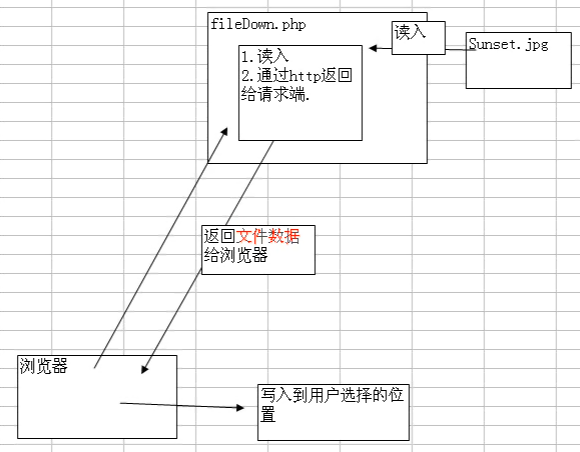
透過 fread 分塊讀取 + sleep + flush 實現應用層流控。適用於大檔案下載限速、進度條演示、防止單用戶佔滿頻寬。
<?php
$localFile = 'large.zip';      // 伺服器實際檔案
$downloadName = 'download.zip'; // 用戶看到的檔名
$rateKB = 512;                 // 限速 512 KB/s

if (!file_exists($localFile)) {
    http_response_code(404);
    exit('檔案不存在');
}

$fileSize = filesize($localFile);

// 快取控制:允許瀏覽器快取、支援斷點續傳
header('Cache-Control: public, must-revalidate');
header('Content-Type: application/octet-stream');
header('Content-Length: ' . $fileSize);
header('Content-Disposition: attachment; filename="' . $downloadName . '"');
header('Accept-Ranges: bytes'); // 聲明支援範圍請求

// 斷點續傳支援(簡易版)
if (isset($_SERVER['HTTP_RANGE'])) {
    list($unit, $range) = explode('=', $_SERVER['HTTP_RANGE'], 2);
    if ($unit === 'bytes') {
        list($start, $end) = explode('-', $range);
        $start = intval($start);
        $end = $end ? intval($end) : $fileSize - 1;
        header('HTTP/1.1 206 Partial Content');
        header("Content-Range: bytes $start-$end/$fileSize");
        header('Content-Length: ' . ($end - $start + 1));
    }
}

$fp = fopen($localFile, 'rb');
if (isset($start)) fseek($fp, $start);

$bufferSize = $rateKB * 1024; // 每秒讀取位元組數
$remaining = isset($end) ? $end - $start + 1 : $fileSize;

while (!feof($fp) && $remaining > 0) {
    $readSize = min($bufferSize, $remaining, 8192); // 8KB 塊
    $data = fread($fp, $readSize);
    echo $data;
    @flush(); // 刷新 PHP 輸出緩衝
    @ob_flush(); // 刷新 Web Server 緩衝
    $remaining -= $readSize;
    if ($remaining > 0) sleep(1); // 限速關鍵:每秒發送一次
}
fclose($fp);
| 技術 | 作用 |
|---|---|
fread($fp, $size) | 二進位讀取,避免記憶體一次載入整檔 |
flush() + ob_flush() | 雙重刷新,確保數據實時送達瀏覽器 |
sleep(1) | 應用層限速,每秒發送一個 buffer |
Accept-Ranges + HTTP_RANGE | 支援斷點續傳、多執行緒下載 |
Content-Length | 瀏覽器顯示進度條、預估剩餘時間的依據 |
$rateBps = 512 * 1024; // 位元組/秒
$bucket = $rateBps;    // 初始令牌桶滿
$last = microtime(true);

while (!feof($fp) && $remaining > 0) {
    $now = microtime(true);
    $elapsed = $now - $last;
    $bucket += $elapsed * $rateBps; // 產生令牌
    if ($bucket > $rateBps) $bucket = $rateBps; // 桶上限

    $readSize = min(8192, $remaining);
    if ($bucket >= $readSize) {
        $bucket -= $readSize;
        echo fread($fp, $readSize);
        @flush(); @ob_flush();
        $remaining -= $readSize;
    } else {
        usleep(10000); // 10ms 等待令牌
    }
    $last = $now;
}
優點:平滑限速、不依賴 sleep(1) 秒級粒度、CPU 佔用低。
// 前端:定時請求進度 API
setInterval(() => {
    fetch('/download_progress.php?file=large.zip')
        .then(r => r.json())
        .then(d => {
            document.getElementById('bar').style.width = d.percent + '%';
            document.getElementById('speed').textContent = d.speed + ' KB/s';
        });
}, 1000);
// download_progress.php:透過 tmp 檔或 Redis 記錄已傳送位元組
$sent = (int)file_get_contents("/tmp/dl_progress_{$file}");
$total = filesize($file);
echo json_encode(['percent' => round($sent/$total*100,1), 'speed' => round(($sent-$lastSent)/1024)]);
limit_rate、sendfile),PHP 僅做權限驗證後 X-Accel-Redirect 或 X-Sendfile