檔案上傳是 Web 系統核心功能。本文提供可直接落地的完整範例,涵蓋單檔/多檔上傳、型別/大小驗證、GD 圖片水印、縮圖預覽、IFrame 無刷新上傳。
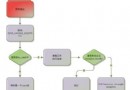
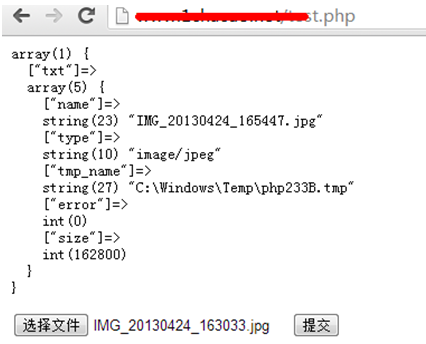
<form enctype="multipart/form-data"> + <input type="file" name="upfile[]" multiple>$_FILES['upfile'] 取得陣列結構error、size、type、副檔名move_uploaded_file() 移至永久目錄<?php
// 設定區
$uptypes = ['image/jpg','image/jpeg','image/png','image/pjpeg','image/gif','image/bmp','image/x-png'];
$max_file_size = 2 * 1024 * 1024; // 2MB
$destination_folder = __DIR__ . '/uploads/';
$watermark = 1; // 1=加水印
$watertype = 1; // 1=文字 2=圖片
$waterposition = 1; // 1=左下 2=右下 3=左上 4=右上 5=置中
$waterstring = 'Demo'; // 水印文字
$waterimg = 'logo.png'; // 水印圖片
$imgpreview = 1; // 產生縮圖
$imgpreviewsize = 0.5; // 縮圖比例
if ($_SERVER['REQUEST_METHOD'] !== 'POST') exit('Invalid request');
$files = $_FILES['upfile'];
// 多檔結構正規化:['name'=>[], 'type'=>[], 'tmp_name'=>[], 'error'=>[], 'size'=>[]]
$count = count($files['name']);
for ($i = 0; $i < $count; $i++) {
$file = [
'name' => $files['name'][$i],
'type' => $files['type'][$i],
'tmp_name' => $files['tmp_name'][$i],
'error' => $files['error'][$i],
'size' => $files['size'][$i],
];
process_upload($file);
}
function process_upload($file) {
global $uptypes, $max_file_size, $destination_folder, $watermark, $watertype, $waterposition, $waterstring, $waterimg, $imgpreview, $imgpreviewsize;
if ($file['error'] !== UPLOAD_ERR_OK) { echo "錯誤代碼:{$file['error']}<br>"; return; }
if ($file['size'] > $max_file_size) { echo "檔案過大<br>"; return; }
if (!in_array($file['type'], $uptypes)) { echo "型別不允許:{$file['type']}<br>"; return; }
if (!is_dir($destination_folder)) mkdir($destination_folder, 0755, true);
$ext = strtolower(pathinfo($file['name'], PATHINFO_EXTENSION));
$newName = time() . '_' . mt_rand(1000,9999) . ".$ext";
$destPath = $destination_folder . $newName;
if (!move_uploaded_file($file['tmp_name'], $destPath)) { echo "移動失敗<br>"; return; }
// 圖片後處理
if ($watermark && in_array($file['type'], ['image/jpg','image/jpeg','image/png','image/gif'])) {
add_watermark($destPath, $file['type']);
}
if ($imgpreview) {
create_thumb($destPath, $file['type'], $imgpreviewsize);
}
echo "<font color=green>上傳成功</font>:$newName <br>";
}
// 水印與縮圖函數略(使用 GD imagecopy、imagecopyresampled)
?>
<!-- 一般提交 -->
<form action="submit_form_process.php" method="post" enctype="multipart/form-data">
  <input type="file" name="upfile[]" multiple>
  <input type="submit" value="上傳">
</form>

<!-- IFrame 無刷新 -->
<iframe name="uploadFrame" style="display:none"></iframe>
<form action="submit_form_process.php" method="post" enctype="multipart/form-data" target="uploadFrame">
  <input type="file" name="upfile[]" multiple>
  <input type="submit" value="上傳(無刷新)">
</form>
finfo_file() 或 getimagesize() 二次驗證。php_flag engine off)。upload_max_filesize、post_max_size、max_execution_time、Nginx client_max_body_size。大檔(>100MB)建議前端切片(如 WebUploader、Uppy),後端合併分片,支援暫停續傳、秒傳(MD5 秒傳)。
掌握上傳全流程與安全細節,能構建穩健、易維護的檔案管理模組。