在日常開發工作中,資料匯出是常見需求。但預設匯出的Excel往往格式單調,難以滿足業務呈現需求。本文將透過完整實例,示範如何使用PHP匯出包含自訂樣式(顏色、字型、粗體、合併儲存格等)的Excel檔案。
控制器負責設定HTTP標頭並載入視圖模板:
/**
 * 匯出Excel檔案
 * @return string
 */
public function export() {
    $file_name = "成績單-" . date("Y-m-d H:i:s", time());
    $file_suffix = "xls";

    // 設定HTTP標頭,告訴瀏覽器這是Excel檔案
    header("Content-Type: application/vnd.ms-excel");
    header("Content-Disposition: attachment; filename=$file_name.$file_suffix");

    // 根據業務邏輯賦值模板變數
    $this->display();
}
關鍵在於引入Microsoft Office相關XML命名空間,讓Excel能正確解析樣式:
<html xmlns:o="urn:schemas-microsoft-com:office:office"
      xmlns:x="urn:schemas-microsoft-com:office:excel"
      xmlns="https://www.w3.org/TR/REC-html40">
<head>
    <meta http-equiv="Content-Type" content="text/html; charset=utf-8">
    <meta name="ProgId" content="Excel.Sheet">
    <meta name="Generator" content="Microsoft Excel 11">
</head>
<body>
    <table border="1" cellpadding="0" cellspacing="0" width="100%">
        <tr>
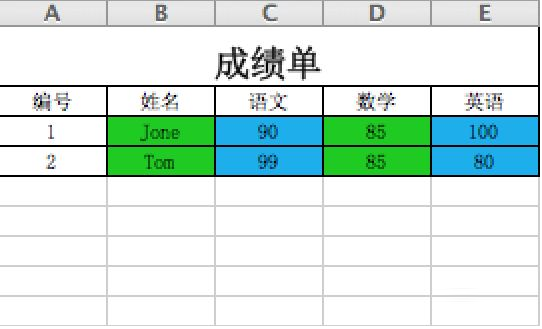
            <td colspan="5" align="center">
                <h2>成績單</h2>
            </td>
        </tr>
        <tr>
            <td style='width:54pt' align="center">編號</td>
            <td style='width:54pt' align="center">姓名</td>
            <td style='width:54pt' align="center">語文</td>
            <td style='width:54pt' align="center">數學</td>
            <td style='width:54pt' align="center">英語</td>
        </tr>
        <tr>
            <td align="center">1</td>
            <td style="background-color: #00CC00;" align="center">Jone</td>
            <td style="background-color: #00adee;" align="center">90</td>
            <td style="background-color: #00CC00;" align="center">85</td>
            <td style="background-color: #00adee;" align="center">100</td>
        </tr>
        <tr>
            <td align="center">2</td>
            <td style="background-color: #00CC00;" align="center">Tom</td>
            <td style="background-color: #00adee;" align="center">99</td>
            <td style="background-color: #00CC00;" align="center">85</td>
            <td style="background-color: #00adee;" align="center">80</td>
        </tr>
    </table>
</body>
</html>
xmlns:x="urn:schemas-microsoft-com:office:excel" 讓Excel識別專屬屬性ProgId 和 Generator 標識檔案來源td 使用 style 屬性設定背景色、對齊、寬度colspan 實現標題跨欄charset=utf-8 確保中文正常顯示實際專案中可將HTML模板獨立為視圖檔案,控制器透過模板引擎動態填充資料,支援更複雜的報表需求(如動態欄位、條件式樣式、多工作表等)。