微信小店 (微小店) 是微信公眾平台提供的電商功能,開發者可透過 API 管理商品、分組、訂單、庫存、物流等。本文提供生產級 PHP SDK 封裝:Access Token 自動快取刷新、統一請求入口、完整 CRUD 介面、錯誤碼對應、限流重試。
appId = $appId;
        $this->appSecret = $appSecret;
        $this->cache = $cache;
        $this->logger = $logger;
    }

    /** 獲取 Access Token (自動快取 7000 秒) */
    private function getAccessToken(): string {
        $key = "wechat_shop_token_{$this->appId}";
        if ($this->cache->has($key)) {
            return $this->cache->get($key);
        }
        $url = "https://api.weixin.qq.com/cgi-bin/token?grant_type=client_credential&appid={$this->appId}&secret={$this->appSecret}";
        $res = $this->httpGet($url);
        if (isset($res['errcode']) && $res['errcode'] !== 0) {
            throw new \RuntimeException("Get access_token failed: {$res['errmsg']}");
        }
        $this->cache->set($key, $res['access_token'], 7000); // 提前 200 秒過期
        return $res['access_token'];
    }

    /** 統一 HTTP 請求 (支援重試、日誌、錯誤拋出) */
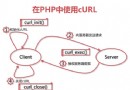
    private function request(string $method, string $endpoint, array $data = []): array {
        $token = $this->getAccessToken();
        $url = "{$this->baseUrl}{$endpoint}?access_token={$token}";

        $ch = curl_init();
        curl_setopt_array($ch, [
            CURLOPT_URL => $url,
            CURLOPT_RETURNTRANSFER => true,
            CURLOPT_SSL_VERIFYPEER => true,  // 生產環境必須驗證
            CURLOPT_SSL_VERIFYHOST => 2,
            CURLOPT_TIMEOUT => 10,
            CURLOPT_CONNECTTIMEOUT => 5,
            CURLOPT_HTTPHEADER => ['Content-Type: application/json'],
        ]);
        if ($method === 'POST') {
            curl_setopt($ch, CURLOPT_POST, true);
            curl_setopt($ch, CURLOPT_POSTFIELDS, json_encode($data, JSON_UNESCAPED_UNICODE));
        }
        $response = curl_exec($ch);
        $errno = curl_errno($ch);
        $error = curl_error($ch);
        $httpCode = curl_getinfo($ch, CURLINFO_HTTP_CODE);
        curl_close($ch);

        if ($errno) {
            $this->logger?->error("cURL error: $error", ['url' => $url, 'errno' => $errno]);
            throw new \RuntimeException("cURL error: $error");
        }
        if ($httpCode !== 200) {
            throw new \RuntimeException("HTTP $httpCode: $response");
        }
        $result = json_decode($response, true);
        if (json_last_error() !== JSON_ERROR_NONE) {
            throw new \RuntimeException("Invalid JSON: $response");
        }
        if (isset($result['errcode']) && $result['errcode'] !== 0) {
            // 42001 access_token 過期/無效 → 清快取重試一次
            if ($result['errcode'] === 42001) {
                $this->cache->delete("wechat_shop_token_{$this->appId}");
                return $this->request($method, $endpoint, $data); // 遞歸重試一次
            }
            $this->logger?->warning("Wechat API error", $result);
            throw new \Wechat\Shop\Exception\ApiException($result['errcode'], $result['errmsg']);
        }
        return $result;
    }

    private function httpGet(string $url): array { /* 簡易 GET */ }
    private function httpPost(string $url, array $data): array { /* 簡易 POST */ }

    // ========== 商品管理 ==========
    public function addProduct(array $product): array {
        return $this->request('POST', '/add', $product);
    }
    public function updateProduct(array $product): array {
        return $this->request('POST', '/update', $product);
    }
    public function deleteProduct(string $productId): array {
        return $this->request('POST', '/del', ['product_id' => $productId]);
    }
    public function getProduct(string $productId): array {
        return $this->request('POST', '/get', ['product_id' => $productId]);
    }
    public function getProductsByStatus(int $status = 0, int $page = 1, int $pageSize = 50): array {
        return $this->request('POST', '/getbystatus', [
            'status' => $status,
            'page' => $page,
            'page_size' => $pageSize,
        ]);
    }

    // ========== 分組管理 ==========
    public function addGroup(string $name): array {
        return $this->request('POST', '/group/add', ['group_name' => $name]);
    }
    public function updateGroup(int $groupId, string $name): array {
        return $this->request('POST', '/group/update', ['group_id' => $groupId, 'group_name' => $name]);
    }
    public function deleteGroup(int $groupId): array {
        return $this->request('POST', '/group/del', ['group_id' => $groupId]);
    }
    public function getAllGroups(): array {
        return $this->request('POST', '/group/getall', []);
    }
    public function getProductsByGroup(int $groupId): array {
        return $this->request('POST', '/group/getbyid', ['group_id' => $groupId]);
    }

    // ========== 庫存/物流/訂單 (略) ==========
}
pushHandler(new StreamHandler('/var/log/wechat_shop.log'));

$client = new Client('YOUR_APPID', 'YOUR_APPSECRET', $cache, $logger);

try {
    // 1. 獲取所有上架商品
    $products = $client->getProductsByStatus(1);
    foreach ($products['products_info'] as $p) {
        echo "{$p['product_id']}: {$p['product_base']['name']} - ¥{$p['product_base']['price']}\n";
    }

    // 2. 新增商品
    $newProduct = [
        'product_base' => [
            'name' => '測試商品',
            'price' => 9900, // 分
            'main_img' => 'media_id_xxx',
            'buy_limit' => 10,
        ],
        'sku_list' => [
            ['sku_id' => 'sku1', 'price' => 9900, 'quantity' => 100],
        ],
        'attr_list' => [],
    ];
    $result = $client->addProduct($newProduct);
    echo "新增成功: {$result['product_id']}\n";

} catch (\Wechat\Shop\Exception\ApiException $e) {
    echo "API 錯誤 [{$e->getCode()}]: {$e->getMessage()}\n";
} catch (\Throwable $e) {
    echo "系統錯誤: {$e->getMessage()}\n";
}
| 錯誤碼 | 含義 | 處理 |
|---|---|---|
| 42001 | access_token 過期/無效 | 清快取重試 |
| 40001 | AppSecret 錯誤 | 檢查配置 |
| 45009 | 頻率限制 | 指數退避重試 |
| 45028 | 商品不存在 | 檢查 product_id |
| 45029 | 分組不存在 | 檢查 group_id |
| 45030 | 庫存不足 | 補貨或下架 |
| 45047 | 郵費模板不存在 | 先建立郵費模板 |
Idempotency-Key Header,配合資料庫唯一索引。endpoint, errcode, duration_ms, request_id。微信官方於 2020 年停止「微信小店」新商家接入,現有商家可繼續使用。新專案請使用:
微信小店 API 設計遵循 REST 風格但統一用 POST + JSON,Access Token 機制與公眾號通用。封裝統一請求入口、自動重試、錯誤碼異常化、PSR 快取/日誌介面,即可構建可維護、可觀測的整合層。