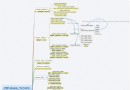
cURL POST 核心流程
function httpPost(string $url, $data, array $options = []): string {
    $ch = curl_init($url);
    $defaultOpts = [
        CURLOPT_POST => true,
        CURLOPT_POSTFIELDS => $data,           // 關鍵:數據格式決定 Content-Type
        CURLOPT_RETURNTRANSFER => true,
        CURLOPT_SSL_VERIFYPEER => false,       // 生產環境請設 true 並配置 CA 證書
        CURLOPT_SSL_VERIFYHOST => false,
        CURLOPT_TIMEOUT => 10,
        CURLOPT_HTTPHEADER => ['Expect:'],     // 避免 100 Continue 導致延遲
    ];
    curl_setopt_array($ch, array_merge($defaultOpts, $options));
    $response = curl_exec($ch);
    if ($response === false) throw new Exception('cURL 錯誤: ' . curl_error($ch), curl_errno($ch));
    curl_close($ch);
    return $response;
}
四種 POST 數據格式深度解析
| 格式 | PHP 數據結構 | 自動 Content-Type | 適用場景 | 接收端獲取方式 |
|---|
| application/x-www-form-urlencoded | 字符串 "a=1&b=2" 或 一維數組 ['a'=>1,'b'=>2] | ✅ 自動設置 | 簡單鍵值對、表單提交、大多數 API | PHP: $_POST / $_REQUEST |
| multipart/form-data | 多維數組或包含 CURLFile 對象 | ✅ 自動設置 (含 boundary) | 文件上傳、混合表單字段 | PHP: $_POST + $_FILES |
| application/json | JSON 字符串 json_encode($arr) | ❌ 需手動設置 Header | REST API、複雜嵌套數據、微信/支付寶回調 | PHP: file_get_contents('php://input') + json_decode |
| application/xml / text/xml | XML 字符串 | ❌ 需手動設置 Header | 銀行/物流/ERP 老舊接口、SOAP | PHP: simplexml_load_string(file_get_contents('php://input')) |
實戰代碼示例
1. 表單數組 (urlencoded)
$data = ['name' => '張三', 'age' => 25, 'tags' => ['php', 'go']];
// 注意:一維數組中值若為數組,會被 PHP 序列化為 tags[0]=php&tags[1]=go
$res = httpPost('https://api.example.com/user', $data);
2. 文件上傳 (multipart)
$data = [
    'username' => 'admin',
    'avatar' => new CURLFile('/path/to/avatar.jpg', 'image/jpeg', 'avatar.jpg'), // PHP 5.5+
    'documents' => [
        new CURLFile('/path/to/doc1.pdf'),
        new CURLFile('/path/to/doc2.pdf'),
    ]
];
$res = httpPost('https://api.example.com/upload', $data);
3. JSON API (最常見)
$payload = [
    'order_id' => '20240101001',
    'items' => [
        ['sku' => 'SKU001', 'qty' => 2, 'price' => 99.00],
        ['sku' => 'SKU002', 'qty' => 1, 'price' => 149.00]
    ],
    'buyer' => ['id' => 12345, 'name' => '李四']
];
$json = json_encode($payload, JSON_UNESCAPED_UNICODE | JSON_UNESCAPED_SLASHES);
$res = httpPost('https://api.example.com/order', $json, [
    CURLOPT_HTTPHEADER => [
        'Content-Type: application/json',
        'Content-Length: ' . strlen($json),
        'Authorization: Bearer ' . $accessToken
    ]
]);
// 接收端
$input = file_get_contents('php://input');
$data = json_decode($input, true);
4. 原始 XML (SOAP/老接口)
$xml = '<?xml version="1.0"?><request><cmd>query</cmd><params><id>123</id></params></request>';
$res = httpPost('https://legacy.example.com/gateway', $xml, [
    CURLOPT_HTTPHEADER => ['Content-Type: text/xml; charset=utf-8', 'SOAPAction: "query"']
]);
常見坑位與解決方案
- JSON 數據 $_POST 為空:
$_POST 只解析 urlencoded/multipart。JSON 需用 php://input。
✅ 解決:接收端統一用 $input = file_get_contents('php://input'); $data = json_decode($input, true);
- 數組深度過深導致丟失:urlencoded 只支援一維,多維需
http_build_query($arr) 扁平化。
✅ 解決:$data = http_build_query($deepArray); // 自動生成 a[b][c]=1 格式
- 文件上傳 @ 符號棄用:PHP 5.6+ 棄用
'@/path/file' 語法,必須用 CURLFile。
✅ 解決:new CURLFile($path, $mime, $name)
- SSL 證書驗證失敗:生產環境
CURLOPT_SSL_VERIFYPEER => true,需部署 CA 證書包。
✅ 解決:CURLOPT_CAINFO => '/etc/ssl/certs/ca-certificates.crt'
- 超時設置:
CURLOPT_TIMEOUT (總超時) + CURLOPT_CONNECTTIMEOUT (連接超時),防止掛死進程。
封裝建議:統一 HTTP 客戶端類
class HttpClient {
    private $defaultHeaders = ['User-Agent' => 'MyApp/1.0'];

    public function postJson(string $url, array $data, array $headers = []): array {
        $json = json_encode($data, JSON_UNESCAPED_UNICODE);
        $raw = $this->request('POST', $url, $json, array_merge($headers, [
            'Content-Type: application/json',
            'Content-Length: ' . strlen($json)
        ]));
        return json_decode($raw, true) ?: [];
    }

    public function postForm(string $url, array $data, array $headers = []): array {
        return $this->request('POST', $url, $data, $headers);
    }

    private function request(string $method, string $url, $body, array $headers): string {
        $ch = curl_init($url);
        curl_setopt_array($ch, [
            CURLOPT_CUSTOMREQUEST => $method,
            CURLOPT_POSTFIELDS => $body,
            CURLOPT_RETURNTRANSFER => true,
            CURLOPT_HTTPHEADER => array_merge($this->defaultHeaders, $headers),
            CURLOPT_SSL_VERIFYPEER => true,
            CURLOPT_CAINFO => __DIR__ . '/cacert.pem',
            CURLOPT_TIMEOUT => 15,
        ]);
        $resp = curl_exec($ch);
        if ($resp === false) throw new HttpException(curl_error($ch), curl_errno($ch));
        $code = curl_getinfo($ch, CURLINFO_HTTP_CODE);
        curl_close($ch);
        if ($code >= 400) throw new HttpException("HTTP $code: $resp", $code);
        return $resp;
    }
}