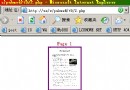
核心代碼
<?php
header('Content-type: image/gif');

$y = date('Y');
$m = date('n');
$w = date('w'); // 0=Sun
$d = date('j');

$ws = ['Sun','Mon','Tue','Wed','Thu','Fri','Sat'];

$im = imagecreate(80, 100);

// 顏色分配
$bgColor     = imagecolorallocate($im, 0, 0, 120);      // 深藍背景
$rectColor   = imagecolorallocate($im, 255, 255, 255);  // 白色矩形
$greenColor  = imagecolorallocate($im, 0, 225, 0);      // 綠色月份
$blackColor  = imagecolorallocate($im, 0, 0, 0);        // 黑色年份
$weekendColor = imagecolorallocate($im, 225, 0, 0);     // 紅色周末日期
$weekdayColor = imagecolorallocate($im, 0, 0, 255);     // 藍色平日日期

// 填充背景
imagefill($im, 0, 0, $bgColor);
// 白色矩形區域
imagefilledrectangle($im, 10, 10, 70, 90, $rectColor);

// 繪製文字
imagestring($im, 5, 23, 15, $y, $blackColor);           // 年份
imagestring($im, 5, 36, 35, $m, $greenColor);           // 月份
$dateColor = ($w == 0 || $w == 6) ? $weekendColor : $weekdayColor;
imagestring($im, 5, 32, 55, $d, $dateColor);            // 日期
imagestring($im, 4, 30, 75, $ws[$w], $dateColor);       // 星期

imagegif($im);
imagedestroy($im);
?>
關鍵函數說明
| 函數 | 用途 |
|---|
| imagecreate(w,h) | 建立調色板模式畫布(支援 256 色) |
| imagecreatetruecolor(w,h) | 建立真彩色畫布(推薦,支援 1677 萬色) |
| imagecolorallocate(im,r,g,b) | 分配顏色,返回顏色標識符 |
| imagefill(im,x,y,color) | 從 (x,y) 泛洪填充 |
| imagefilledrectangle(im,x1,y1,x2,y2,color) | 繪製實心矩形 |
| imagestring(im,font,x,y,str,color) | 繪製水平字串(內建字體 1-5) |
| imagettftext(im,size,angle,x,y,color,fontfile,str) | 繪製 TTF 字體文字(可縮放、抗鋸齒) |
| imagegif(im[,filename]) | 輸出/保存 GIF |
| imagedestroy(im) | 釋放畫布內存 |
HTML 引用方式
<img src="calendar.php" alt="今日日曆">
進階擴展建議
- 完整月曆網格:計算當月天數、首日星期、雙層循環繪製 6x7 格子
- 節假日標記:紅色高亮、圖標裝飾
- TTF 字體:
imagettftext() 解決「字體太小/不可縮放」問題,支援中文
- 緩存機制:文件名含日期
cal_2024_05.gif,存在則直接讀取,避免重複繪製
- PNG 輸出:
imagepng() 品質更好、支援透明背景
- 參數化:
calendar.php?y=2024&m=12 任意月份查看
常見問題
- 字體無法放大?
- 內建字體
imagestring 固定 5 種大小(1-5),無法縮放。必須使用 imagettftext() 載入 .ttf 字體文件,指定 size 參數實現任意大小。
- 中文顯示亂碼/方塊?
- 需載入中文字體(如
msyh.ttf 微軟雅黑),且 PHP 文件編碼為 UTF-8,字串亦為 UTF-8。
- GIF 色彩斑駁?
- 調色板模式限 256 色,漸變/圖片輸出品質差。改用
imagecreatetruecolor() + imagepng()。