在 Linux 系統上從源碼編譯安裝 Apache、MySQL、PHP (LAMP),並部署 Discuz! 論壇系統,驗證環境可用性。
/usr/local/src/usr/local/apache、/usr/local/mysql、/usr/local/php/var/www/htmlmkdir /mnt/cdrom
mount /dev/cdrom /mnt/cdrom
cd /mnt/cdrom/Server
rpm -ivh vsftpd-2.0.5-16.el5.i386.rpm
cd /var/ftp
chmod o+w pub
vim /etc/vsftpd/vsftpd.conf
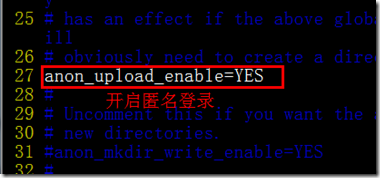
# 關鍵設定:anonymous_enable=YES, local_enable=YES, write_enable=YES, anon_upload_enable=YES, anon_mkdir_write_enable=YES
service vsftpd start
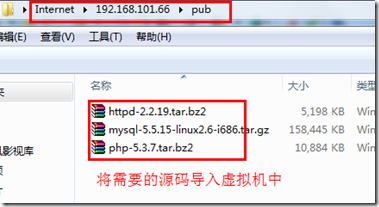
yum groupinstall "Development Tools" "Development Libraries" -y
yum install zlib-devel openssl-devel pcre-devel libxml2-devel curl-devel libjpeg-devel libpng-devel freetype-devel libmcrypt-devel mhash-devel -y
# APR / APR-Util
tar zxvf apr-1.4.6.tar.gz -C /usr/local/src
cd /usr/local/src/apr-1.4.6 && ./configure --prefix=/usr/local/apr && make && make install

tar zxvf apr-util-1.5.1.tar.gz -C /usr/local/src
cd /usr/local/src/apr-util-1.5.1 && ./configure --prefix=/usr/local/apr-util --with-apr=/usr/local/apr/bin/apr-1-config && make && make install

# PCRE
tar zxvf pcre-8.xx.tar.gz -C /usr/local/src
cd /usr/local/src/pcre-8.xx && ./configure --prefix=/usr/local/pcre && make && make install

# Apache
tar zxvf httpd-2.2.14.tar.gz -C /usr/local/src
cd /usr/local/src/httpd-2.2.14
./configure \
  --prefix=/usr/local/apache \
  --enable-so --enable-rewrite --enable-ssl --enable-modules=most --enable-mods-shared=all \
  --with-apr=/usr/local/apr --with-apr-util=/usr/local/apr-util --with-pcre=/usr/local/pcre
make && make install
groupadd mysql
useradd -g mysql -s /sbin/nologin mysql

tar zxvf mysql-5.1.45.tar.gz -C /usr/local/src
cd /usr/local/src/mysql-5.1.45
./configure \
  --prefix=/usr/local/mysql \
  --with-charset=utf8 --with-collation=utf8_general_ci --with-extra-charsets=all \
  --with-plugins=innobase,myisam,partition
make && make install

cd /usr/local/mysql
./scripts/mysql_install_db --user=mysql --datadir=/usr/local/mysql/data
cp support-files/my-medium.cnf /etc/my.cnf
cp support-files/mysql.server /etc/init.d/mysqld
chmod +x /etc/init.d/mysqld
chkconfig --add mysqld
chkconfig mysqld on
service mysqld start
tar zxvf php-5.2.5.tar.gz -C /usr/local/src
cd /usr/local/src/php-5.2.5
./configure \
  --prefix=/usr/local/php \
  --with-apxs2=/usr/local/apache/bin/apxs \
  --with-mysql=/usr/local/mysql \
  --with-mysqli=/usr/local/mysql/bin/mysql_config \
  --with-pdo-mysql=/usr/local/mysql \
  --with-config-file-path=/usr/local/php/etc \
  --enable-mbstring --enable-sockets --enable-ftp --enable-gd-native-ttf \
  --with-freetype-dir --with-jpeg-dir --with-png-dir --with-zlib --with-libxml-dir \
  --with-curl --with-openssl --with-mcrypt --with-mhash \
  --enable-bcmath --enable-zip --enable-soap --enable-calendar --enable-exif
make && make install

cp php.ini-production /usr/local/php/etc/php.ini
# 編輯 php.ini 設定 date.timezone、error_log、upload_max_filesize 等
vim /usr/local/apache/conf/httpd.conf
# 確認/新增:
LoadModule php5_module modules/libphp5.so
AddType application/x-httpd-php .php .php5
AddType application/x-httpd-php-source .phps
DirectoryIndex index.php index.html
# 重啟 Apache
/usr/local/apache/bin/apachectl restart
CREATE DATABASE discuz CHARACTER SET utf8 COLLATE utf8_general_ci;/var/www/html/discuz,設定權限:chown -R apache:apache /var/www/html/discuz; chmod -R 777 data/ config/ uc_client/data/ uc_server/data/https://IP/discuz/install,按精靈完成安裝。install 目錄,設定 config/config_global.php 唯讀。建立 /var/www/html/phpinfo.php:<?php phpinfo(); ?>,確認所有模組載入正常。論壇前台、後台功能測試無誤即視為部署成功。
| 錯誤 | 套件 | 解決 |
|---|---|---|
| apr-config not found | Apache | 安裝 apr-devel 或指定 --with-apr 路徑 |
| pcre.h not found | Apache/PHP | yum install pcre-devel 或源碼安裝 PCRE 指定 --with-pcre |
| libmysqlclient not found | PHP | 指定 --with-mysql=/usr/local/mysql --with-libdir=lib64 (64位系統) |
| gd: jpeg/libpng not found | PHP | yum install libjpeg-devel libpng-devel freetype-devel |
| openssl/ssl.h not found | PHP | yum install openssl-devel |