在專案開發中,客戶常要求編輯器支援圖片拖曳調整大小的功能。經過測試發現,目前主流編輯器(如百度 UEditor、網易編輯器、QQ 空間編輯器)僅在 IE 瀏覽器下完美支援圖片拖曳縮放,其他瀏覽器表現不一。本文以 ThinkPHP 框架為例,詳細記錄百度 UEditor 的整合步驟,供開發者參考。
首先在專案根目錄下建立 plugins 資料夾,用於存放第三方編輯器相關檔案。
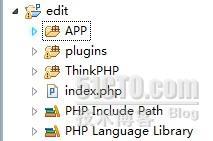
utf8-php(或 gbk-php)資料夾完整複製到 plugins 目錄下,並重命名為 ueditor。在 Lib/Action/IndexAction.class.php 中新增預設動作:
class IndexAction extends Action {
    public function index() {
        $this->display();
    }
}在模板的 <head> 標籤內引入核心檔案:
<script type="text/javascript" src="/edit/plugins/ueditor/ueditor.config.js"></script>
<script type="text/javascript" src="/edit/plugins/ueditor/ueditor.all.js"></script>在需要編輯器的位置放入以下程式碼(以 textarea 為例):
<textarea id="myEditor" name="content" style="width:700px;height:300px;"></textarea>
<script type="text/javascript">
    UE.getEditor('myEditor');
</script>
官方推薦使用 <script type="text/plain"> 標籤作為編輯器容器,可直接輸出資料庫內容:
<script type="text/plain" id="myEditor">
// 從資料庫取出文章內容列印到此處
</script>根據業務需求精簡工具列,以下為完整工具按鈕配置範例,可刪減不需要的功能:
toolbars: [[
    'fullscreen', 'source', '|', 'undo', 'redo', '|',
    'bold', 'italic', 'underline', 'fontborder', 'strikethrough',
    'superscript', 'subscript', 'removeformat', 'formatmatch',
    'autotypeset', 'blockquote', 'pasteplain', '|',
    'forecolor', 'backcolor', 'insertorderedlist', 'insertunorderedlist',
    'selectall', 'cleardoc', '|', 'rowspacingtop', 'rowspacingbottom',
    'lineheight', '|', 'customstyle', 'paragraph', 'fontfamily',
    'fontsize', '|', 'directionalityltr', 'directionalityrtl',
    'indent', '|', 'justifyleft', 'justifycenter', 'justifyright',
    'justifyjustify', '|', 'touppercase', 'tolowercase', '|',
    'link', 'unlink', 'anchor', '|', 'imagenone', 'imageleft',
    'imageright', 'imagecenter', '|', 'insertimage', 'emotion',
    'scrawl', 'insertvideo', 'music', 'attachment', 'map', 'gmap',
    'insertframe', 'insertcode', 'webapp', 'pagebreak', 'template',
    'background', '|', 'horizontal', 'date', 'time', 'spechars',
    'snapscreen', 'wordimage', '|', 'inserttable', 'deletetable',
    'insertparagraphbeforetable', 'insertrow', 'deleterow',
    'insertcol', 'deletecol', 'mergecells', 'mergeright', 'mergedown',
    'splittocells', 'splittorows', 'splittocols', '|', 'print',
    'preview', 'searchreplace', 'help'
]]百度網盤近期有活動,若有興趣可參考:分享連結(含部分技術電子書)。