效果預覽
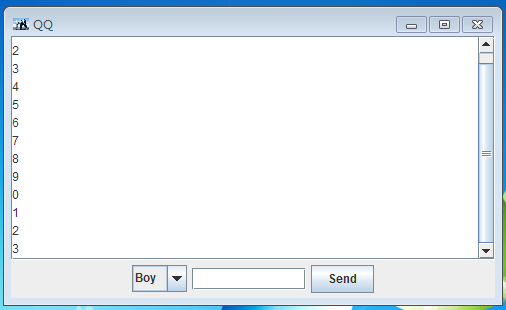
完整程式碼
package com.os.frame;
import javax.swing.*;
import java.awt.*;
import java.awt.event.*;

public class ChatFrame extends JFrame {
    public static void main(String[] args) {
        SwingUtilities.invokeLater(() -> new ChatFrame("QQ Chat"));
    }

    private final JTextArea msgArea = new JTextArea();
    private final JTextField inputField = new JTextField(20);
    private final JComboBox targetBox = new JComboBox<>(new String[]{"Friend A", "Friend B", "Group Chat"});
    private final JButton sendBtn = new JButton("Send");

    public ChatFrame(String title) {
        super(title);
        initUI();
        setDefaultCloseOperation(EXIT_ON_CLOSE);
        setSize(500, 400);
        setLocationRelativeTo(null);
        setVisible(true);
    }

    private void initUI() {
        // 訊息區:唯讀 + 自動換行 + 捲軸
        msgArea.setEditable(false);
        msgArea.setLineWrap(true);
        msgArea.setWrapStyleWord(true);
        JScrollPane scrollPane = new JScrollPane(msgArea,
                JScrollPane.VERTICAL_SCROLLBAR_AS_NEEDED,
                JScrollPane.HORIZONTAL_SCROLLBAR_NEVER);

        // 底部輸入區
        JPanel bottom = new JPanel(new FlowLayout(FlowLayout.LEFT));
        bottom.add(new JLabel("To:"));
        bottom.add(targetBox);
        bottom.add(inputField);
        bottom.add(sendBtn);

        // 佈局
        setLayout(new BorderLayout());
        add(scrollPane, BorderLayout.CENTER);
        add(bottom, BorderLayout.SOUTH);

        // 事件
        Action sendAction = new AbstractAction() {
            @Override public void actionPerformed(ActionEvent e) {
                String text = inputField.getText().trim();
                if (!text.isEmpty()) {
                    msgArea.append("Me → " + targetBox.getSelectedItem() + ": " + text + "\n");
                    inputField.setText("");
                    msgArea.setCaretPosition(msgArea.getDocument().getLength());  // 自動捲動到底
                }
            }
        };
        sendBtn.addActionListener(sendAction);
        inputField.addActionListener(sendAction);  // Enter 送出
    }
}
核心組件解析
| 組件 | 關鍵設定 | 作用 |
|---|
| JTextArea | setEditable(false), setLineWrap(true) | 多行訊息顯示,禁止編輯,自動換行 |
| JScrollPane | VERTICAL_SCROLLBAR_AS_NEEDED | 訊息超出可視區時自動出現垂直捲軸 |
| JComboBox | 預設好友列表 | 切換聊天對象 |
| JTextField | columns=20 | 輸入訊息,支援 Enter 觸發 ActionListener |
| BorderLayout | CENTER + SOUTH | 訊息區佔滿剩餘空間,輸入區固定底部 |
進階擴充方向
- 富文本:改用
JEditorPane + HTML 內容,支援表情、圖片、超連結
- 訊息氣泡:自定義
JPanel 渲染左右對齊氣泡,放入 JList 或 BoxLayout 容器
- WebSocket 整合:
javax.websocket 客戶端非同步收發,配合 SwingUtilities.invokeLater 更新 UI
- 系統托盤:
SystemTray + TrayIcon 實現最小化到托盤、新訊息彈窗