OutputStream/讀取 InputStream 皆可能阻塞,線程失去 CPU 使用權。ServerSocketChannel 接收、向 Selector 註冊輪詢調度、取得就緒連接、利用 Buffer 高效填充資料、快速切換下一就緒連接。Selector,每通道獲一 SelectionKey。程式詢問 Selector 獲知就緒通道,無阻塞完成 I/O,並可查詢鍵集合。馮·諾依曼架構下,資料在元件間傳輸速率決定執行效率。各級儲存(CPU 暫存器、快取、記憶體、硬碟)速度差距數量級。傳統 BIO 導致高速運算單元大量時間等待資料傳輸。網路環境同理。
傳輸速度階層:
傳統對策:
NIO 借鑑多線程思路,進一步優化掉線程建立與切換開銷——單線程非阻塞管理多 I/O 連接,即為 NIO 核心價值。
先建立簡單測試伺服器(每秒發送固定訊息):
public class TestServer {
    public static void main(String[] args) {
        int port = 9999;
        try (ServerSocket server = new ServerSocket(port);
             Socket client = server.accept();
             OutputStream out = client.getOutputStream()) {
            byte[] buffer = "llin of Tianjin University love JAVA and Alibaba!".getBytes();
            while (true) {
                out.write(buffer);
                Thread.sleep(1000);
            }
        } catch (IOException | InterruptedException e) {
            e.printStackTrace();
        }
    }
}
客戶端使用 SocketChannel + ByteBuffer 讀取並輸出至控制台(為示範 API 採阻塞模式,未使用 Selector):
public class TestClient {
    public static final String DEFAULT_IP = "127.0.0.1";
    public static final int DEFAULT_PORT = 9999;
    public static final int BUFFER_SIZE = 200;

    public static void main(String[] args) {
        String ip = args.length > 0 ? args[0] : DEFAULT_IP;
        int port = args.length > 1 ? Integer.parseInt(args[1]) : DEFAULT_PORT;

        try (SocketChannel channel = SocketChannel.open(new InetSocketAddress(ip, port));
             WritableByteChannel out = Channels.newChannel(System.out)) {
            ByteBuffer buffer = ByteBuffer.allocate(BUFFER_SIZE);
            while (channel.read(buffer) != -1) {
                buffer.flip();  // 切換讀模式:position=0, limit=原 position
                out.write(buffer);
                System.out.write("\n".getBytes());
                buffer.clear(); // 重置 position=0, limit=capacity
            }
        } catch (Exception e) {
            e.printStackTrace();
        }
    }
}關鍵點:flip() 將寫模式轉讀模式,clear() 重置供下次寫入。position、limit、capacity 三屬性控制緩衝區操作窗口。
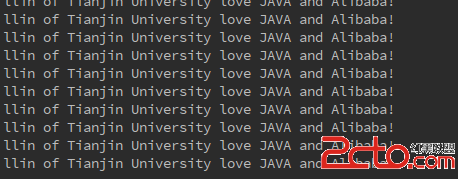
執行效果(需先啟動伺服器):
測試客戶端新增發送請求行:
client.write(ByteBuffer.wrap("testing...".getBytes()));伺服器端完整實作(註解詳解核心流程):
public class NioHttpServer {
    public static void main(String[] args) throws IOException {
        Selector selector = Selector.open();
        ServerSocketChannel serverChannel = ServerSocketChannel.open();
        serverChannel.configureBlocking(false); // 關鍵:非阻塞模式
        serverChannel.bind(new InetSocketAddress(8080));
        serverChannel.register(selector, SelectionKey.OP_ACCEPT); // 註冊接受事件

        ByteBuffer buffer = ByteBuffer.allocate(1024);

        while (true) {
            selector.select(); // 阻塞等待就緒事件
            Set keys = selector.selectedKeys();
            Iterator iter = keys.iterator();

            while (iter.hasNext()) {
                SelectionKey key = iter.next();
                iter.remove();

                if (key.isAcceptable()) {
                    // 接受新連接
                    ServerSocketChannel ssc = (ServerSocketChannel) key.channel();
                    SocketChannel client = ssc.accept();
                    client.configureBlocking(false);
                    client.register(selector, SelectionKey.OP_READ); // 註冊讀事件
                } else if (key.isReadable()) {
                    // 讀取請求
                    SocketChannel client = (SocketChannel) key.channel();
                    buffer.clear();
                    int read = client.read(buffer);
                    if (read > 0) {
                        buffer.flip();
                        // 簡易解析 HTTP 請求(略)
                        // 構建回應
                        String response = "HTTP/1.1 200 OK\r\nContent-Length: 13\r\n\r\nHello, NIO!";
                        client.write(ByteBuffer.wrap(response.getBytes()));
                        client.close(); // 簡單示範:短連接
                    }
                }
            }
        }
    }
} 核心流程:
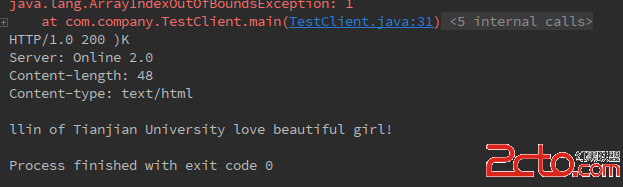
Selector,建立非阻塞 ServerSocketChannel 綁定埠並註冊 OP_ACCEPT。selector.select() 阻塞等待就緒事件。selectedKeys(),處理各就緒事件:OP_ACCEPT:接受連接,設新通道非阻塞並註冊 OP_READ。OP_READ:讀取資料,處理業務邏輯,寫回回應(可再註冊 OP_WRITE 處理大量回應)。測試結果:
此架構單線程支援高併發連接,避免傳統多線程上下文切換開銷,為 Netty 等高效能網路框架基石。