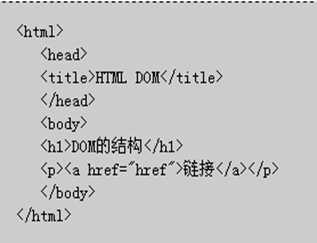
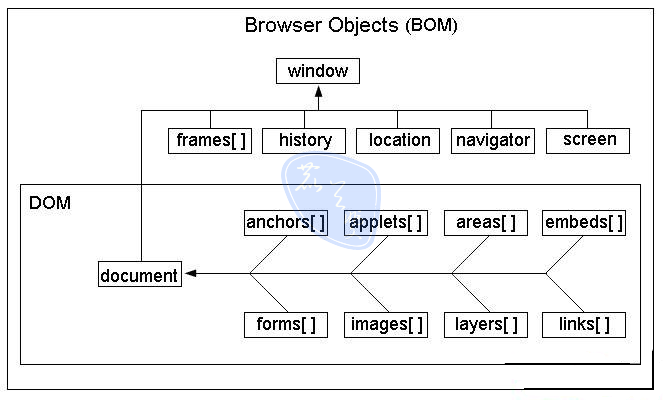
文檔對象模型(DOM)是瀏覽器解析 HTML 與 XML 文檔的標準編程接口。它將標記型文檔中的每一個元素——標籤、屬性、文本——全部封裝為可操作的對象節點,賦予開發者以程式化方式動態修改文檔結構、樣式與內容的能力。
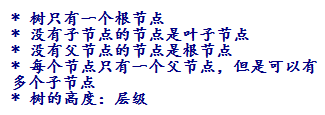
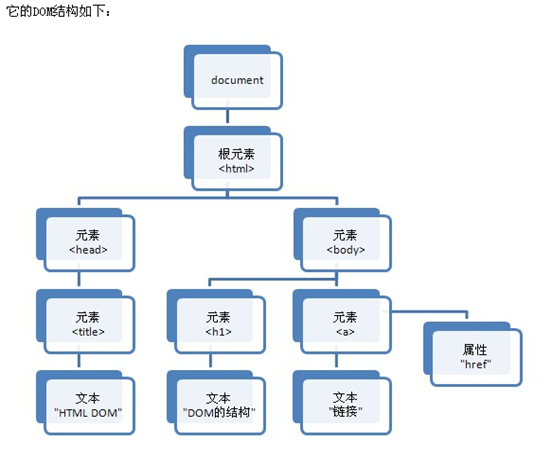
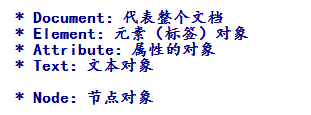
DOM 樹狀結構由四類核心節點構成:Document(文檔根節點)、Element(元素節點)、Attribute(屬性節點)、Text(文本節點)。所有節點均繼承自 Node 接口,共享 nodeName、nodeType、nodeValue 等基礎屬性。
addEventListener)、CSS 樣式操作(CSSStyleDeclaration)、遍歷與範圍 API。normalize()、isSameNode() 等方法,並規範鍵盤事件與 XPath 整合。DHTML(動態 HTML)非單一語言,而是 HTML(結構)+ CSS(表現)+ DOM(接口)+ JavaScript(邏輯) 四大技術的協同體。HTML 負責語義化封裝數據,CSS 定義視覺規則,DOM 提供結構化訪問入口,JavaScript 則操縱對象實現交互邏輯。
// 單一元素查找
const el = document.getElementById('nameId');
// 集合查找(即時 NodeList)
const inputs = document.getElementsByName('username');
const tags = document.getElementsByTagName('input');

// 動態創建節點
const li = document.createElement('li');
const txt = document.createTextNode('深圳');
li.appendChild(txt);
document.querySelector('ul').appendChild(li);
const input = document.getElementById('nameId');
input.getAttribute('value');   // 讀取
input.setAttribute('value', 'new'); // 寫入
input.removeAttribute('value');     // 刪除
| 屬性/方法 | 說明 | 備註 |
|---|---|---|
parentNode | 父元素節點 | 永遠返回 Element |
childNodes | 所有子節點(含空白文本) | IE9+ 建議用 children |
firstChild / lastChild | 首尾子節點 | 現代瀏覽器對應 firstElementChild |
nextSibling / previousSibling | 同輩節點 | 同理有 Element 版本 |
appendChild(node) | 尾部插入 | 移動現有節點會先移除 |
insertBefore(new, old) | 指定節點前插入 | 無 insertAfter,需組合實現 |
removeChild(node) | 刪除子節點 | 返回被刪節點引用 |
replaceChild(new, old) | 替換節點 | |
cloneNode(deep) | 複製節點 | deep=true 遞歸複製子樹 |
innerHTML 雖非 W3C 標準,但各主流瀏覽器均支援,適合大批量 HTML 片段注入。搭配 div/span 容器使用時,注意防範 XSS 風險——優先使用 textContent 設置純文本。
// 焦點事件示例
const username = document.querySelector('[name="username"]');
const tip = document.getElementById('uspan');
username.onfocus = () => tip.textContent = '請輸入 6-12 位字符';
username.onblur = () => {
  // 此處可接入 AJAX 校驗
  tip.textContent = '用戶名已存在';
};
click、dblclick、mouseover/mouseout、mousemovekeydown/keyup(表單即時搜尋、快捷鍵)focus/blur、change、submit(攔截提交驗證)load、unload、resize、scroll// 全選/全不選/反選核心邏輯
function toggleAll(checked) {
document.querySelectorAll('[name="love"]').forEach(cb => cb.checked = checked);
}
function invertSelection() {
document.querySelectorAll('[name="love"]').forEach(cb => cb.checked = !cb.checked);
}
// 雙向選擇器(select 多選移動)
function moveOptions(fromId, toId) {
const from = document.getElementById(fromId);
const to = document.getElementById(toId);
[...from.selectedOptions].forEach(opt => to.appendChild(opt));
}
利用 onchange 事件獲取父級選值,通過預載入的二維數組或 AJAX 請求動態填充子級 select,實現「選省→顯市」的級聯效果。核心在於 select.innerHTML = '' 清空後重新 appendChild(new Option(text, value))。
瀏覽器開發者工具(F12)提供 Elements 面板實時編輯 DOM、Console 執行片段、Sources 斷點調試、Network 監控資源加載。善用 console.dir(element) 查看完整屬性對象,monitorEvents(element) 監聽事件觸發。